A Japanese Company Has AI Writing 80% of Its Code. We Decoded PeopleX's Deployment Blueprint from the Inside
HR AI startup PeopleX generates 80% of all product code with AI. What changed when they combined Cursor and v0? We break down the story alongside ARI's company-wide Claude Code rollout — and deliver an adoption decision checklist you can bring back to your team
What you'll learn in this article
- The key point to grasp before reading the full article
- How the issue changes the way developers should work next
- Which follow-up article is worth opening next
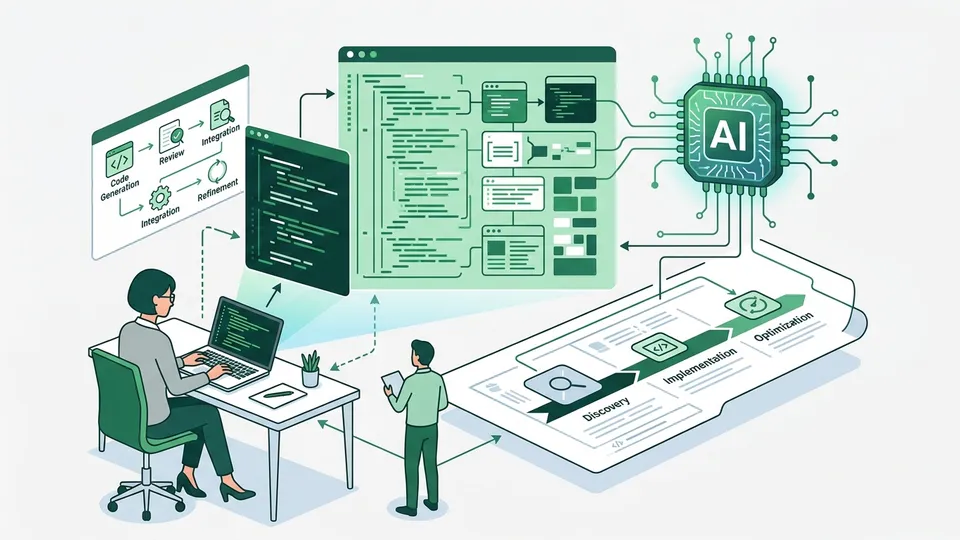
A Japanese Startup Where AI Writes 80% of the Code
80% of product code generated by AI. That claim comes straight from the CEO of PeopleX, an HR AI platform startup.
My honest first reaction: “80%? That has to be inflated.”
I use Cursor and Claude Code every day. My gut sense is that AI writes maybe half of what I produce. But 80% across an entire product portfolio is a different scale entirely. If you count only test code, the number balloons fast — and whether you include infrastructure configs or migrations changes the conclusion dramatically.
So for this article, I decided to dig into what’s inside that 80%.
What did PeopleX hand off to AI, and what did they keep for humans? I’ve reconstructed the full picture — tool stack, rollout sequence, and all — drawing on PeopleX’s corporate profile on PR TIMES and the CEO’s public posts. One important caveat: the 80% figure has not been verified in an official press release. It circulated from CEO commentary. Keep that in mind as you read.
I’ll also compare this against the ARI company-wide adoption case that Nagi wrote about last week. ARI, a TSE Growth-listed company, deployed Claude Code to every engineer in the organization. Startup vs. public company. Cursor vs. Claude Code. Putting both side by side should help you identify which pattern looks most like your own team.
This is Article 4 in our AI Agent Implementation Series — Technical Track. The series started with the Cursor CEO warning piece and has been following the theme of tool design. This installment explores how that design translates into real enterprise adoption.
Three Foundations That Explain PeopleX
PeopleX is a startup building an AI-native HR platform — recruitment, workforce management, and organizational analytics, designed from the ground up with AI at the center.
Why was this company able to reach 80%? Three preconditions made it possible.
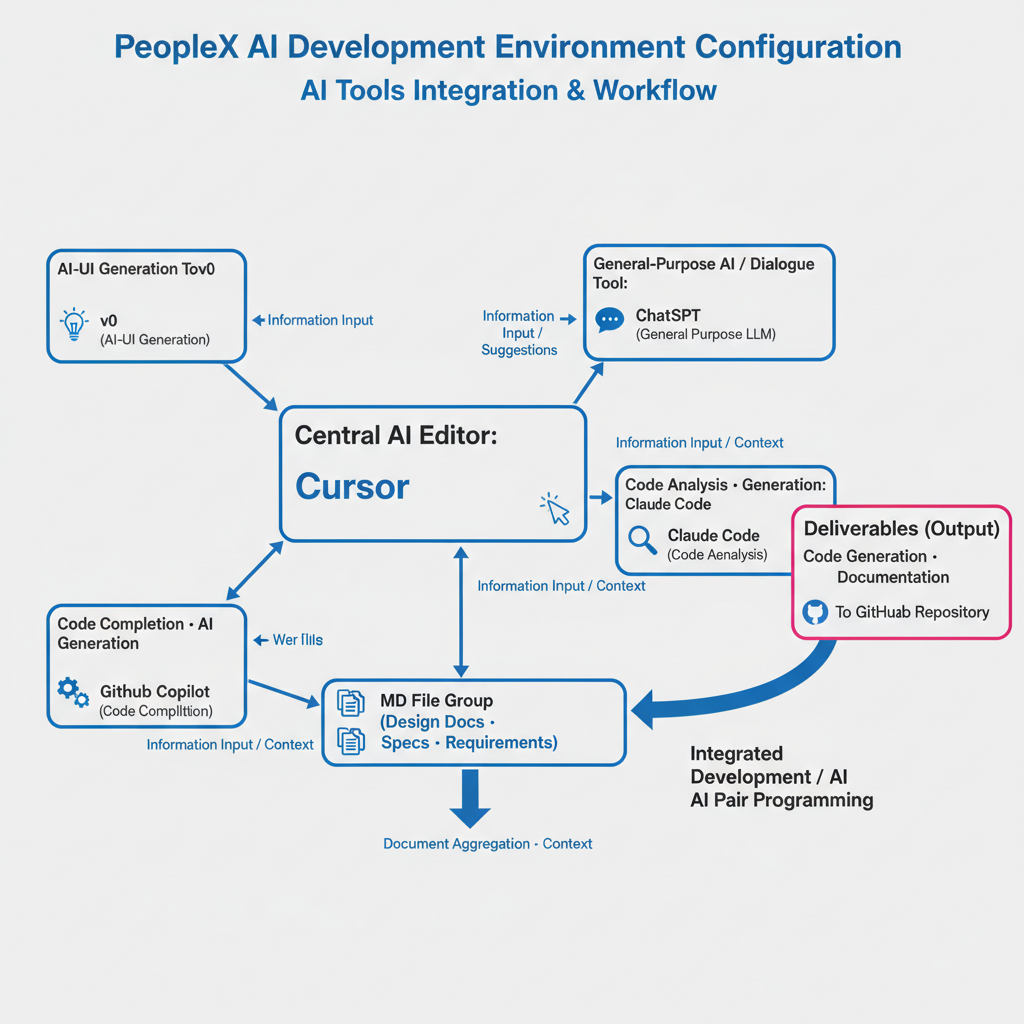
Foundation 1: Multiple products in parallel
This isn’t a single-app shop. PeopleX is simultaneously developing multiple products under the HR platform umbrella. The 80% figure spans all of them — not one isolated project. The sheer volume of parallel development means a higher proportion of work is inherently repetitive and well-suited for AI generation.
Foundation 2: AI tools distributed to every engineer
Cursor, v0, ChatGPT, GitHub Copilot, and Claude Code — all of it, available to every engineer. Not “a few people piloting this.” Every engineer, fully equipped. Notably, individuals have the freedom to choose which tools they reach for. That autonomy seems intentional.
Foundation 3: Cross-project MD file ingestion as an operational design
Cursor reads Markdown files across projects to maintain context. This isn’t an accidental byproduct of tooling — it’s a deliberate architectural decision. The team built an environment where AI has access not just to code, but to the surrounding documentation ecosystem.
That third point resonated with me personally. I’ve recently started placing CLAUDE.md and DESIGN.md files in my own projects to pass context to AI. As I wrote in the Cursor CEO warning piece, there’s a world of difference between “AI can write code” and “AI can write code with the right context.” PeopleX seems to have understood that distinction early.
Breaking Down the 80%: What AI Owns vs. What Humans Keep
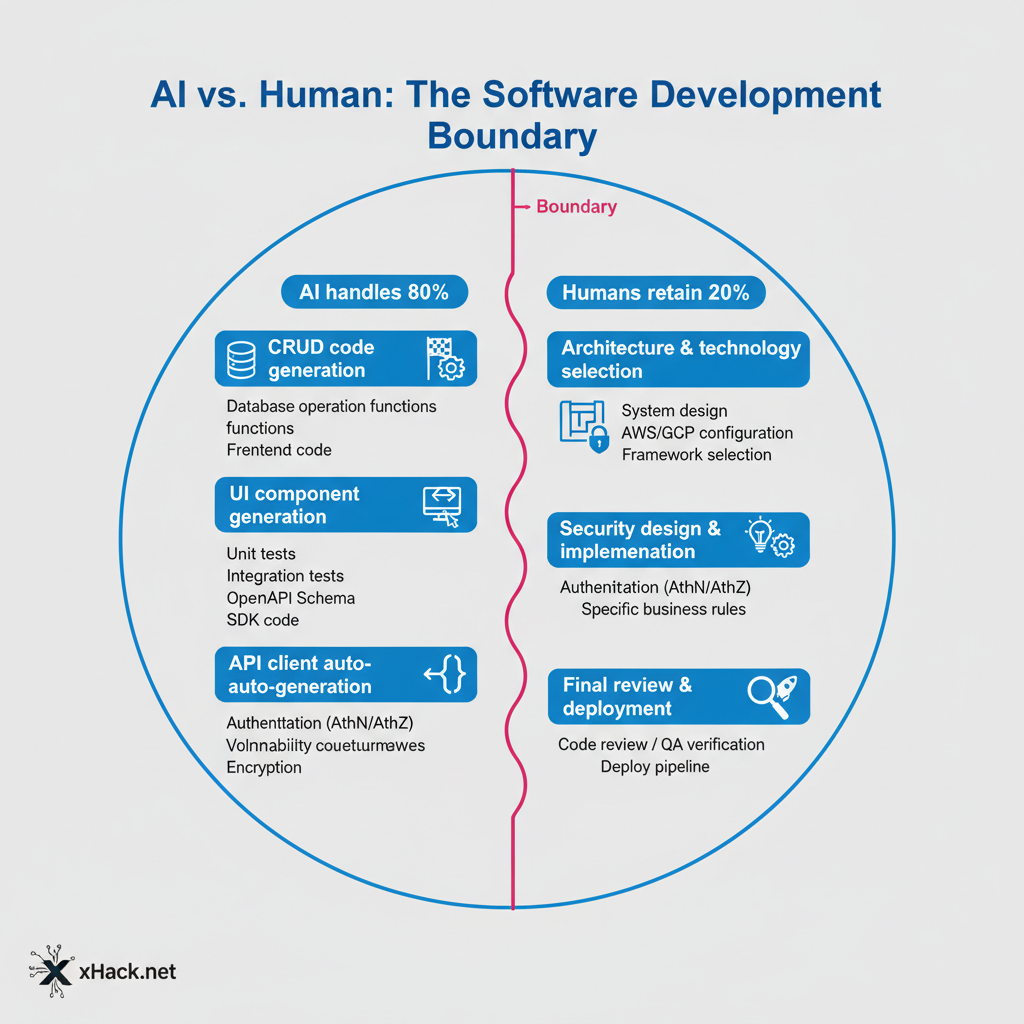
The short version: AI handles volume, humans handle judgment. The boundary between those two is starting to come into focus.
I’m not taking the 80% at face value — it’s a reference figure. But even as a rough benchmark, the pattern it suggests is worth mapping out. Here’s my own classification, built from six-plus months of daily vibe coding.
The territory AI can own
CRUD implementations represent the largest single chunk. User registration, data retrieval, list views, update flows. An HR platform needs enormous quantities of this kind of functionality. The more standardized the pattern, the more consistent the AI output.
UI component generation is another AI stronghold. v0 produces front-end components from natural language. Forms, tables, dashboard layouts — things that would take half a day by hand come together in minutes. I’ve experienced this firsthand.
Automated test generation is a significant lever. Point AI at existing code and say “write unit tests for this file” and you can spike coverage quickly. Offloading tedious-but-necessary work to AI is a genuine quality-of-life improvement.
API client implementation, when specs are well-defined, is effectively AI territory. Connection code generated from documentation, often with error handling included.
The 20% humans can’t give up
Architecture design remains a human job for now. Which services to split, how data flows, where the seams are — these decisions require simultaneous understanding of business requirements and technical constraints.
Security design is even less delegable. Auth and authorization models, encryption schemes. HR data is dense with personal information, and the consequences of getting this wrong are severe. A study of Lovable-built apps found security flaws in over 10% of them. AI-generated code that works is not automatically code that’s safe.
Business logic specification is human territory. Deciding what the rules are — not how to implement them — requires domain knowledge that AI doesn’t have. AI implements. Humans specify.
Final code review judgment. Someone has to own the decision to merge AI-generated code. That accountability stays with humans.
One failure worth sharing from my own experience: I once generated a UI with Cursor that looked perfect — and was completely inaccessible. Zero aria attributes, no keyboard navigation support. “Works” and “usable” aren’t the same thing. Of the 80% AI generates, maybe 60–70% is actually production-ready without human intervention. Building that gap into your estimates from the start will save you a lot of pain.
Why Cursor + v0 Works: A Two-Stage Design for GUI and Prototyping
Cursor is where code gets written. v0 is where UI drafts get made. That division of responsibility is what drives PeopleX’s development velocity.
Tool selection usually gets discussed in terms of preference. Looking at PeopleX, there’s clear design intent behind the combination.
Cursor’s role: writing code inside the editor
Cursor’s strengths are GUI-based code completion and tight editor integration. It runs as a VS Code extension, which means you can layer AI into an existing workflow without disrupting it. What PeopleX specifically leverages is cross-project context loading.
Write your design principles into MD files, feed them to Cursor. The AI then completes code with an understanding of your project’s conventions — API auth patterns, naming rules, all of it preserved across sessions.
# Example DESIGN.md (from my own practice)

## API Design Principles
- RESTful, resource names in plural
- Auth: Bearer Token (JWT)
- Error responses: RFC 7807 compliant

## Code Conventions
- TypeScript strict mode required
- Function names: camelCase
- File names: kebab-case
A single file like this makes a visible difference in Cursor’s output quality. PeopleX runs this pattern across all their projects.
v0’s role: generating UI prototypes at speed
v0 is Vercel’s AI-powered frontend generation tool. Describe what you want — “user list table with sort and filter” — and React components come out. An HR platform is exactly the kind of product that needs dashboards, admin panels, and input forms at scale. Things that would take days by hand become usable starting points in minutes.
The combined workflow
Generate UI prototype in v0 → import to Cursor and wire to backend → Cursor generates test coverage. Once this loop is running, the time from decision to release collapses significantly.
My own data point: last month I built a customer success dashboard using this exact flow. Three layout variations from v0, team picked one, Cursor handled the API integration. A working prototype in two days. I would have budgeted a week doing it the old way.
The caveat: v0’s output often doesn’t meet production standards out of the box. Type definitions can be vague, error handling thin, performance optimizations absent. The value isn’t “v0 and done” — it’s “v0 for the rough cut, Cursor to finish it.”
PeopleX vs. ARI: Two Japanese Companies, Two Design Philosophies
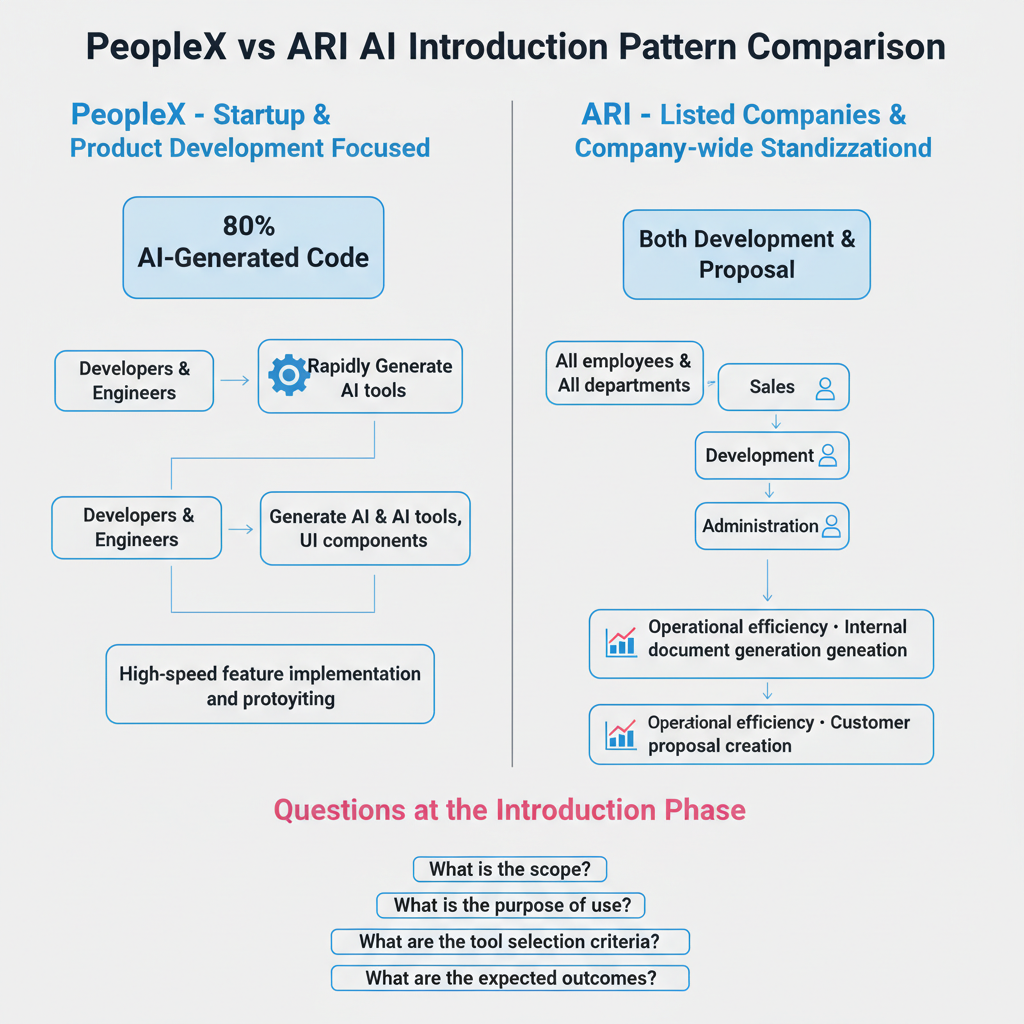
PeopleX: build fast with a small team. ARI: get everyone using AI. Same AI adoption story, completely different design philosophy.
As Nagi covered in the ARI piece, ARI — listed on TSE Growth — made Claude Code standard equipment for every employee. Put the two companies side by side and you can see how the right answer changes depending on organizational stage.
| Dimension | PeopleX | ARI |
|---|---|---|
| Company size | Startup | TSE Growth-listed |
| Tool of choice | Cursor + v0 | Claude Code |
| Rollout scope | All product development | All engineers + all consultants |
| AI adoption goal | Scale with a small team | Efficiency across existing business |
| Tool character | GUI-assisted completion | Terminal-based autonomous execution |
| Reported metric | 80% AI-generated code (reference value) | Company-wide standardization (no public quantitative data) |
What this reveals is that tool selection mirrors organizational character.
PeopleX chose Cursor because their HR platform work is UI-heavy — GUI completion delivers outsized value. ARI chose Claude Code because their goal was company-wide adoption including consultants, not just engineers. Terminal-based Claude Code has range beyond code completion: document generation, research, general-purpose tasks.
One more meaningful distinction: PeopleX’s 80% is scoped to product code. ARI extends AI use to proposals and client-facing documents. The two companies defined “what AI replaces” differently from the start.
Neither is right or wrong. The right choice depends on your phase and your goal. As I noted in the Cursor CEO warning piece, Cursor is GUI-assisted completion; Claude Code is terminal-based autonomous execution. PeopleX and ARI each picked the tool that fit their business. That looks like good judgment to me.
Which Type Is Your Team? A Four-Pattern Adoption Checklist
AI coding adoption isn’t “install the tool and you’re done.” The right entry point — and exit point — depends on what kind of team you have.
Drawing on both case studies, here are four adoption patterns. Find where your team fits.
Type A: Startup (closest to PeopleX)
Under 10 engineers, and shipping speed is existential. Recommendation: deploy Cursor + v0 so everyone participates in prototyping. Design the MD-file context-passing practice into day one — don’t bolt it on later.
The primary risk: skipping security review under speed pressure. If you’re handling HR data, payment data, or personal information, automate security scanning of generated code from the start. Don’t leave it to “we’ll add that later.”
Type B: Public Company or Large Enterprise (closest to ARI)
50+ engineers, primary work is maintaining and improving existing systems. The realistic path: pilot Claude Code with a small team, measure quantitatively over three months, then decide on broader rollout.
The trap: top-down mandates alone don’t produce adoption. The first month has to generate at least one “this is genuinely easier” experience for working engineers. That moment of conviction is what carries the rollout forward.
Type C: Non-Engineering Team
No dedicated dev team, but you want to build lightweight tools — spreadsheet integrations, Slack bots. Starting with Claude Code in the terminal is a natural fit. Learning to express “what I want to build” in natural language is the only ramp you need.
The important constraint: stay within the boundary of code you can understand. I’m all for a “if it runs, ship it” mentality in the right context — but not for production systems you can’t reason about. Automation without comprehension is how incidents happen. I say this with full conviction as a CS graduate.
Type D: Still Watching
You’re evaluating, but cost concerns or security questions have kept you from starting. Start with Cursor’s free tier on a personal project. Individual experience produces organizational conviction more often than you’d expect.
I’ve watched a lot of people say “too early” a year ago scrambling today. Finish the evaluation this week and start touching it next week. That’s about the right pace.
Three Principles That Apply to All Four Types
1. Documentation before tooling Set up your DESIGN.md and CLAUDE.md before you install anything. Without documentation, you’ll re-explain the same context every session and plateau before you see real gains.
2. Build the review process on day one Decide on day one how generated code gets checked by a human. “We’ll formalize the review process later” never happens. Adding an “AI-generated code verified” checkbox to your PR template is a minimal effective starting point.
3. Set a retreat threshold in advance If you can’t measure impact after three months, pull back and reassess. Drifting indefinitely wastes money and corrodes team culture. Paradoxically, defining a clear exit condition in advance makes it easier to commit fully at the start.
Conclusion: Read the 80% as a Map, Not a Goal
PeopleX’s 80% is a reference value. It isn’t backed by an official press release.
But the pattern the number points to is real. The boundary between what AI can write and what humans have to own is becoming visible through Japanese company case studies.
CRUD implementations, UI components, test code, API clients — these can be handed to AI starting today. Architecture, security decisions, business logic specification — that 20% will stay human work for the foreseeable future.
PeopleX is the “startup scales fast with a small team” pattern. ARI is the “listed company standardizes AI across the organization” path. Neither is universally correct. The right entry point depends on where your team is right now.
I have my own history with this. Years ago, I came face-to-face with the gap between my abilities and those of seasoned engineers. I still remember the day I admitted there were things I simply couldn’t reach. Today, AI is closing that gap. PeopleX’s 80% reads to me like an attempt to give that “elite engineer instinct” to an entire organization — not just one person.
Whether you’re Type A, B, C, or D: if you’re going to start, today is the earliest you can.
The map keeps getting redrawn. Next month it’ll look different again.
Next up: I’m planning to dig into the prompt design behind PeopleX and ARI’s results. How do humans actually instruct AI to generate that 80%? The quality of the instruction determines the quality of the output — that’s the piece I want to write.
Sources
- PR TIMES — PeopleX “80% of code AI-generated with Cursor + v0” announcement ↗
- Nikkei — PeopleX coverage ↗
- A Japanese IT Company Gave Claude Code to Every Employee
- The Article Where the Cursor CEO Warned the Ground Was Shifting

正直、一度エンジニアは諦めました。新卒で入った開発会社でバケモノみたいに優秀な人たちに囲まれて、「あ、私はこっち側じゃないな」って悟ったんです。その後はカスタマーサクセスに転向して10年。でもCursorとClaude Codeに出会って、全部変わりました。完璧なコードじゃなくていい。自分の仕事を自分で楽にするコードが書ければ、それでいいんですよ。週末はサウナで整いながら次に作るツールのこと考えてます。