Vibe Coding Gets a Safety Net. Cracking the Trilogy with Cisco's Project CodeGuard
170 Lovable vulnerabilities. CurXecute's zero-click attack. The final chapter of a trilogy tracking vibe coding's safety problem. We've extracted a minimum config you can use today from Cisco's open-source Project CodeGuard ruleset.
What you'll learn in this article
- The key point to grasp before reading the full article
- How the issue changes the way developers should work next
- Which follow-up article is worth opening next
10.3% of apps built with vibe coding have security defects. A zero-click vulnerability was found in the AI coding tools themselves. For the past six months, I’ve been chasing this problem nonstop.
The April 1st piece on Lovable’s 170 vulnerabilities. The April 3rd analysis of CurXecute. And today, as the third installment in the vibe coding security trilogy, the final piece falls into place.
It’s Cisco’s open-source release, “Project CodeGuard.”
A large enterprise has gone all-in on building a safety net for vibe coding. And they’ve made it freely available to everyone. I feel this is the turning point where “I’m a solo developer, so security comes later” stops being acceptable.
The goal of this article is to consolidate the common principles revealed across the trilogy and extract a minimum CodeGuard config set.
Where Does Vibe Coding Security Stand Right Now?
45% of AI-generated code contains security vulnerabilities. That number cuts straight to where vibe coding stands today.
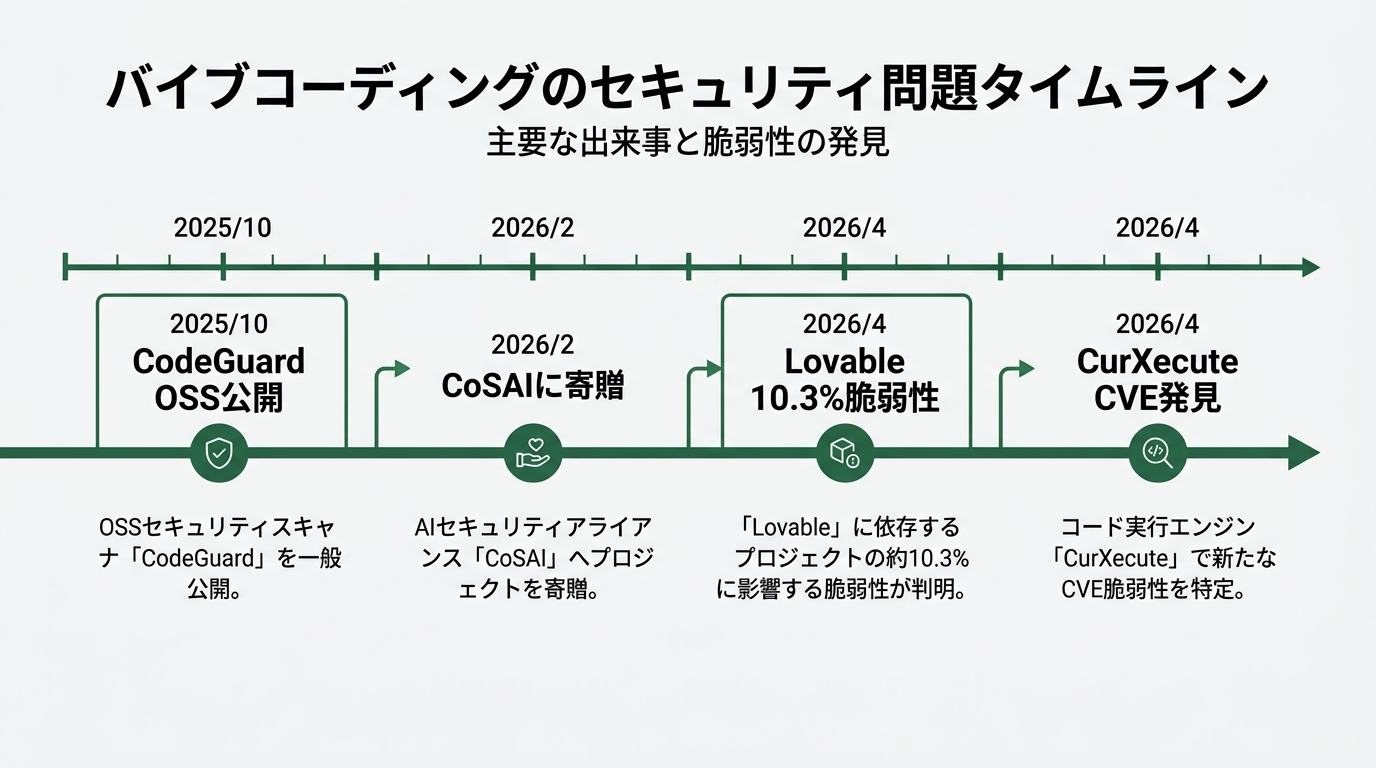
The problems I’ve tracked across the trilogy fall into three layers.
Part 1 (Lovable) focused on “what’s inside the AI-generated code.” A survey of 1,645 Lovable-built apps uncovered security defects in 170 of them. Missing RLS (Row-Level Security) was common, as were hardcoded API keys and missing authentication. AI is great at making things work, but it doesn’t automatically build in defensive design.
Part 2 (CurXecute) shifted the focus to “the tools themselves.” A zero-click vulnerability was found in Cursor. CVE-2025-54135, CVSS 8.6. Through MCP (Model Context Protocol) Auto-Start, arbitrary code could be executed without any user action. It marked the moment AI coding tools themselves became attack targets.
Part 3 (this article) is about “defensive mechanisms.” From finding problems to standardizing the solutions. CodeGuard, built by Cisco, is the framework the trilogy was destined to arrive at.
Vibe coding security is racing through the phases of “discovery, expansion, and standardization.” What solo developers are being asked is whether they can ride this wave of standardization.
What Is Project CodeGuard?
A ruleset and framework for making AI generate secure code. That’s what CodeGuard is, at its core. Cisco released it as open source in October 2025.
In February of the following year, it was donated to CoSAI (Coalition for Secure AI). It was elevated from a single company’s project to an industry standard.
There are three key points.
Model-agnostic design. It supports major tools like Copilot, Claude Code, and Cursor. With a unified Markdown format, you can carry your rules with you when switching tools.
Covers the entire development lifecycle. Pre-design, during code generation, and post-review. Guardrails are embedded at these three moments. It’s a “protect before you run” mindset rather than “check after it runs.”
Practical rules based on OWASP and CWE. Encryption best practices, input validation, authentication and authorization, supply chain, and more. The scope is broad, but you don’t need to adopt everything at once.
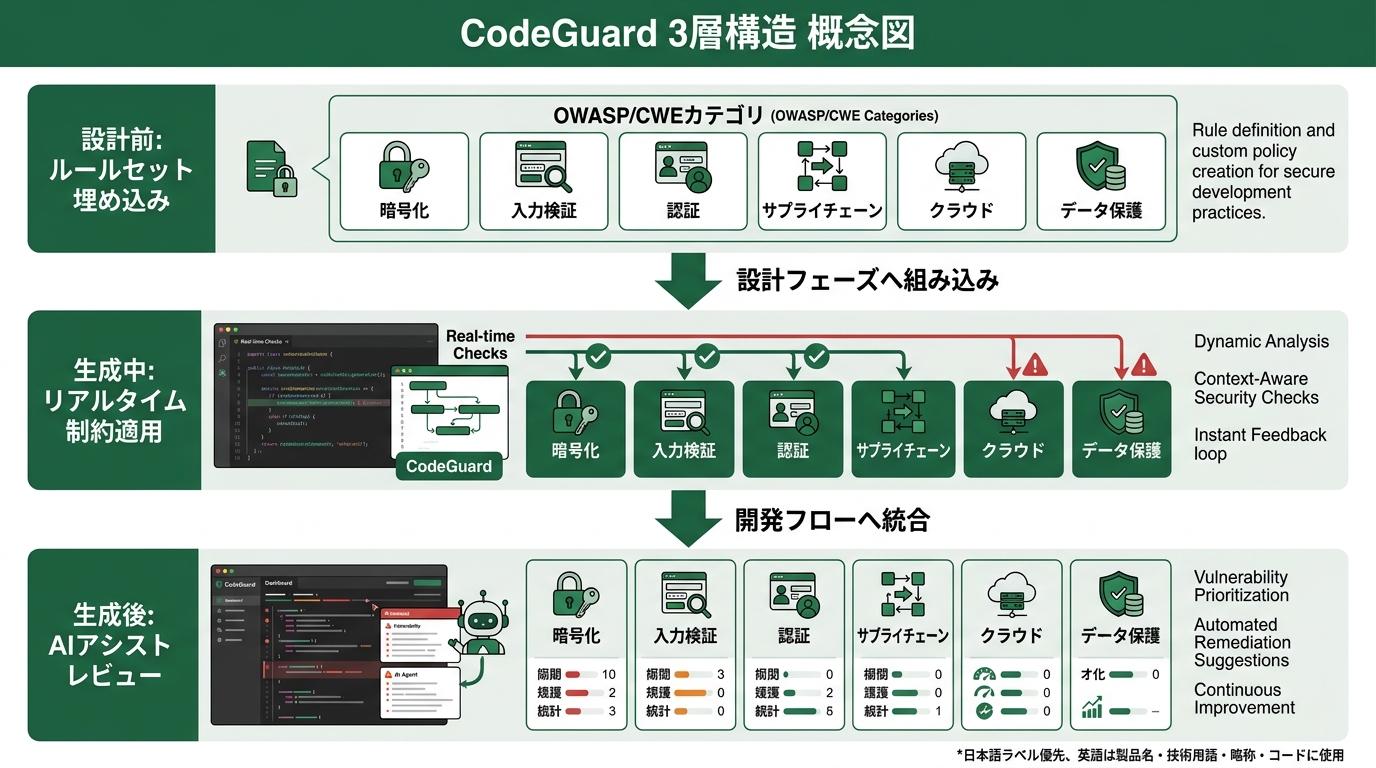
As someone with a CS background, what made me think “this is usable” was the unified Markdown format. Just paste it into .cursor/rules/ or CLAUDE.md and the AI reads it. You don’t even need to edit configuration files. The strength is that it raises your security floor without breaking the “let’s just build something that works” spirit of vibe coding.
Three Common Principles Running Through the Trilogy
Writing these three articles, I noticed there are common patterns in security.
Principle 1: AI Prioritizes “Making It Work” and Deprioritizes “Protecting It”
Of Lovable’s 170 vulnerabilities, the majority were unset RLS and hardcoded API keys. Neither affects how the app runs. In fact, not setting them keeps things simpler. AI faithfully followed “make this work” and skipped security.
It’s not that AI is at fault; the instructions weren’t well-designed. I think that’s the takeaway. Ask for “code that works” and you get code that works. You didn’t ask for “code that works safely.” The CodeGuard ruleset is a mechanism that embeds the “safely” part by default.
This is also a reflection on myself. I was confident in my user perspective as a CS grad, but the basic idea of handing security instructions to the AI was missing. I’m sure plenty of people have had the same experience.
I tried putting CodeGuard rules into CLAUDE.md and then asked the AI to write code. It started flagging environment variables I had let slip through before. “Wait, I was letting that pass all this time?” That kind of surprise. Honestly, the change you get from one line of rules is impressive.
Principle 2: The Attack Surface Has Expanded From Code to Tools
What CurXecute drove home is the reality that AI coding tools themselves are now an attack surface. MCP server auto-start, extension supply chains, prompt injection. What you need to protect goes far beyond the contents of your code.
The fact that CodeGuard includes a supply chain category is precisely the answer to this problem. Validating dependency packages, controlling external MCP connections, eliminating end-of-life libraries. What sets it apart from a simple linter is that it makes the “outside” of the tools a rule target too.
When I first started vibe coding, I never even thought about the safety of packages installed via npm install. Let me flag a gotcha up front: dependency package issues are the “scary because invisible” kind of vulnerability. CodeGuard’s checklist makes those invisible problems visible.
To be specific, I once ran npm audit and got back “HIGH severity: 3 findings.” For a package I had just installed. The older package contained known vulnerabilities. The packages AI suggests aren’t always the latest version. After adding CodeGuard’s supply chain rules, the AI started warning me “this package should be updated to the latest version.”
Principle 3: Solo Developers Are the Ones Who Most Need a Standard Ruleset
Enterprises have security teams and established code review processes. Many even have scanning built into their CI/CD pipelines. Solo developers and solopreneurs don’t have that infrastructure.
The main users of vibe coding are “individuals without a team.” The value of being able to freely use a standard ruleset from a Cisco-class company is enormous. The effort of identifying security requirements from scratch disappears.
In my case, I used to call it done at “it works.” I was aware my security knowledge was lacking, but to be honest, I didn’t know where to start. CodeGuard clearly tells you “do this first.” Just that alone, I really feel the value is huge for solo developers.
I’ve Extracted a Minimum Set You Can Use Today
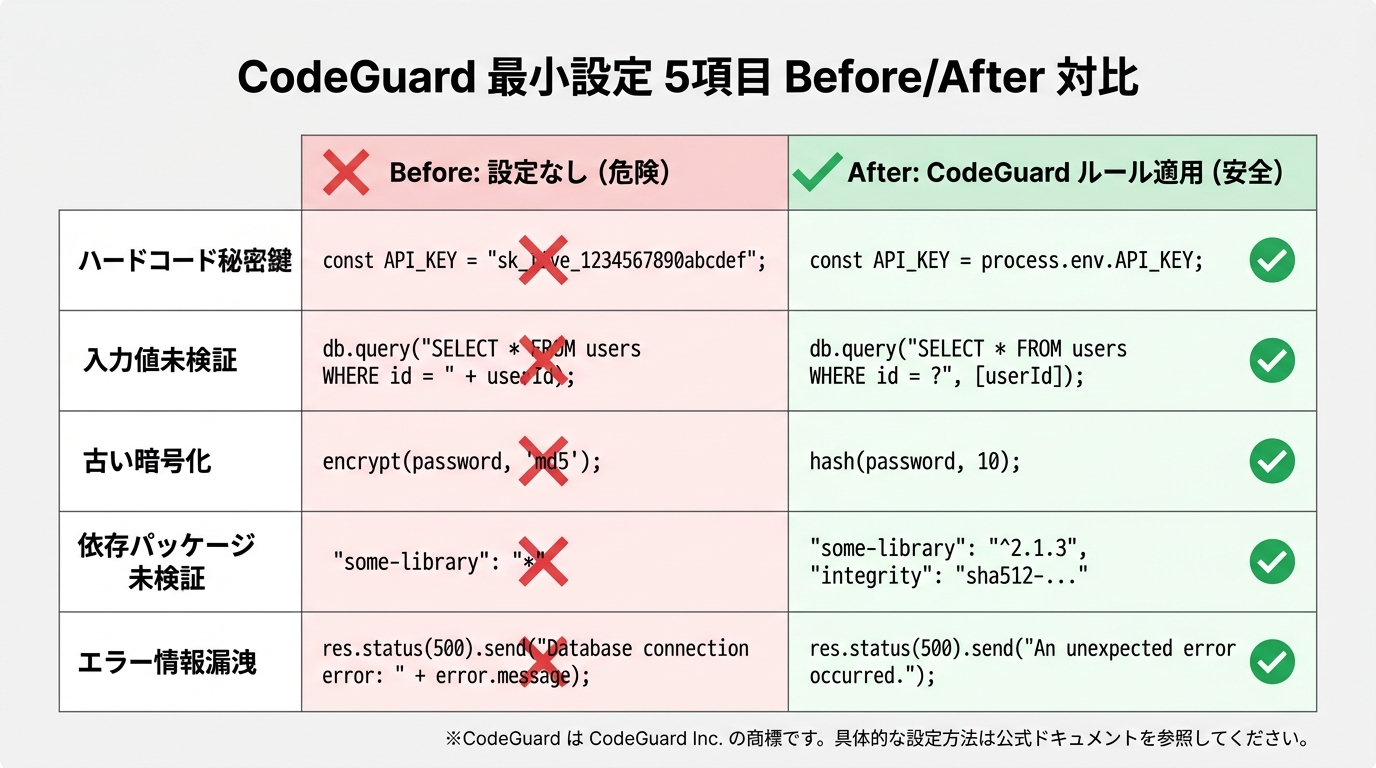
CodeGuard’s full ruleset is extensive. Here I’ve extracted the five items most likely to cause problems in vibe coding.
1. No Hardcoded Secrets
This was the most common Lovable vulnerability. API keys, DB connection strings, JWT secrets. When you ask the AI to “connect to Supabase,” it may write the connection string straight into the code.
In CodeGuard, environment variable management for secrets is mandatory. Just adding “manage secrets in environment variables” to your AI instructions resolves it.
# Minimum rule example to add to CLAUDE.md or .cursor/rules/
# CodeGuard compliant: Secret management
security:
  secrets:
    - "Do not write API keys, tokens, or passwords directly in source code"
    - "Use environment variables (.env) or a secret management service"
    - "Always include .env in .gitignore"
2. Input Validation
The pattern of passing user input directly to a DB query. It’s a breeding ground for SQL injection (injecting malicious commands) and XSS (embedding malicious scripts). CodeGuard mandates sanitization (neutralization) and validation (format checking).
Let me share a failure I actually experienced. When I built a contact form, the AI-generated code sent user input straight to email. During testing, I entered <script>alert('test')</script> and the email arrived without errors, as is. XSS protection was completely missing. After applying CodeGuard’s rules, the AI now automatically suggests neutralizing input values.
// CodeGuard compliant: Input validation example (Node.js)
// BAD: Used as-is
// const name = req.body.name;

// GOOD: Used after validation
const { body, validationResult } = require('express-validator');

// Define validation rules
const validateInput = [
  body('name').trim().isLength({ min: 1, max: 100 }).escape(),
  body('email').isEmail().normalizeEmail(),
];
3. Modern Encryption
There are reports of AI using outdated hash algorithms like MD5 or SHA-1. These are already considered crackable and aren’t sufficient for password protection. CodeGuard lets you specify modern encryption standards like SHA-256 or higher, or AES-256-GCM.
I once asked the AI to “use older code as a reference” and got back code that hashed passwords with MD5. It works, sure. But MD5 in 2026 is out of the question. If you write encryption standards into your CodeGuard rules, you can prevent the AI from defaulting to obsolete algorithms.
4. Validating Dependency Packages
Are the packages installed via npm install safe? Are you using libraries that have reached end of life? CodeGuard covers supply chain checks too. As I noted in Principle 2, the package versions AI suggests aren’t always the latest.
5. Controlling Error Information
The problem of leaking development-time error messages straight into production. Leaking stack traces or DB structure hands hints to attackers. Make it your default design to return generic messages in production and keep the details in server logs.
// CodeGuard compliant: Error handling example
// BAD: Returns detailed errors as-is (carrying dev code into production)
// res.status(500).json({ error: err.stack });

// GOOD: Return generic message, log details
app.use((err, req, res, next) => {
  console.error(err.stack); // Keep details in server logs
  res.status(500).json({ error: 'A server error occurred' }); // Generic message for users
});
These five items alone cover the majority of vulnerabilities from the Lovable survey. You don’t need to aim for perfection. Start with five. Your defensive baseline moves up a notch.
I myself only adopted these five items recently. After putting them in, what hit me was a cold sweat: “Wait, was all my previous code dangerous?” It’s never too late. The day you notice is the fastest day to respond.
Setup Takes Five Minutes
Adopting CodeGuard requires no complex configuration. Three steps and you’re done.
Step 1: Download the ruleset from the CodeGuard official site. It’s in Markdown, so you can read it directly.
Step 2: Place it according to the tool you’re using.
# For Claude Code
# Append to CLAUDE.md in the project root
# → cat codeguard-rules.md >> CLAUDE.md

# For Cursor
# Place the rule file in the .cursor/rules/ directory
# → cp codeguard-rules.md .cursor/rules/security.mdc

# For GitHub Copilot
# Append to .github/copilot-instructions.md
# → cat codeguard-rules.md >> .github/copilot-instructions.md
Step 3: Verify by asking the AI to “check the security rules.” If it recognizes them, the constraints will be reflected in subsequent code generation.
An auto-conversion translator for IDE-specific formats is included. No need to rewrite rules when switching tools.
Let me share a gotcha up front. Loading the full ruleset can slow down AI response. It’s more comfortable to drop categories irrelevant to your project. My recommendation is to start with the five items and add more as needed.
Another caveat. Right after adding the rules, you might feel like the AI is generating less code. With the added safety-check step, sometimes each output gets more compact. This isn’t “efficiency dropping”; it’s evidence that “safety checks are running.” Once you get used to it, this change starts feeling reassuring.
To put it in real-feel terms: for the first week, I felt “a bit slow.” By week two, I was used to it. By week three, I couldn’t go back: “code without rules is too scary to use.” That’s how it goes — once you experience safety, you can’t go back.
Which Type Are You? Four Action Patterns
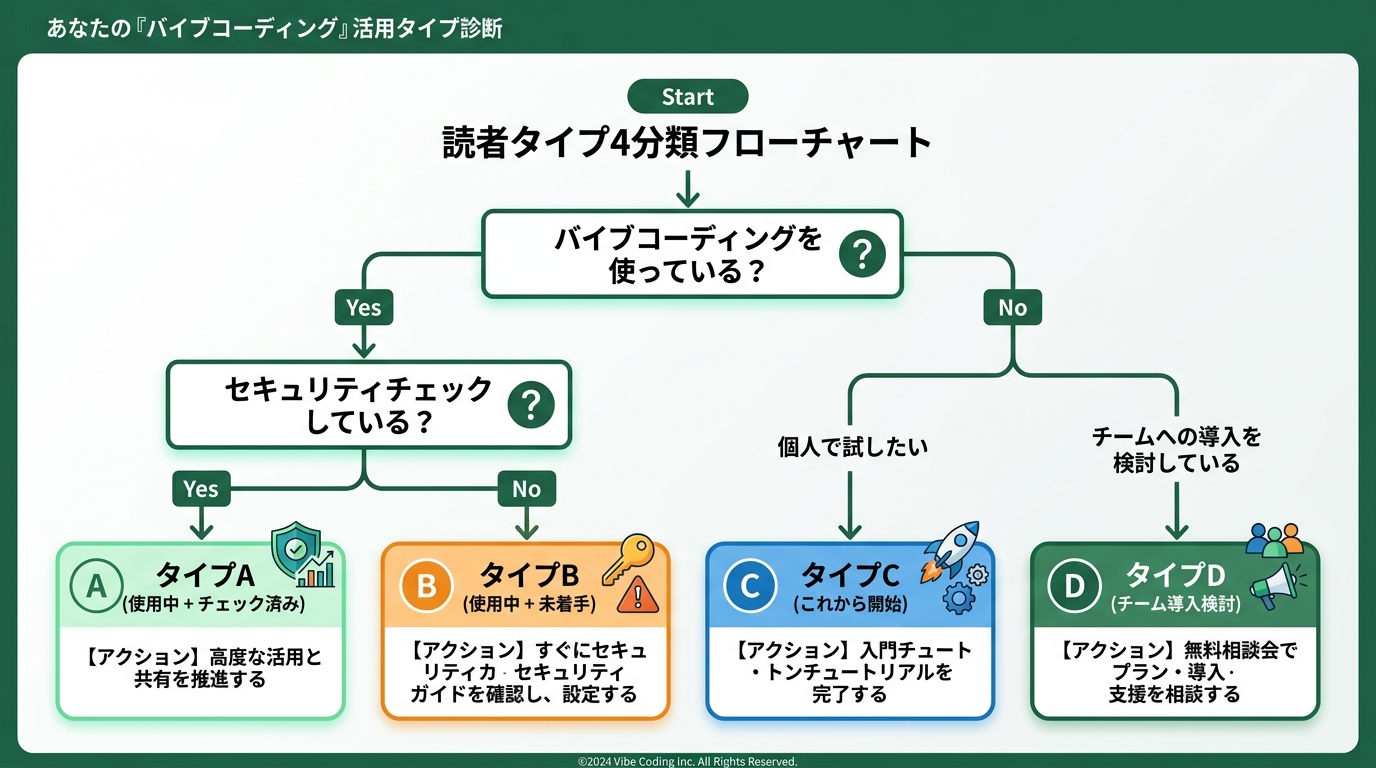
Readers of this trilogy come from various positions. Check your type and start with what you can do today.
Type A: You’re already doing security checks
Adding CodeGuard as an “extra layer” on top of your existing setup is effective. Diff it against your own checklist and fill the gaps. Supply chain is a category that’s hard for individuals to cover comprehensively, so the benefit is especially big there.
Today’s action: Compare with your current checklist on the CodeGuard official site, identify one missing category, and add it.
Type B: You’re using vibe coding but haven’t taken action
There’s one top-priority action: copy those five items into CLAUDE.md or .cursor/rules. Done in five minutes. Drawing a minimum defensive line beats perfect config. Most of the vulnerabilities in the Lovable survey could have been prevented by these five items.
Today’s action: Copy the “No hardcoded secrets” code from this article into CLAUDE.md and load it into your AI.
Type C: You’re about to start vibe coding
The best move is to start with CodeGuard rules already in place. It’s much easier to bake security in from the start than to add it later. An environment where you can have both “things that work” and “things that are safe” is already in place.
Today’s action: Set up CodeGuard rules at the same time you install the tools. Just follow the setup section step by step.
Type D: You’re considering adoption for a team
The significance of CodeGuard being donated to CoSAI (an OASIS Open project) is huge. It has shifted into a framework targeting industry standardization. By specifying CodeGuard compliance in your development guidelines, you can move away from person-dependent checks.
Today’s action: Check the latest activity from SIGs (special interest groups) on the CoSAI page, and use it as a starting point for a proposal to incorporate it into your in-house dev guidelines.
Wrap-Up: What the Trilogy Revealed
What’s come into view through these three articles is the reality that vibe coding security has moved from “discovery” to “standardization.”
- Part 1 (Lovable): Exposed the structural weaknesses in AI-generated code
- Part 2 (CurXecute): Showed the arrival of a phase where the tools themselves are attack targets
- Part 3 (CodeGuard): Delivered an industry-level answer as open source
There’s one lesson running through the trilogy. The fact that “AI is convenient, but it won’t take care of safety for you.” Put another way: once you put safety mechanisms in, you can confidently enjoy the benefits AI offers.
I wrote this trilogy because I wanted to reach people who are in the same position I once was. People who know the joy of stepping away from code and coming back through AI. To say “you don’t have to give up that joy.” Strap on a safety net and enjoy it fully.
It takes less than five minutes to add CodeGuard’s five items. Those five minutes might prevent one future incident. You don’t need to change the “let’s just build something that works” spirit. Just upgrade it to “let’s just build something that works safely.”
The stage is set to safely enjoy the experience of having an ace engineer inhabit you. All that’s left is five minutes of action. If you’ve read this trilogy, I’m sure you won’t begrudge those five minutes.
Source Map
| # | Source | URL | Verified | Cited Content |
|---|---|---|---|---|
| 1 | Cisco Blogs | Announcing a New Framework for Securing AI-Generated Code | curl 200 ✅ | CodeGuard OSS release, unified Markdown format, OWASP/CWE-based |
| 2 | OASIS Open | Cisco Donates Project CodeGuard to CoSAI | curl 200 ✅ | Donation to CoSAI, industry standardization |
| 3 | SiliconANGLE | Cisco unveils Project CodeGuard | curl 200 ✅ | Framework details, multi-IDE support |
| 4 | Publickey | Cisco Releases Project CodeGuard as OSS | curl 200 ✅ | Japanese primary reporting, validator and translator explanation |
| 5 | CoSAI | Cisco Donates Project CodeGuard | curl 200 ✅ | SIG establishment, community development structure |
| 6 | Official site | project-codeguard.org | curl 200 ✅ | Ruleset download |
※ Data previously cited in the first two articles (Lovable 10.3%, CurXecute CVE-2025-54135 CVSS 8.6, 45% of AI-generated code vulnerable) follows the sourcing in those prior articles. ※ Internal links: Trilogy Parts 1 and 2 (Gen’s articles) are not yet listed in the published article index, so links are not included.

正直、一度エンジニアは諦めました。新卒で入った開発会社でバケモノみたいに優秀な人たちに囲まれて、「あ、私はこっち側じゃないな」って悟ったんです。その後はカスタマーサクセスに転向して10年。でもCursorとClaude Codeに出会って、全部変わりました。完璧なコードじゃなくていい。自分の仕事を自分で楽にするコードが書ければ、それでいいんですよ。週末はサウナで整いながら次に作るツールのこと考えてます。