Cisco's Project CodeGuard: The Day Enterprise Security Finally Showed Up to Help Solo Developers
Cisco open-sourced CodeGuard, a security ruleset for AI coding agents. A former CS engineer's practical guide for vibe coders — 3 minimal setup steps.
What you'll learn in this article
- The key point to grasp before reading the full article
- How the issue changes the way developers should work next
- Which follow-up article is worth opening next
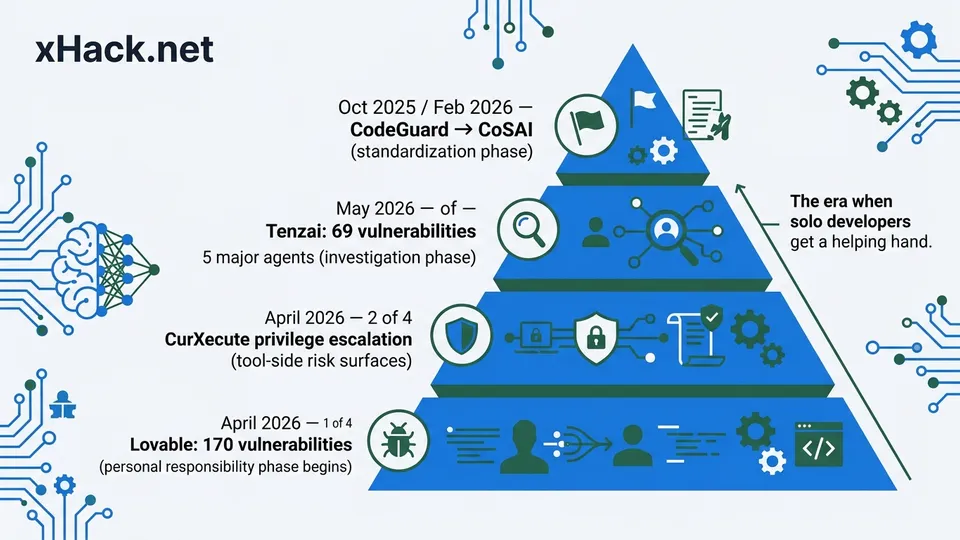
Cisco published “Project CodeGuard” on GitHub — a security ruleset for AI code generation. This is the domain I’ve been dodging for three years as a vibe coder, and now a major enterprise has stepped in to help carry the weight. Writing as a formerly burnt-out engineer, this felt like “the day I finally got someone in my corner.” This is the 8th entry in my vibe coding series, and I’m writing about how to actually integrate CodeGuard into your own development workflow. This article is the next step in a thread that runs through Lovable’s 170 backdoors, CurXecute’s privilege escalation, and the 69 vulnerabilities Tenzai found across major agents.
Cisco Released “Project CodeGuard.” So What Changes?
Standards are starting to form on the rule side of AI code generation.
Cisco open-sourced “Project CodeGuard” in October 2025. It’s a security ruleset for AI coding agents, supporting major tools like Cursor, GitHub Copilot, and Claude Code. The official repository is at https://github.com/project-codeguard/rules. Then in February 2026, Cisco donated the project to CoSAI (Coalition for Secure AI), upgrading it from a single company’s effort into an industry-standard framework.
If you do vibe coding, you’ve definitely typed something like “don’t cause SQL injection” or “don’t log secret keys” into a prompt at some point. I know I have. If you let your guard down, the AI will happily make those mistakes. So you wrote it manually, every single time.
What Cisco offered is a way to load all those per-session instructions as a single “rule file.” Instead of writing them in the prompt, you drop the file at the root of your repository. The AI reads it every time it generates code. No more repeating yourself.
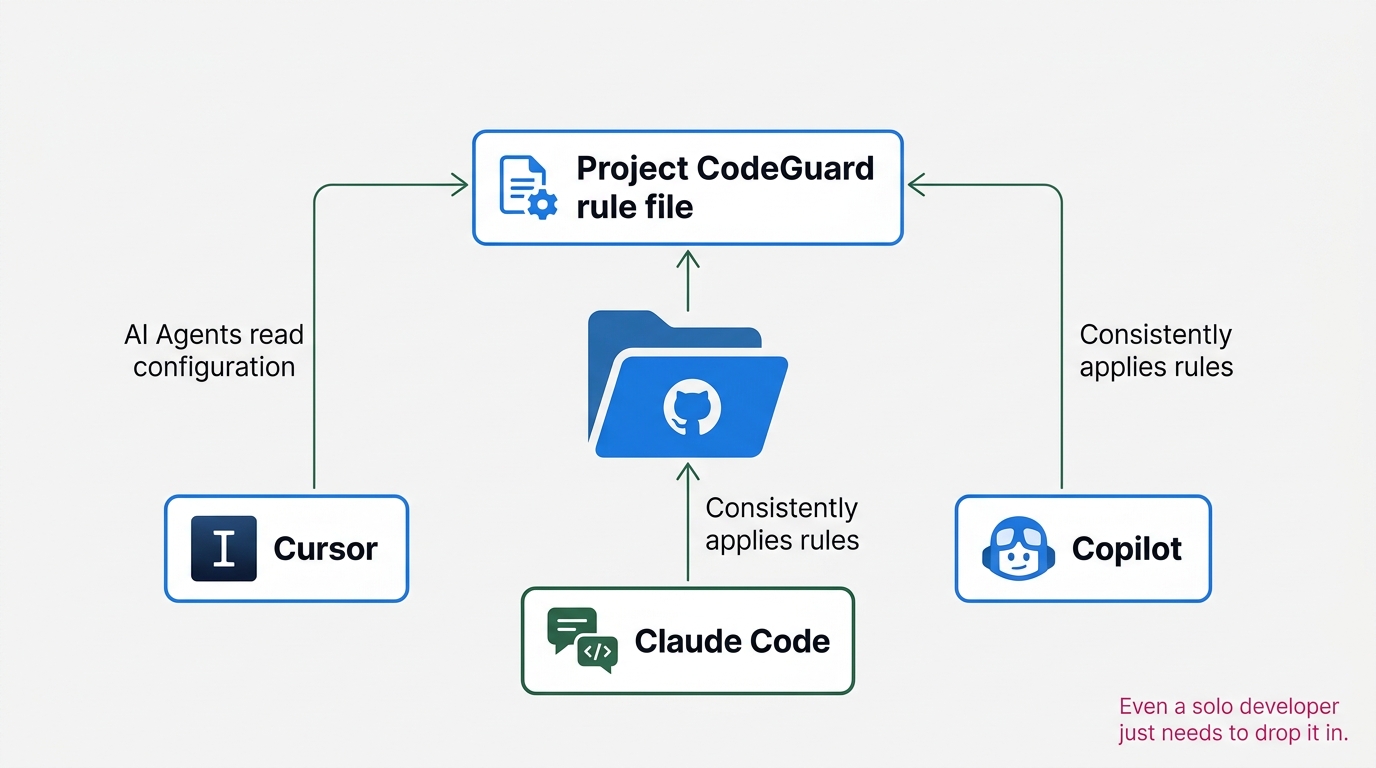
I want to pause on this for a moment. This isn’t just about a “handy config file.” The 170 vulnerabilities in Lovable (series #1), the CurXecute privilege escalation (#3), and the 69 holes Tenzai found (#7) — all of these have been framed as “problems on the side of people using AI.” CodeGuard looks like the first major project to address both the tool side and the rule side at once.
I saw this pattern over and over in my CS work. There’s a phase where you tell the customer “please be careful,” and then there’s a phase where you build “be careful” into the product itself. When you reach the second phase, the burden on the customer drops dramatically. CodeGuard has stepped into that second phase.
What’s Inside CodeGuard — As Best as I Can Understand It
I’ll be upfront: this section is written with direct reference to the primary sources at https://github.com/project-codeguard/rules and https://project-codeguard.org/getting-started/. I’ll flag where my own interpretation comes in.
From reading the CodeGuard repository, the rules break down into roughly three categories.
The first is prohibition rules. These enumerate things you must never do: no hardcoded secret keys, no eval, no exec. It’s designed to stop the kinds of mistakes vibe coders make in “just make it work” mode before the code is even generated.
The second is recommendation rules. Input validation, rate limiting, CSRF token inclusion. The part where Tenzai, in article #7, pointed out that “14 out of 15 apps had zero rate limiting” — that’s what these rules bake in as a default.
The third category I’d call contextual rules. They switch which rules apply based on the layer — frontend, API, database. Even “input checking” works differently for user input vs. a DB connection string. These rules handle that distinction by context. (This is my interpretation; check the repository for precise classification.)
# CodeGuard rule file (conceptual structure)
rules:
  - id: no-hardcoded-secrets
    severity: error
    layer: all
  - id: rate-limit-required
    severity: warning
    layer: api
  - id: input-validation
    severity: error
    layer: frontend,api
Reading it this way, you just place the file at your repository root and the AI loads it as a “design assumption” from the start — no need to re-declare security requirements in every prompt. That’s what I see as CodeGuard’s core value.
One gotcha to flag upfront: CodeGuard doesn’t work just by writing the rules. The agent you’re using has to be able to read that rule format. I’ll cover this in the next section, but Cursor, Copilot, and Claude Code each have different installation methods. Get the format wrong and the rules simply won’t apply.
Stop Yourself the Moment You Think “This Isn’t for Me”
Let me knock out three misconceptions right now.
Misconception #1: “This is enterprise-scale stuff, not relevant to me.” Some people close the tab the moment they see Cisco’s name. That’s backwards. The whole point of releasing it as OSS is a message that says “individual developers, please use this too.” The structure requires nothing more than dropping one file at your repository root.
Misconception #2: “My scale is small enough that vulnerabilities don’t really matter.” This was the core of my first Lovable article. The SVIBES study reported that “even code that passes functional tests is only safe in about 1 out of every 6 cases.” Working code and secure code are not the same thing. The information that leaks carries the same weight regardless of your project’s scale.
Misconception #3: “This is only for people who have a security team.” This one runs the deepest. The majority of vibe coders are writing alone. No reviewer. That’s my situation too. That’s exactly why you need the rule side to carry some of the burden. CodeGuard reads to me as “training wheels specifically for people who write alone.”
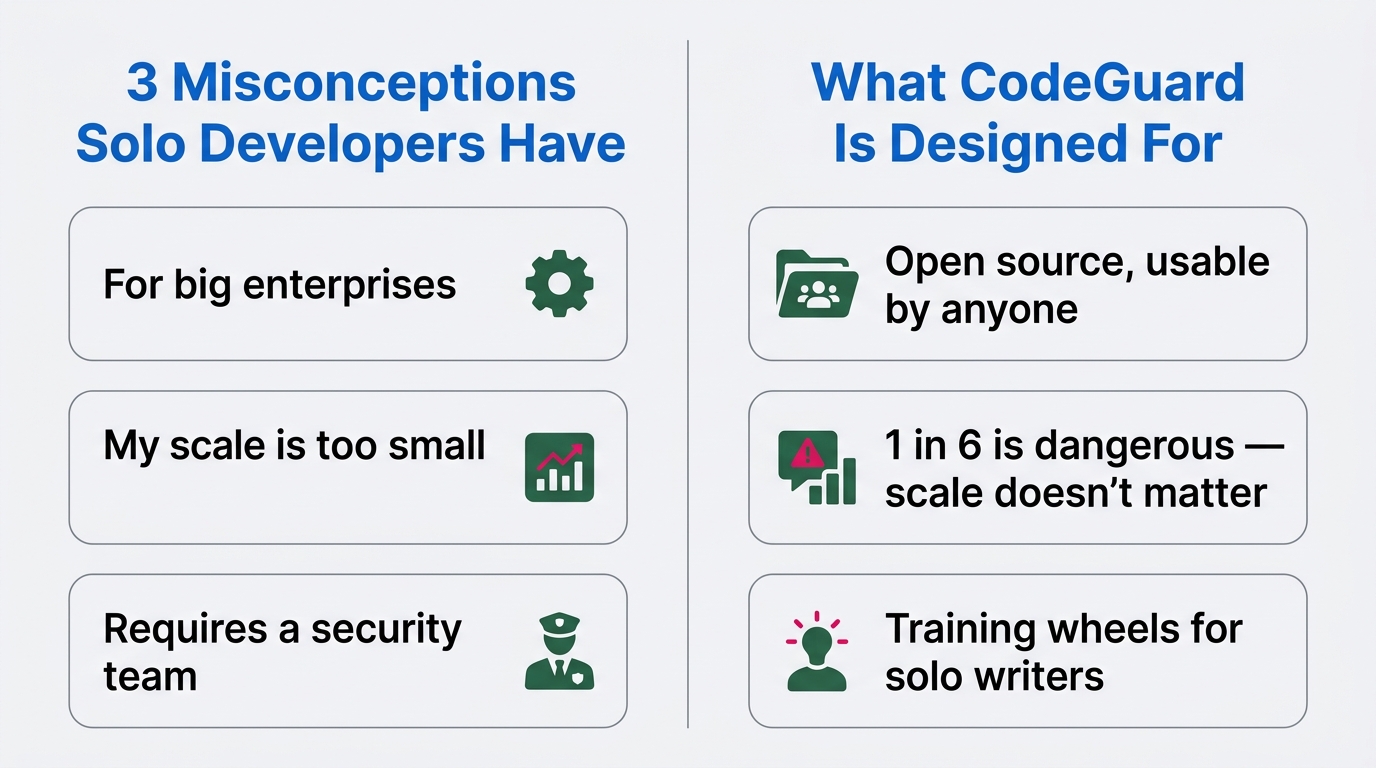
In my CS days, I can’t count how many times I heard “we’re a small company so we’re probably fine.” There’s no size threshold for a data breach. The same applies to vibe coders. Writing alone is all the more reason to start from a protected baseline — it’s just easier in the end.
If you’ve read this far and are thinking “sounds like a hassle,” — the next section covers the minimal setup you can do today. Just three things.
The Minimal Setup for Vibe Coders — 3 Things You Can Do Today
Three things is enough. Here they are in order.
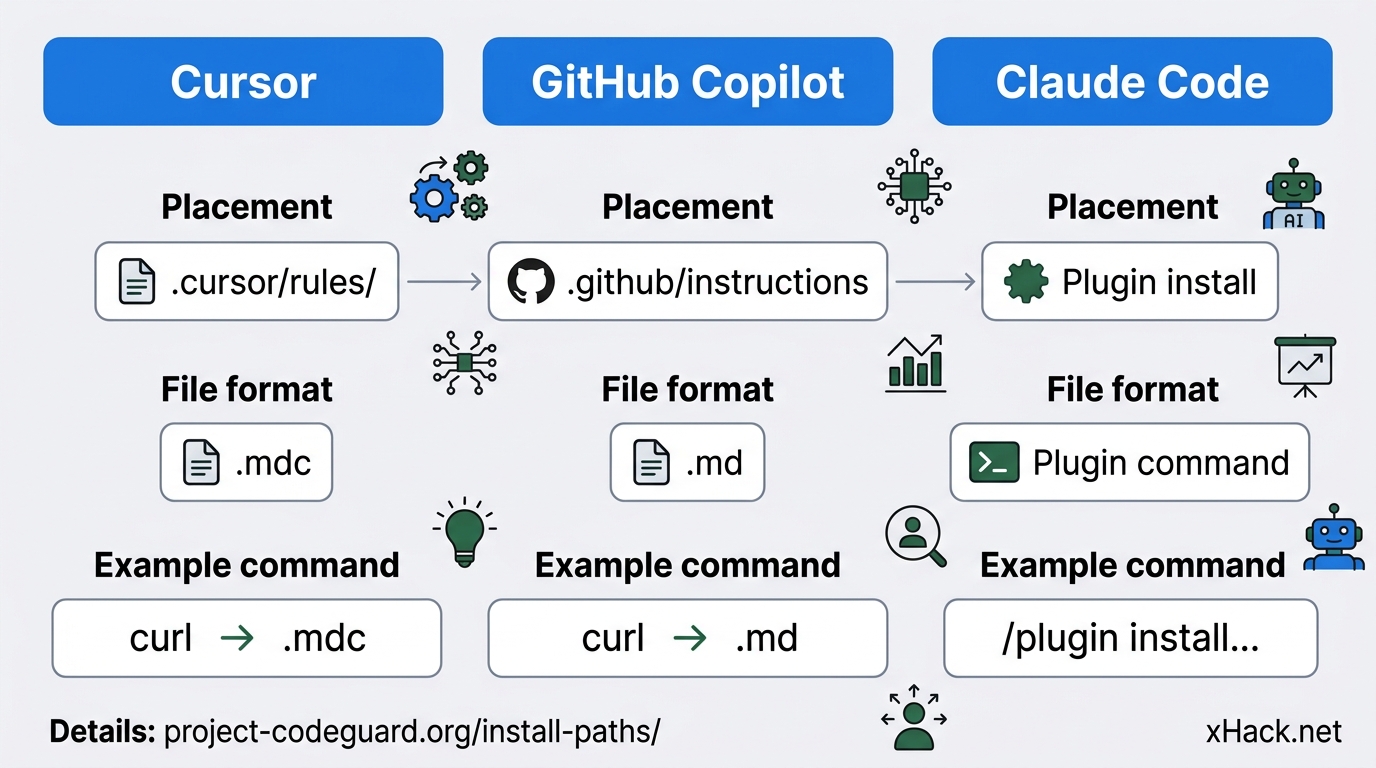
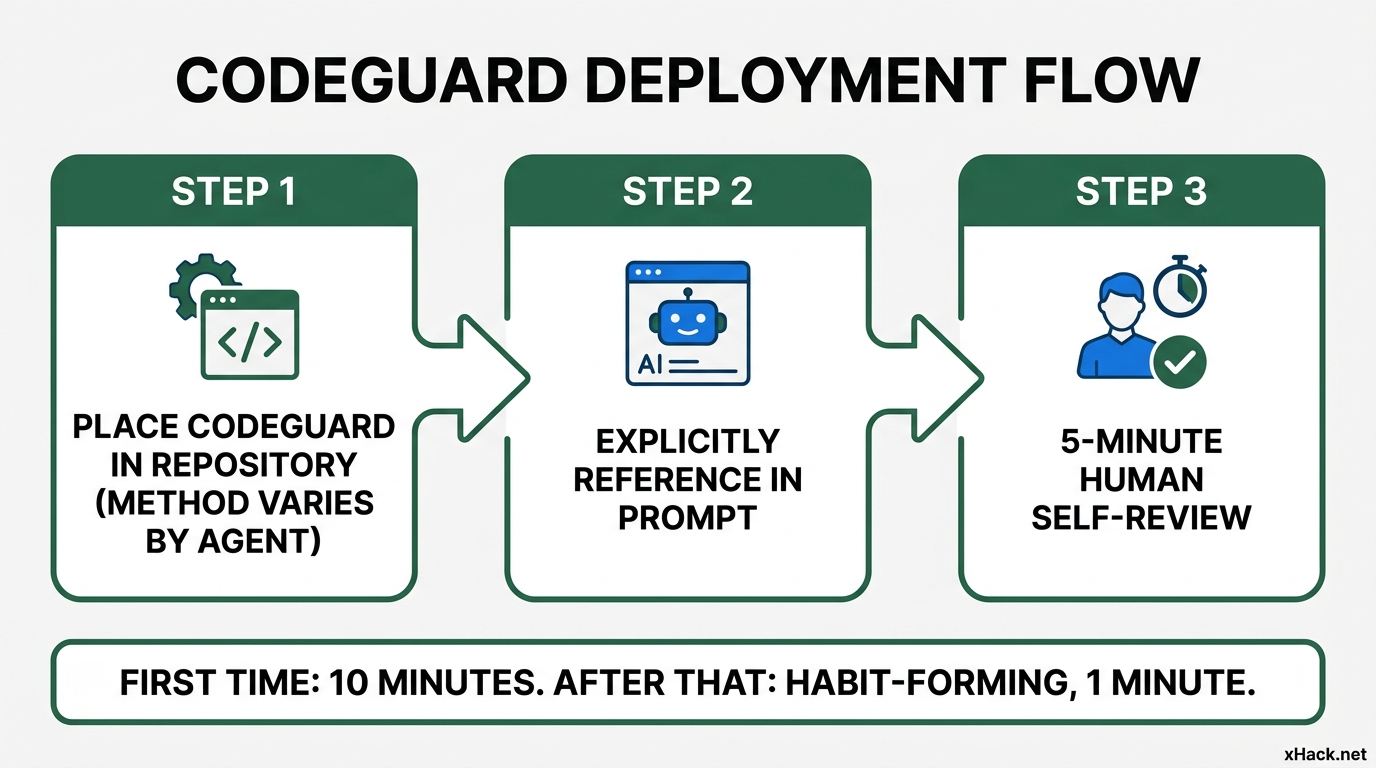
Setup 1: Drop the rule file at your repository root. The method varies by which agent you use.
If you’re using Cursor: Place the rule file under .cursor/rules/. Download the Cursor-specific file from the official repository (https://github.com/project-codeguard/rules) and put it there.
# For Cursor users
cd your-project
mkdir -p .cursor/rules
# Official repo: https://github.com/project-codeguard/rules
# Download the Cursor rule file
curl -o .cursor/rules/codeguard.mdc \
  https://raw.githubusercontent.com/project-codeguard/rules/main/cursor/codeguard.mdc
If you’re using GitHub Copilot: Place it in .github/instructions. Grab the file from the Copilot-specific directory in the repository.
If you’re using Claude Code: Install it as a plugin. Run /plugin install codeguard-security@project-codeguard inside Claude Code and you’re done. This plugin command is the officially recommended path — not manually copying to CLAUDE.md.
The exact installation steps for each agent are documented at https://project-codeguard.org/install-paths/. First-time setup takes under 10 minutes.
Setup 2: Explicitly tell the AI to reference the rules in your prompt. Just dropping the rule file in place isn’t enough — depending on the agent, it may not read it. Adding “Make sure to reference the CodeGuard rules before writing” at the top of your prompt noticeably increases the reference rate in practice. One line added.
Setup 3: Use CodeGuard’s categories as a checklist when you do your human review. When you do your final review of generated code, check it against the three categories: prohibition, recommendation, and contextual. I take a 5-minute self-review period as a habit. Within that, I just look at “how many prohibition rules did this violate” and “how much of the recommendation rules are covered.”
Two gotchas worth calling out. First: the installation method really does differ by agent. Cursor uses .cursor/rules/, Copilot uses .github/instructions, Claude Code uses a plugin. When I first tried it, I put the Copilot file in my Cursor setup and spent an hour wondering why it wasn’t working. Match the method to your agent (details: https://project-codeguard.org/install-paths/).
Second: over-loading with rules. If you enable all of CodeGuard’s rules at once, the AI can start generating code that doesn’t actually run. Tenzai’s research in article #7 touched on this — too many rules degrades generation quality. My experience was that starting with “prohibition rules only” and then gradually adding recommendation rules was the safer approach.
Three minimal setups: about 10 minutes the first time, roughly 1 minute of added overhead per coding session after that. Even at that level, you’re inside a system that blocks a significant portion of the vulnerabilities that Lovable, CurXecute, and the Tenzai research have been documenting.
How This Connects to the “3 Habits” I Wrote About in Article #7
In article #7 (Tenzai’s comparison of 5 major AI agents), I proposed three habits for vibe coders. Habit 1: write your common-sense assumptions directly into the code spec. Habit 2: put a SECURITY-CHECKLIST.md in the repository. Habit 3: a human manually tests 5 scenarios at the end.
CodeGuard slots right into the middle of those three habits — specifically the “document you put in the repository” part. It replaces the SECURITY-CHECKLIST.md you were writing yourself. The 100-line checklist you were maintaining alone gets replaced by an industry-standard set of hundreds of rules.
That said, “replace” isn’t quite right. CodeGuard is a general-purpose ruleset. Project-specific requirements won’t be in there. Things like “this API must never call the email-sending function” or “this screen handles payment data, add extra logging.” Those local rules are a different thing.
So I switched to a two-layer system. Layer 1 is CodeGuard (generic, hundreds of industry-standard rules). Layer 2 is my own SECURITY-CHECKLIST-LOCAL.md (project-specific, around 10–30 lines). The AI reads both.
# Development instruction prompt for the AI (example)

In this repository, please always reference the following two:

1. CodeGuard rules (pre-configured rules per agent)
2. `.cursor/rules/local-checklist.mdc` — requirements specific to this project

Generate code that violates neither.
This two-layer approach made the division of responsibilities clear. What I’d been cramming into a single SECURITY-CHECKLIST.md is now separated, and the maintenance overhead has dropped considerably.
This connects to the “design skill on the user’s side” point in Nagi’s article “The Era Where Just ‘Using AI’ Won’t Differentiate You” (/blog/n2026042000009401/). CodeGuard provides the rules — but local design remains the responsibility of the person using it. The parts you can’t delegate to AI are still on you. That part hasn’t changed.
What It Means That a Big Company Released This as OSS — and How the Phase Is Shifting for Solo Developers
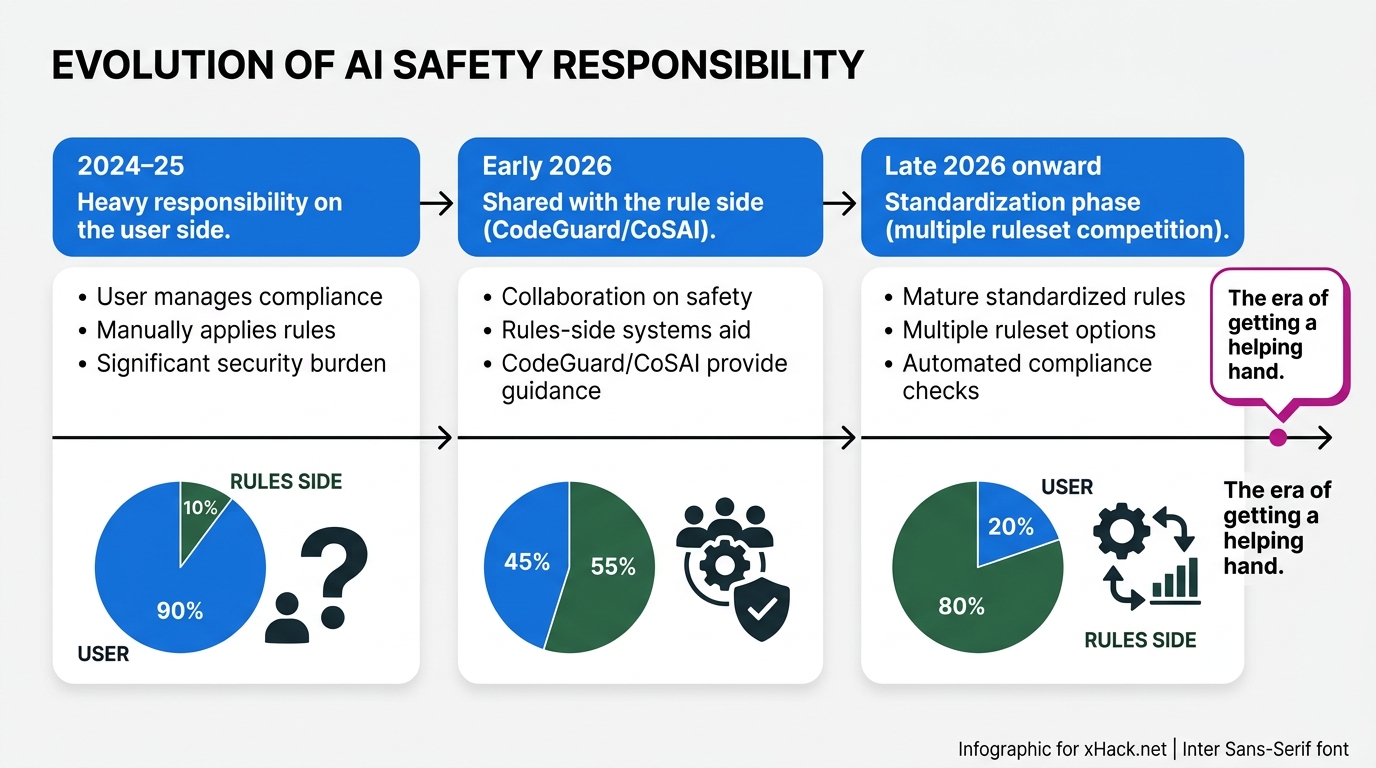
I read Cisco’s OSS release of CodeGuard as a signal that the “personal responsibility phase” of vibe coding is starting to end.
From 2024 to 2025, the dominant conversation in vibe coding security was “users need to be more careful.” The Lovable incident (#1) and the CurXecute incident (#3) — the conclusions of most commentary landed on “we need to improve user awareness.” That’s true, but it has limits. Hand a solo developer 10 checklists and the practice won’t stick.
Then CodeGuard stepped in with “we’ve prepared the rules — just drop them in.” The center of gravity of the burden is shifting to the tool side and the rule side. Tenzai’s conclusion in article #7 — “the winner is whoever tests most rigorously” — and the direction CodeGuard points toward — “share the rules” — are part of the same current.
Nagi’s “You Don’t Have to Know How to Code Anymore” article (/blog/n2026032200000901/) dealt with the structure of “can’t write code, but can build.” That idea is expanding beyond just coding ability. It’s starting to include “can’t write code, but can build safely.” CodeGuard is the assist line for “safely.”
It’s the same pattern I’ve seen play out in CS work many times. A domain that started as “the customer’s fault for using it wrong” eventually gets built into the product as a feature. Code generation security has finally reached that inflection point.
My read is that over the next six months to a year, ruleset alternatives to CodeGuard will emerge — from Microsoft, Google, Anthropic, each potentially entering this same layer. When multiple rulesets start competing, vibe coders will be in the position of choosing which ones to adopt. That’s a luxurious problem to have. Three years ago there were no options at all.
As an engineer who burned out and stepped away, this is genuinely good news. The “general-purpose security rules for individual developers” I wished had existed when I was active have finally arrived. I suspect a lot of people feel the same way.
Summary: The Day Vibe Coders Stopped Being Completely on Their Own
Let me compress everything above.
1. Cisco open-sourced “Project CodeGuard” in October 2025. It’s a security ruleset for AI code generation, supporting Cursor, Copilot, and Claude Code. It was donated to CoSAI in February 2026 and became an industry-standard framework.
2. The content is structured in roughly three categories (prohibition, recommendation, contextual). Drop it in your repository and the AI reads it automatically. Security instructions you used to write in every prompt get consolidated into a single file.
3. The minimal setup for solo developers is three things: repository placement (method varies by agent), explicit reference in prompts, and a 5-minute human self-review. Around 10 minutes the first time; roughly 1 minute of overhead per session after that.
4. Of the “3 habits” from article #7, the SECURITY-CHECKLIST.md part can be replaced by CodeGuard. A two-layer approach — generic + project-specific — makes ongoing operations manageable.
5. Cisco’s OSS release signals that the responsibility for vibe coding security is starting to shift from “the user’s side” to “the rule side.” This is good news for people writing alone. A support structure that didn’t exist three years ago is now forming.
When I burned out and left coding behind, and then came back through AI, security was the first thing that stumped me. My CS instincts could tell me “is this okay?” — but I didn’t know how to stop it in code. If something like CodeGuard had existed three years ago, I might have come back sooner. For anyone starting now, you’re no longer completely alone. There are tools starting to offer a helping hand. Start by dropping one file into your repository and see how it feels.
Sources
- Project CodeGuard official repository: https://github.com/project-codeguard/rules
- Project CodeGuard getting started guide: https://project-codeguard.org/getting-started/
- Project CodeGuard installation paths (per agent): https://project-codeguard.org/install-paths/
- Cisco “Project CodeGuard” announcement blog (October 2025): https://blogs.cisco.com/ai/announcing-new-framework-securing-ai-generated-code
- CoSAI “Cisco donation announcement” (February 2026): https://www.oasis-open.org/2026/02/09/cisco-donates-project-codeguard-to-coalition-for-secure-ai/
- Anthropic “Claude Code” official documentation: https://docs.anthropic.com/claude/docs/claude-code
- Cursor “Rules for AI” official documentation: https://docs.cursor.com/context/rules-for-ai
- Past series (this publication, written by Gen)
- #1 “170 Backdoors in Vibe Coding” (published 2026-04-01)
- #3 “Forrester Secure Vibe Coding” (published 2026-04-04)
- #6 “45% of Vibe-Coded Apps Have Holes” (published 2026-04-16)
- #7 “Tenzai Compared 5 Major Vibe Coders” (published 2026-05-12)

正直、一度エンジニアは諦めました。新卒で入った開発会社でバケモノみたいに優秀な人たちに囲まれて、「あ、私はこっち側じゃないな」って悟ったんです。その後はカスタマーサクセスに転向して10年。でもCursorとClaude Codeに出会って、全部変わりました。完璧なコードじゃなくていい。自分の仕事を自分で楽にするコードが書ければ、それでいいんですよ。週末はサウナで整いながら次に作るツールのこと考えてます。