The Day My $75/Month AI Stack Beat a $1,000/Month Assistant. A Solopreneur's Full Cost-Benefit Breakdown
Invest just $75/month in AI tools and you can match the work of a $1,000/month virtual assistant. A practical guide reverse-engineering which tools to use, how much to spend, and how many hours you save — organized as a priority map.
What you'll learn in this article
- The key point to grasp before reading the full article
- How the issue changes practical decisions after reading
- Which follow-up article is worth opening next
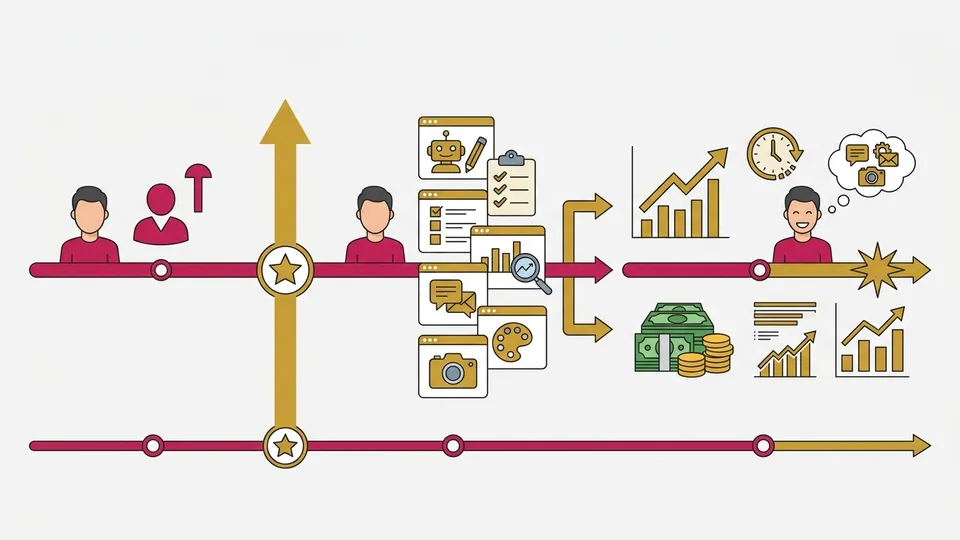
When I first started my one-person company, the very first thing I did was hire a virtual assistant (VA). $600 a month. Email replies, scheduling, research. “Now I can focus on the real work,” I thought.
But here in April 2026, I’m doing the same work with 5 to 7 AI tools. Monthly cost: $75 to $150. About one-tenth of what I paid the VA. And it runs 24/7 with almost no mistakes.
This isn’t a “AI is taking our jobs” story. It’s an “AI is now your team” story. For someone running a business solo like me, this was a genuine game-changer — no exaggeration.
In this article, I’ll reverse-engineer “which tools, how much to spend, and how many hours you save.” I’ll also show you the actual AI stack (the combination of AI tools I use for work) that I run. If you’ve been thinking “I don’t even know where to start,” read all the way through.
29.8 Million Solopreneurs Are Hitting the Same Wall
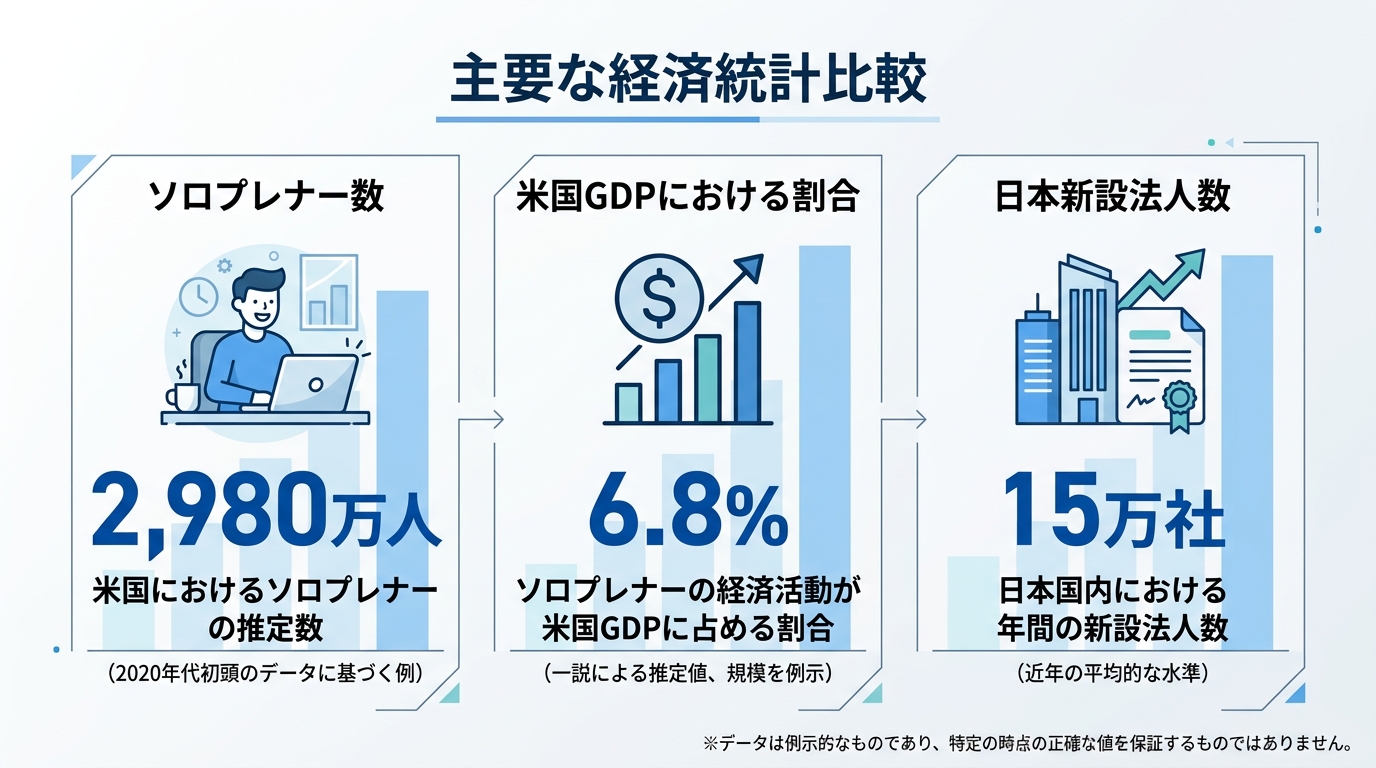
There are 29.8 million solopreneurs (people running businesses solo) in the US alone. They make up 82% of all American small businesses, with an economic scale of $1.7T (about ¥255 trillion). This isn’t niche anymore — it’s mainstream. (Founder Reports)
That number’s hard to picture, right? Put another way: 4 out of every 5 small businesses in the US are one-person operations. In Japan, new business registrations hit a record 153,938 — an all-time high. With the rise of approved side hustles, the number of people starting solo businesses is steadily climbing.
But doing everything alone is harder than you’d imagine. Email, invoices, social media posts, customer support, accounting, scheduling. “I want to focus on real work but admin eats the whole day” — yeah, I’ve been there.
Wake up and reply to emails. Draft 3 invoices by lunch. Schedule social posts in the afternoon, answer client questions in the evening. Before you know it, you’re asking yourself “did I actually do any real work today?” That’s the reality of solopreneur life.
So you have two options. Hire someone, or delegate to AI.
The conventional answer was “hire a VA.” A Filipino VA runs $3–7/hour. A US-based VA runs $20–40. Full-time, that’s $640–$2,400/month. (Wishup)
And VAs come with management overhead. Giving instructions, checking quality, juggling time zones. “I hired help and somehow have more work” — I’ve been there, and it’s not funny.
The other answer in 2026 is “build an AI stack.” Let me show you exactly how to build one.
What Does a $75 AI Stack Actually Replace?
Bottom line first. A $75–150/month AI stack covers about 80% of the work a VA used to handle.
Here’s the breakdown of the stack I actually use.
| Tool | Use | Monthly | Replaces |
|---|---|---|---|
| Claude Pro | Research, writing, strategy sounding board | $20 | Research VA |
| Zapier | Workflow automation | $20 | General admin VA |
| Canva Pro | Social media images, decks | $13 | Design VA |
| Descript | Video and audio editing | $24 | Editing VA |
| Notion AI | Task management, meeting notes, knowledge base | $10 | PM-assist VA |
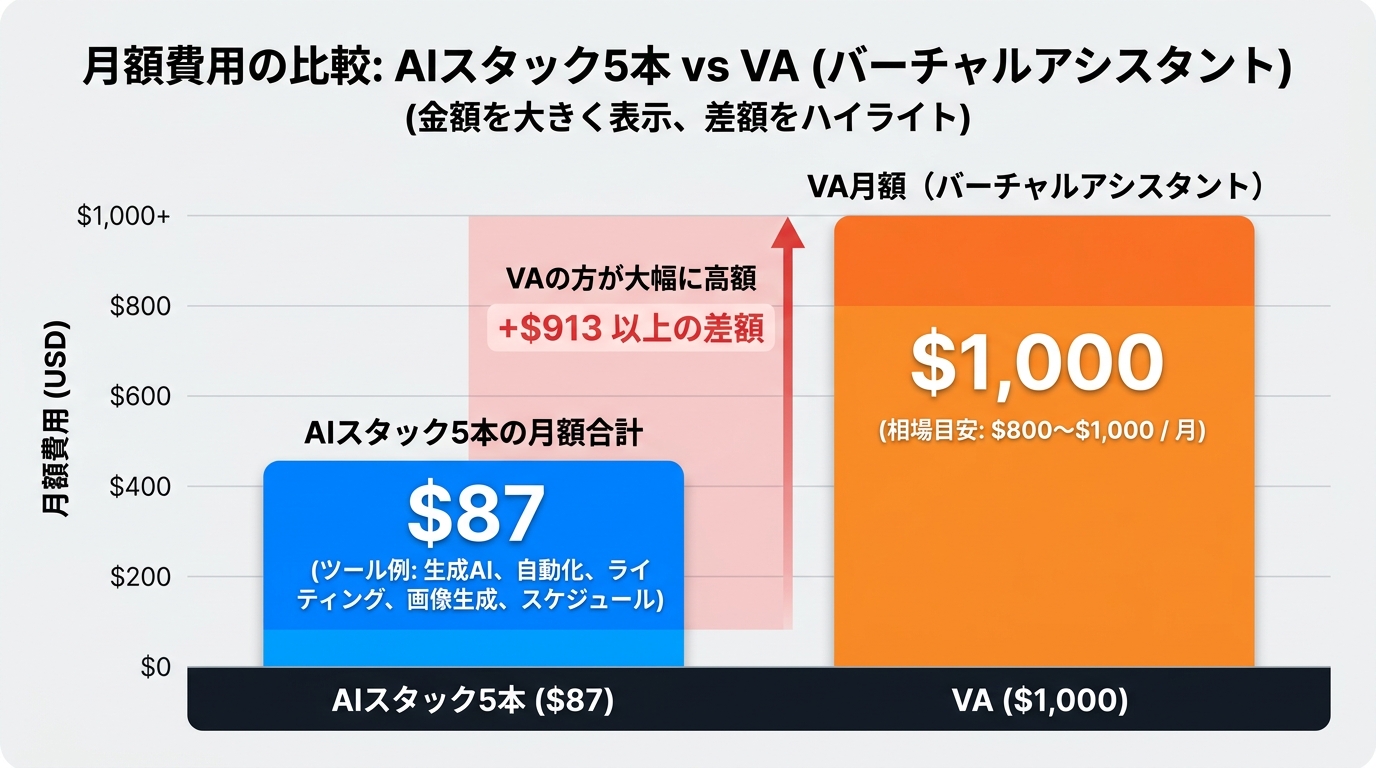
Total: about $87/month.
When I outsourced this to a VA, equivalent work cost me $800–$1,000/month. That’s over $700 saved every month. $8,400 a year. For a one-person company, that’s huge.
“Does it really work that well?” I was skeptical at first too. So for the first month, I actually ran the VA and AI in parallel. Gave both the same tasks and compared.
Email drafts. The VA returns them 3 hours after I send instructions. Claude returns in 30 seconds. Quality? Honestly, about the same. Both need editing, but the speed difference is massive.
Research summaries. A task like “summarize the latest trends in this industry in 3 lines.” The VA comes back the next day with a 5-page document. Claude Pro returns in 2 minutes. And the killer feature: I can follow up with “dig deeper here.”
Social media captions. Ask the VA for 5 variations and it takes half a day. Claude pumps out 10 in 3 minutes. Picking 2 and rewriting them in my voice was faster.
The result: for email drafts, research summaries, and social captions, AI was faster and the quality was more consistent. The VA only won on “phone calls” and “customer follow-ups requiring emotional nuance.”
So I didn’t fire the VA completely. I kept them on at $100/month just for phone support. AI does what AI is good at, humans do what humans are good at. That division of labor is the 2026 sweet spot, I think.
A Priority Map for “What to Replace First”
I’m not saying “switch everything to AI overnight.” I learned the right order through failure.
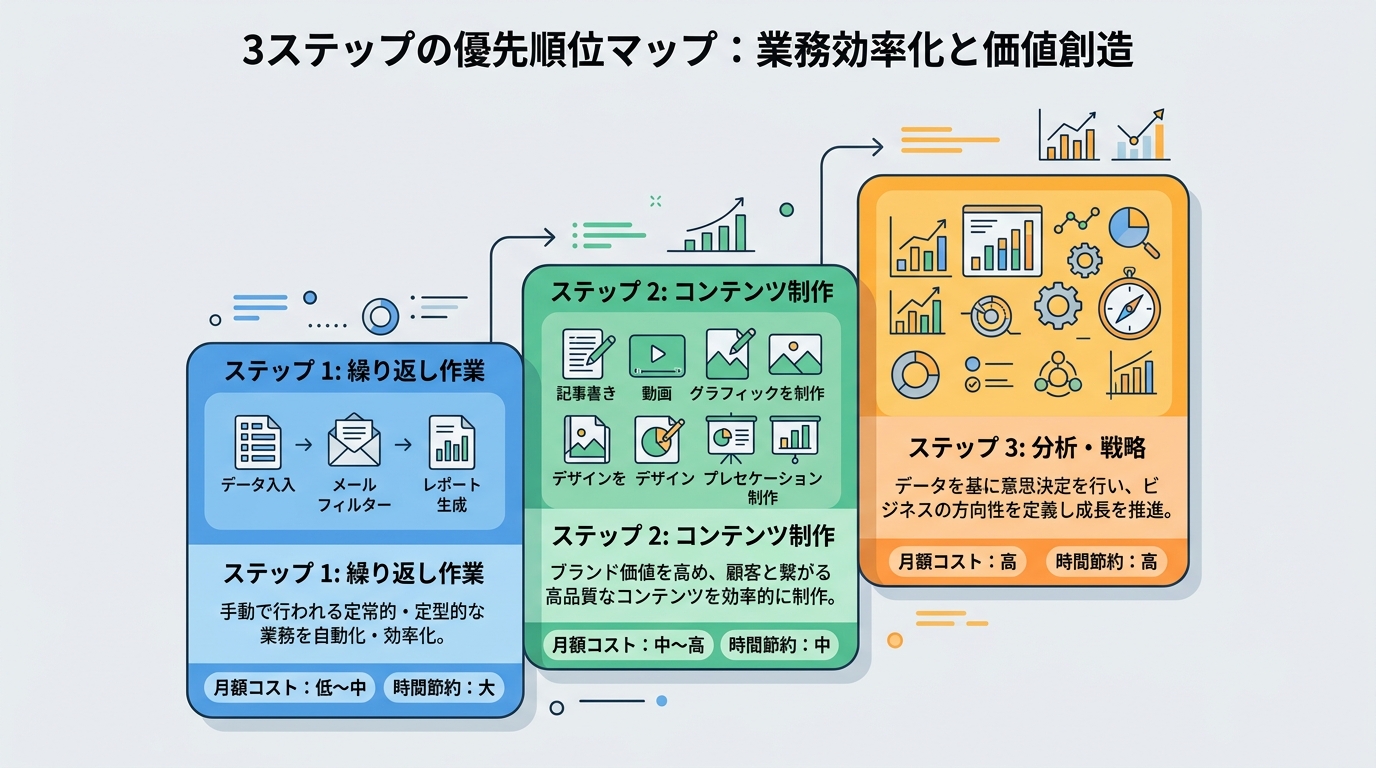
Step 1: Replace Repetitive Tasks First (Month 1+)
Start with tasks you do the same way every day. Template email replies, invoice generation, scheduled social posts. Zapier alone frees up 5–10 hours a month.
According to Zapier’s business automation stats, companies that adopt workflow automation save an average of $46,000 a year. (Zapier)
“$46,000 a year — that’s enterprise talk, right?” Maybe. But scaled to solo-business size, you still generate $200–500/month of time value. In my case, I automated 3 things with Zapier:
- Contact form → Slack notification → auto-reply: 3 hours/month of manual replies → zero
- Monthly invoice auto-generation: 2 hours of monthly work, done in 5 minutes of one-time setup
- Social post scheduling consolidated: 30 minutes every morning → one 1-hour session per week
The point isn’t “can this be automated?” It’s “is it worth automating?” Automating a 30-minute weekly task isn’t worth it if setup takes 2 hours.
Step 2: Accelerate Content Creation (Month 2+)
The next big lever is content. Blogs, social posts, newsletters, proposals. Among all solopreneur tasks, this is the biggest time sink.
Pay $20/month for Claude Pro or ChatGPT Plus. Your research → outline → draft pipeline gets 3x faster. For me, a blog post that used to take 3 hours now has a first draft done in 1 hour.
Here’s how I actually use it:
- Tell Claude the topic and target audience
- Ask for 3 outline options
- Pick the one that clicks and ask for a draft
- Add my own stories and numbers to the draft
- Rewrite the tone and word choice in my own voice
Steps 4 and 5 are critical. The raw AI output is a 70-point draft. Adding your experience and perspective to get it to 90 — that’s our job.
AI is the tool. You are the author. Get that wrong and you’ll regret it later.
Step 3: Use It for Analysis and Strategy Sparring (Month 3+)
By now you can stop using AI as a task-doer and start using it as a thinking partner.
“Analyze this month’s social numbers and propose next month’s strategy.” Throw that at Claude and you get output close to a human consultant’s.
A marketing consultant at $100/hour, twice a month, costs you $200. AI does unlimited sparring sessions for $20/month. And it’s available at 2 AM or Sunday morning.
What I actually do is a “weekly sparring session.” Every Monday morning, I throw last week’s data at Claude and ask “what worked, what didn’t?” I was skeptical at first, but after 3 months I realized “this is the same value I used to get from a consultant.”
Zapier’s research shows 90% of small businesses are considering AI and automation adoption. (Zapier)
The “should we?” phase is over. We’re in the “when?” phase now.
Here’s a concrete example of my weekly sparring session.
Every Monday morning, I paste screenshots of last week’s Instagram data (impressions, saves, follower delta) and write one line: “Analyze what worked and what didn’t. Tell me what to prioritize next week.” 5 minutes later: “Save rate is high on career listicles. Engagement is low on quote posts. Prioritize 3 experience-based how-to posts next week.” Done.
When I used to ask consultants, sometimes I got “let’s wait for the next data cycle.” AI gives you an answer the moment you input data. As many times as you want. That ¥20,000/month consulting fee now goes into other investments.
The Real ROI Beyond “I Saved Time”
This is where it gets important. If your story ends at “I saved 15 hours a month,” that’s just cost-cutting. What I want to tell you is this: what you do with those reclaimed hours determines whether your ROI is mediocre or spectacular.
Pattern A: Convert Saved Time into Revenue
Say you save 15 hours a month. Use those 15 hours on new client acquisition. Even one extra contract per month adds tens of thousands of yen, maybe hundreds of thousands.
The $87/month AI stack pays for itself easily with a single contract.
In my case, the month I switched VA admin work to AI, I used the freed-up time to build one online seminar. ¥3,000 admission × 40 attendees = ¥120,000. I recouped the AI stack’s entire annual cost (~$1,000 = ~¥150,000) with basically one event.
“$87 investment for ¥120,000 in revenue” sounds too good to be true. But it’s not AI that earned the money — AI freed up time, and I used that time to earn. That distinction matters.
Pattern B: Invest Saved Time in Learning
Even without immediate revenue, putting time into skills is the right call. I spend part of my AI-freed time studying finance.
Once you can read your business numbers, your decision speed goes up. “Should I take this project?” “Will this investment pay off?” You can decide with numbers instead of gut feel. That’s a slow-burn return that pays off 6 months or a year later.
Pattern C: Use Saved Time to Rest
This is surprisingly important. The thing that breaks solopreneurs most often is working nonstop.
Cut admin with AI, and create even half a day of “do nothing” time per week. That itself is ROI. Burning out and shutting down the business kills any ROI, period.
My first year independent, I worked 7 days a week. In year 2, I built the AI stack and finally got down to 1.5 days off per week. Revenue didn’t drop — it went up. With breathing room you get better ideas, and your client conversations have more space in them.
Don’t Forget the “Invisible” Side of ROI
One more important thing. ROI isn’t just what you can measure in numbers.
Since adopting the AI stack, my “should I take this work?” decisions got faster. I used to spend 2 hours researching only to end with “hmm, not sure.” Now I have Claude do market analysis in 5 minutes and I decide on the spot.
Faster decisions mean you catch more opportunities. It doesn’t show up on the monthly P&L, but it’s definitely moving the business forward.
One of my coaching clients told me “I was able to raise my prices after adopting AI.” Before, when negotiations got tough, they’d cave. “Hmm, I can’t quite go that high” was enough to make them drop the price.
Once they could do market research with AI, things changed. “Competitor A charges ¥XX/month for this service. Competitor B charges ¥XX. My service has these strengths, so the fair price is this range.” Now they could explain with numbers.
Result: successful price hike. And the client said “I see, that price makes total sense.” That kind of shift doesn’t show on the monthly P&L, but it rebuilds the foundation of the business. That’s the moment AI became a “negotiation weapon.”
3 Common Mistakes from People Who “Tried AI But Nothing Changed”
Watching my coaching clients, I see a pattern: people who adopt AI tools but get no results all make the same mistakes.
Mistake 1: Subscribing and Calling It Done
Start a ChatGPT subscription, use it 3 times, then forget about it. Same as joining a gym, going 3 times, and becoming a ghost member. Tools have to be used hard to matter.
A Zapier survey turned up an interesting result. Companies that adopt AI structurally get 3–4x the return compared to ad-hoc adoption. (Zapier — note: this is an SMB-wide reference figure, varying by industry and scale)
“Just trying it” is the worst-loss pattern. 1 in 3 of my clients tells me “I subscribed to Plus but I have no idea what to use it for.”
The trick is to narrow your start: “This month I’ll only use AI for email drafts.” Once you have one win, you’ll naturally want to expand to the next use case.
Mistake 2: Trying to Switch Everything at Once
“Email AND social AND accounting — all in AI!” Get fired up, spend a week on setup, burn out. Stick to the 3-step order I laid out and switch one thing at a time.
I get the urge. I had it too. Excited about “fully automated everything,” I built 20 Zapier workflows in a day. Next day, half were broken and I spent a full day fixing them.
One tool per month is plenty. Slow is fast.
Mistake 3: Using AI Output As-Is
Send an AI-written email straight to the recipient. Submit an AI-generated proposal without editing. People will notice — and more importantly, your voice disappears.
AI is the drafter. You are the editor-in-chief. The moment you forget this division of labor, AI flips from “useful tool” to “trust-eroding machine.”
A client once came to me saying “engagement dropped on my AI-generated social posts.” I looked — every post had the same tone, zero personality. AI writing is polished but generic. Your followers want to read your words, not AI’s.
Public Servants Can Now Have Side Hustles. The “Stability × AI Stack” Combo
Quick timely note here.
In April 2026, Japan’s national civil service rules on side hustles were reformed. “Keep your stable day job while starting a business on the side” is now an option open to public servants too.
This trend is a tailwind for aspiring solopreneurs. Day-job salary means lower risk on initial investment. And with an AI stack, you can run a business even with limited spare time (the hours you have outside your main job).
$75/month AI stack + stable day job income. That’s the lowest-risk entry point into solopreneurship.
To anyone thinking “I don’t have the courage to go independent yet”: you don’t have to. Just try the $75 AI stack on the side first. I started as a side hustle too.
When I was a salaried employee, I ran social marketing projects only on weeknights and weekends. There was no AI back then — everything was manual. Now AI handles half of it for $75/month. Today’s starting environment is far better than mine was.
- For details on the public-servant side-hustle reforms, I covered them here. → (Internal link: mikoto_2026-04-11_v3 “The Era Where Public Servants Can Side Hustle. 3 Steps to ‘Stability × Side Income’ with Japan’s April 2026 Reform”)
My AI Stack: Monthly P&L, Fully Public
To close, let me show you real numbers. “Exactly how much I spent and exactly how much I saved” — so you can plug it into your own situation.
March 2026 Results
| Item | Before AI (March 2025) | After AI (March 2026) | Delta |
|---|---|---|---|
| Tool costs | $0 | $87 | +$87 |
| VA costs | $800 | $100 (phone only) | -$700 |
| My work hours | 45 hrs/week | 30 hrs/week | -15 hrs/week |
| Monthly content pieces | 4 | 10 | +6 |
| New leads | 8 | 22 | +14 |
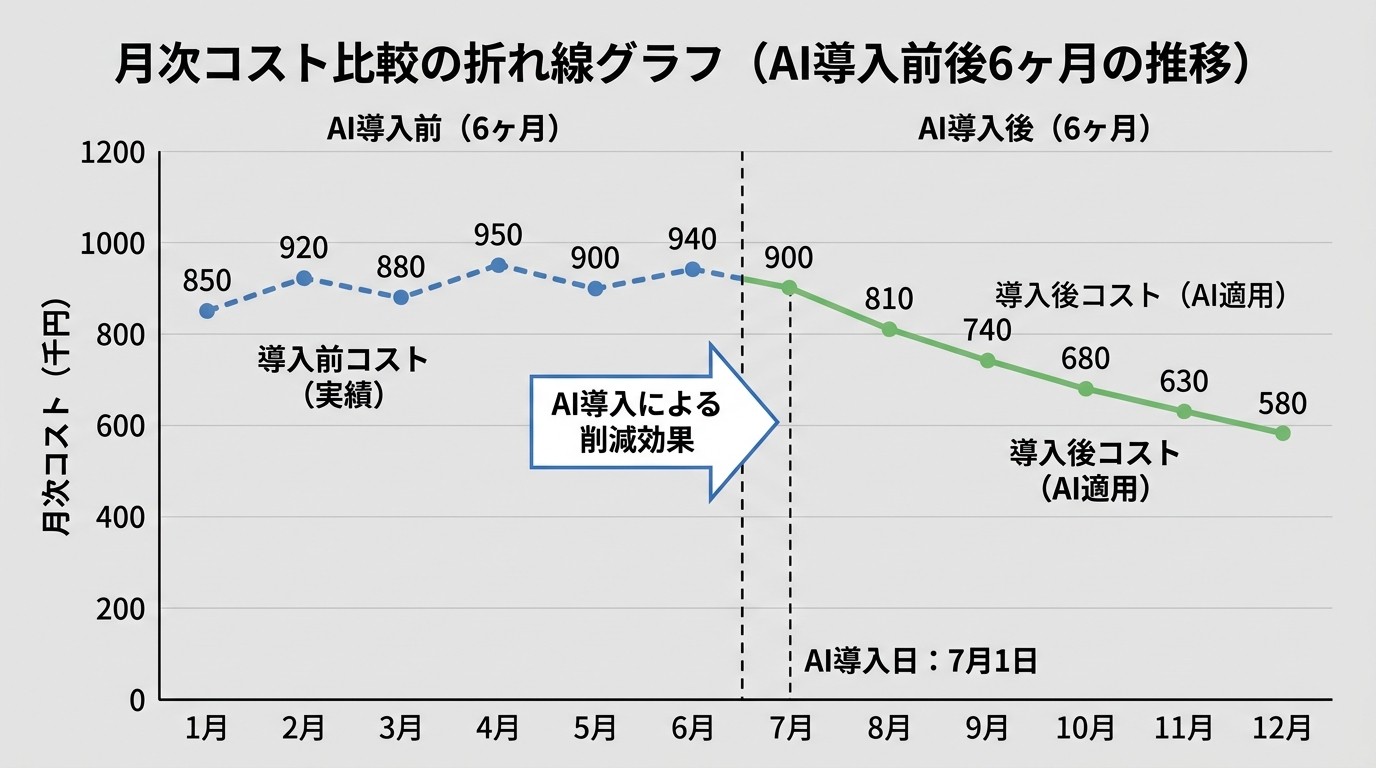
Monthly cost savings: $613. Annualized: roughly $7,356 (~¥1.1M) saved.
On top of that, I 2.5x’d my content output. Leads followed at 2.75x. Factoring in the revenue increase, the ROI is multiples of the investment.
A caveat I should mention: it took 2–3 months before the AI stack stabilized. Month 1 was mostly setup and trial and error — I actually had less time.
Don’t expect immediate results. Plan for break-even in 60–90 days.
Also, $87 is my stack configuration. Start with just Claude free and Canva free, and you can begin at $0/month. Zapier has a free plan too. Start at $0 to get a feel for it, then upgrade to paid plans when you think “I want more.”
You can start at zero and build up at your own pace.
Wrap-Up — What I Really Want You to Hear About “Starting at $75”
What I most wanted to convey in this article isn’t “build an AI stack.”
It’s this: “Your time is worth more than $75/month.”
A solopreneur’s time is finite. That 1 hour you’re losing to admin? It could’ve been an hour with a client. It could’ve been an hour designing a new service. It could’ve been an hour with your family.
The $75 AI stack is just a way to buy back that time. What you do with the bought-back time is up to you.
Here’s a recap of what I covered:
- 5 AI tools for $87/month: covers 80% of an $800–1,000/month VA’s work
- 3-step priority order: repetitive tasks → content creation → analysis & strategy sparring
- How you spend the saved time determines ROI: 3 patterns — revenue, learning, rest
- Common failure modes: subscribe-and-forget, switch-everything-at-once, copy-paste AI output
- You can start at $0: try free plans, upgrade after you feel the value
To anyone who says “I don’t know where to start”: build one Zapier free-plan automation for email notifications. That alone will give you the “oh, that’s all there is to it” moment.
If $75 feels expensive, start at $0. Claude free, Zapier free, Canva free — all completely free. Try those three for a month. If you think “I want more,” then consider paid plans. I did exactly that — ran on free versions for a month, confirmed “I want to keep this going,” then paid.
You don’t need to build the perfect stack from day one. Just “start using one thing today.” That alone puts you three months from now ahead of where you are now, guaranteed.
When I was a salaried employee, I thought “running a business solo is impossible.” But after starting a side hustle, the first time my voice reached someone on social media, the world changed. Now you have AI as your ally. The starting line is much further ahead than it was for me.
The ones who act win. I went first and got results, so I can say it: you’re up next.
References

女性だからこそ、AIを使いこなさなきゃって思ってる。仕事も、副業も、推し活も、旅行も、全部やりたい。人生一度きりなのに時間は足りないじゃん?だからAIに任せられることは全部任せる。浮いた時間で本当にやりたいことをやる。それがあたしのスタイル。ここにはあたしが実際にやったことをまとめてるだけ。誰かのためになったらいいなって思って書いてるよ。