"Five Tools Are Enough"—The Complete Blueprint for an $80/Month AI Distribution System
The implementation sequel to last month's 'Build the Media Before the Product.' I wrote out every concrete step for combining ChatGPT, Canva, Buffer, beehiiv, and Zapier within $80/month to run content production → distribution → automation in 3 hours a week.
What you'll learn in this article
- The key point to grasp before reading the full article
- How the issue changes practical decisions after reading
- Which follow-up article is worth opening next
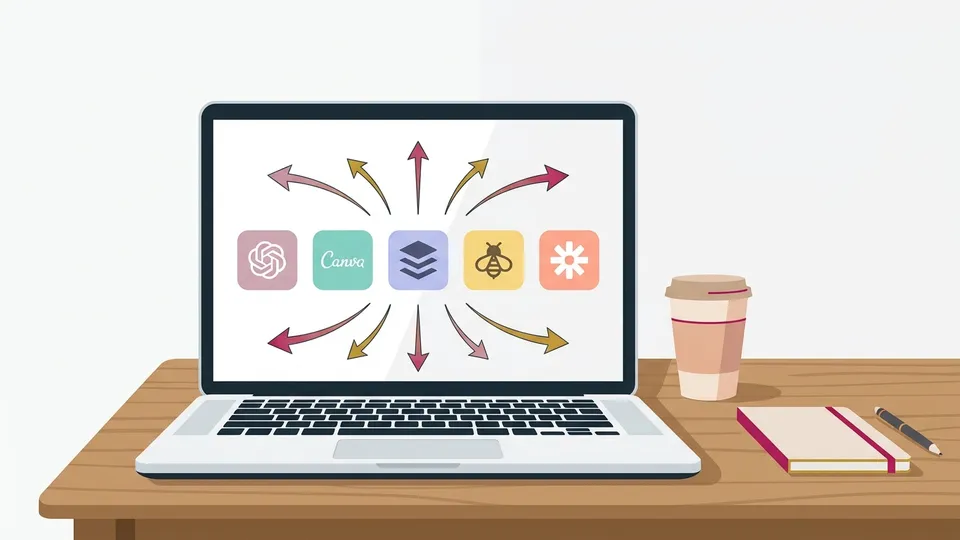
In my previous article, I wrote “build the media before the product.” I laid out the whole concept of Distribution First (the strategy of building your distribution mechanism first) and why it works for solopreneurs (people running a business alone) in 2026.
The most frequent reaction was this question:
“So, specifically, what tools should I use?”
I get it. You understand the concept. You want to take action. But there are too many tools, and you don’t know where to start. You’ve used ChatGPT. You’ve heard of Canva. But how do you combine them into “a system that runs a weekly newsletter and social media posts”? That part is invisible, so you can’t move.
This time I’m writing out the entire “implementation.” Only 5 tools. $80/month (about ¥12,000) is enough. It runs in 3 hours a week.
The 5 Tools I Chose and Why: A Breakdown That Fits Within $80/Month
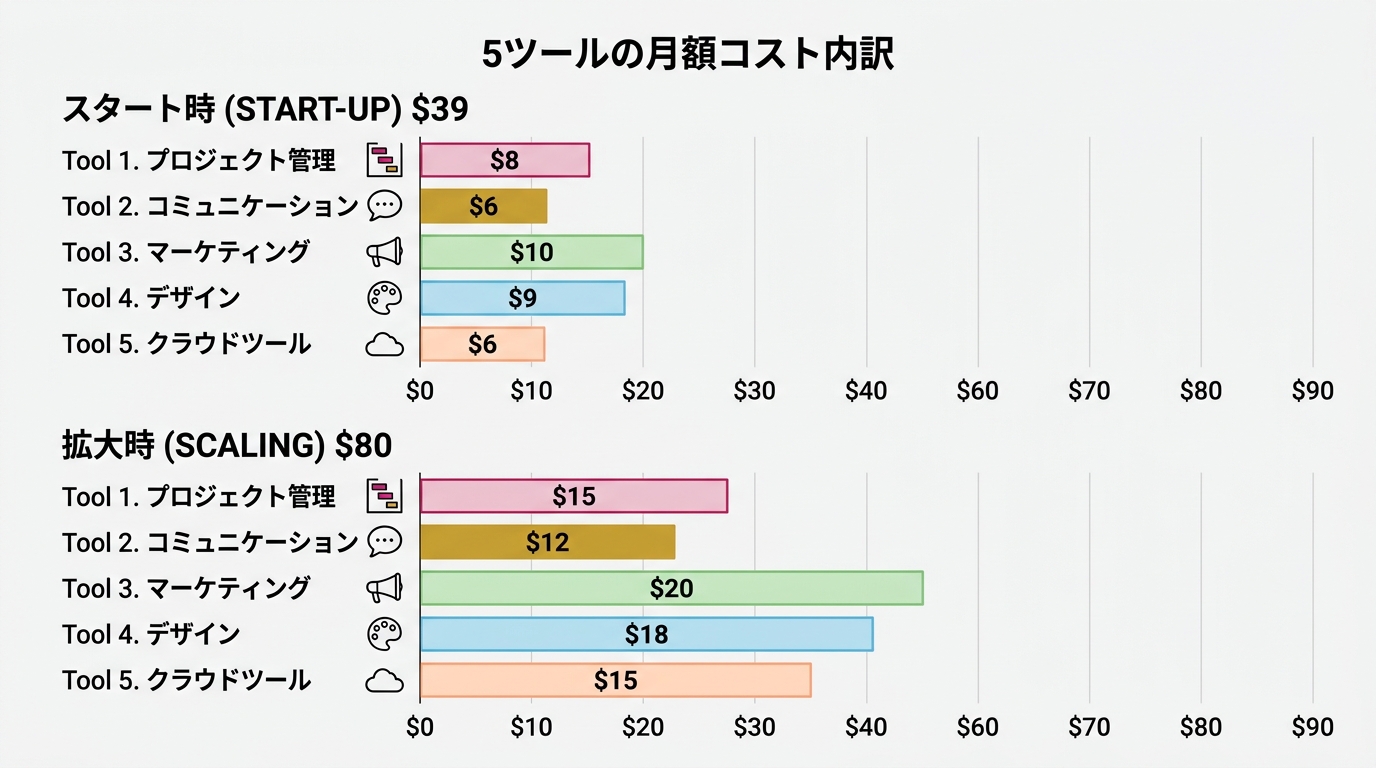
Bottom line: You can start from $39/month. Even as readers grow, the $80 ceiling is plenty.
First, the cost table. I’m writing out the exact combination I personally use.
| Tool | Role | Monthly | Notes |
|---|---|---|---|
| ChatGPT Plus | Ideation, structure, drafts | $20 | GPT-5 series models available |
| Canva Pro | Social images, newsletter headers | $10 | Annual plan at $120 (monthly is $15) |
| Buffer | Social scheduling, analytics | $0 | Free plan: 3 channels + AI Assistant |
| beehiiv | Newsletter delivery | $0 | Free up to 2,500 subscribers (Launch plan) |
| Zapier | Automation between tools | $0 | Free up to 100 tasks/month |
| Total | From $30 | Up to $80 max |
Let me explain “why these 5” one by one.
ChatGPT is my “thinking partner.” I delegate three things: ideation, outlining, and drafting. Adding Claude would make it $20 × 2 = $40/month, but one is enough at the start. I only bring in Claude when the research is deep.
Canva is my “stand-in designer.” With Magic Studio (its AI design feature), I drop text into a template and a social image is done in 5 minutes. Annual billing is $10/month. Monthly is $15, so I recommend annual.
Buffer is my “social post manager.” It schedules to Instagram, X (formerly Twitter), and LinkedIn in one operation. The free plan covers 3 channels plus AI Assistant (buffer.com). That’s enough at the start. If you want more channels, upgrade to Essentials ($6/channel/month).
beehiiv is the “home base for the newsletter.” Free up to 2,500 subscribers. This becomes the foundation of Distribution First. I covered why I push newsletters in the previous article: a medium that isn’t subject to algorithms and delivers directly to readers becomes an asset.
Zapier is the “glue between tools.” When a new subscriber signs up on beehiiv, it auto-logs to a spreadsheet. You can build that kind of integration without code. Free up to 100 tasks/month, which is plenty at the start.
Here’s the important thing. $80 is a ceiling, not a goal. Start at $30/month, and upgrade in stages as readers grow and you need to. There’s no need to pay for everything from day one.
Once you exceed 2,500 subscribers, move beehiiv to the Scale plan ($43/month). If you expand to 4+ social channels, upgrade to Buffer Essentials. Even then, around $80/month total. This ceiling gives you the “peace of mind that lets you keep going.”
Content Production Flow: From Ideation to Posting in 90 Minutes
Bottom line: The whole process takes 90 minutes. AI does 70%, you do 30%. What you handle is “perspective” and “experience.”
Here are the concrete steps. I’m publishing exactly what I do every week.
Step 1: Ideation (10 min)
Ask ChatGPT this:
“List 10 topics that thirty-something women considering going independent from a side hustle would probably care about this week. In the domains of business, career, money, and personal growth.”
When 10 come back, pick one where you think, “Ah, I can write this. I have the experience.” This is the fork in the road. If you let AI decide everything, you’ll end up with topics where you have “no reason to be the one writing it.” The rule: only pick topics where you have lived experience.
Step 2: Outlining (10 min)
Once the topic is set, have ChatGPT build the outline.
“Write a 1,500-character newsletter on this topic. Give me an outline with 4 headings. The reader is a thirty-something woman with side hustle experience. Use a friendly tone.”
Look at the outline that comes back, rearrange the order, and rewrite headings in your own voice. This part also takes 5 minutes.
Let me show what an actual output looks like. When I entered “How to gather 1,000 social media followers as a side hustle” as the topic, ChatGPT gave me this outline:
- The real reason “your followers aren’t growing”
- How to gather the first 100 people
- The post design that breaks through the 100→500 wall
- 500→1,000 comes down to “consistency of theme”
I looked at it and felt “I want to flip #2 and #3” and “I want to insert my own failure story into #4.” That’s fine. Use the AI outline as a “draft to work from.” The act of editing it to make it your own is the essence of co-working with AI.

Step 3: Drafting (20 min)
Have AI draft based on the outline. But “write the whole thing” is forbidden. Give instructions section by section.
“For the first heading, write it with this lived experience folded in. Tone is casual and assertive. Each sentence under 50 characters.”
When you have it generate section by section, it’s easier to revise. If you have it dump the whole thing at once, when the tone drifts, you have to rewrite everything.
Step 4: Rewrite in Your Own Voice (30 min)
This is the most important step. Don’t skip it.
Read the AI draft and rewrite every place where you think, “I wouldn’t say it like that.” Add your lived experience. Drop in specific numbers. Slip in your own verbal habits—phrases like “honestly” or “for real.”
What readers follow isn’t “polished AI-generated text.” People gather around “writing that only this person could have written.” In the previous article I cited Justin Welsh. Anne-Laure Le Cunff is another. The reason both succeeded isn’t “because they used AI” but “because they had their own perspective.”
People who skip this step are almost exactly the same population as those who say, “I started publishing with AI but couldn’t keep it up.” The bigger reason readers leave isn’t “the posting frequency dropped” but the far more serious “the content reads like anyone could have written it.”
Step 5: Image Creation (10 min)
Make the social image in Canva. The best approach: pick one template and just swap the text.
My rule is “one image per post, text under 20 characters.” Images stuffed with information can’t be read on a phone. Narrow what you want to convey to one thing. If you prepare three patterns of background color and font, you don’t have to think every time.
Step 6: Schedule the Posts (10 min)
Schedule the newsletter through beehiiv. Summarize the same content and batch-schedule it to 3 social platforms via Buffer. Design it so one piece of content reaches 3 distribution points (details in the next section).
Total: about 90 minutes. With practice it drops to 70 minutes. For one post a week, that’s a pace you can absolutely sustain.
Distribution Automation: A Setup Where Writing One Piece Reaches Three Places
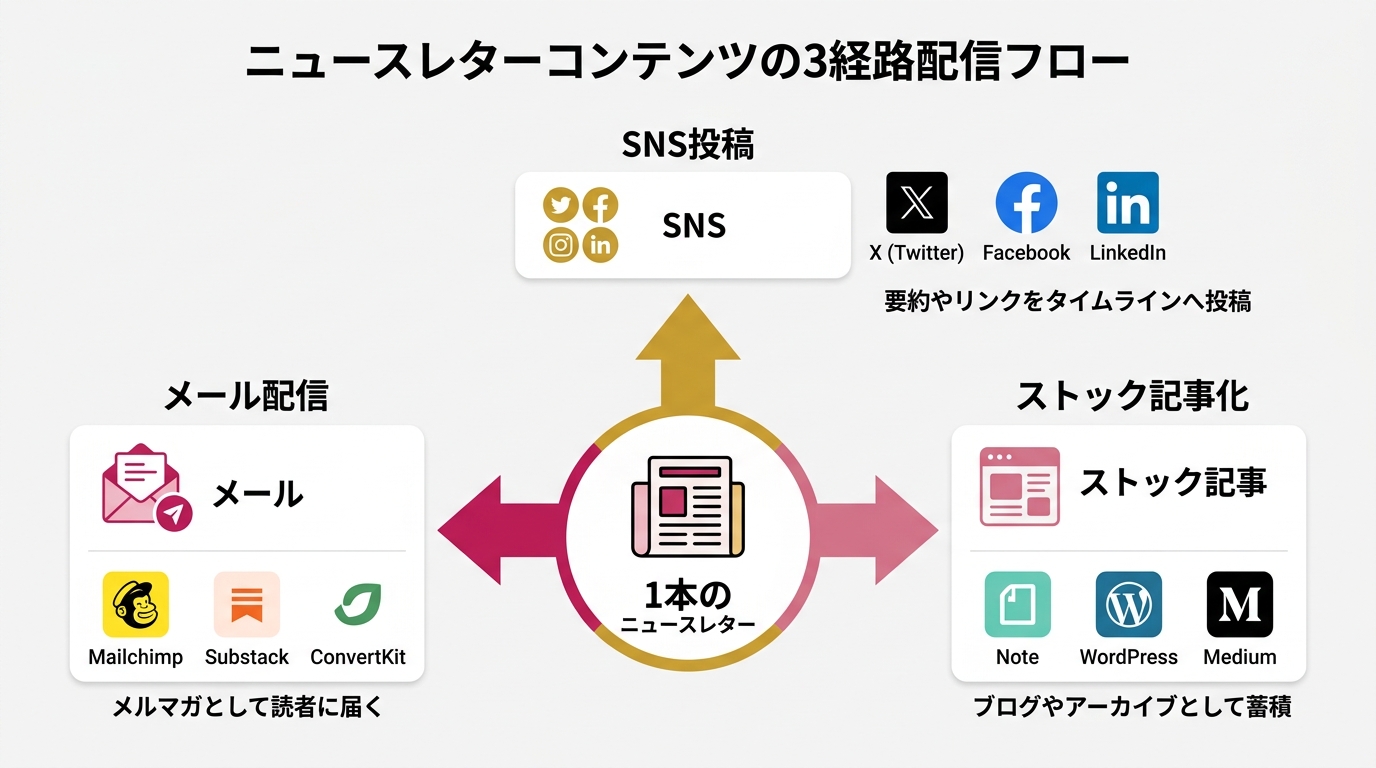
Bottom line: If you design three paths—newsletter → social → evergreen article—one piece of work generates 3x the touchpoints.
“One a week is already all I can handle”—you might think that. Actually, you can design things so one piece automatically lands in three places.
Path 1: Newsletter (beehiiv) → Reader Inbox
This is the main channel. Send on the same day and time every week. Mine is Tuesday at 7 a.m. The trick is “becoming part of the reader’s routine”—locking in the day and time stabilizes the open rate.
Even on beehiiv’s free plan, you can run A/B tests (a feature that auto-picks the higher-opening of two subject lines you write). When you’re torn on a subject line, just enter both and let beehiiv decide.
Path 2: Social (via Buffer) → Follower Timelines
Summarize the newsletter’s key points in 3 lines and post via Buffer. Change the format per platform.
- X (formerly Twitter): One-line hook + link. “Did you know XX? I wrote about it in detail in the newsletter → link”
- Instagram: Carousel post (a format readers swipe through). Drop into a Canva template
- LinkedIn: A short 500-character post. Rewrite in a more business-oriented tone
Building these from zero every time is exhausting. Make a template once and you only swap the text. Batch-schedule all three platforms inside Buffer and it’s done in 10 minutes.
Path 3: Evergreen Article (note or a blog) → Search Traffic
Lightly edit the newsletter content and publish it as an “evergreen article” on note or WordPress. The newsletter peaks the moment you send it; the evergreen article keeps being read six months later via search engines.
“Is it okay to recycle the same content?” you may wonder. It’s fine. Newsletter readers and note readers barely overlap. Newsletters go through email; note goes through search and social. Different entry points mean the same content still has value.
The Glue: Zapier
Set up only 2 things in Zapier.
- New beehiiv subscriber → log to Google Sheets (auto-track subscriber growth over time)
- beehiiv article published → notify Slack (a reminder to yourself; use it as the cue to post on social)
Save advanced automation for later. These two are enough at the start. The piece “when published on beehiiv, auto-schedule social posts via Buffer” is better done manually—the quality stays more consistent. Social text auto-generated from articles tends to come out unnatural.
What “People Who Can’t Stick With It” Are Missing: Decide This Before Tools
Bottom line: Tools are means. People who start without deciding “whose what problem do I answer?” drop out first.
I’ve laid out specific tools and steps so far. But honestly? The choice of tools makes almost no difference. ChatGPT, Claude, Gemini—any of them work. You can use Figma instead of Canva.
What makes the difference is “what you decided before the tools.”
As I wrote in the previous article, the starting point of Distribution First is writing in one line: “whose what problem do I answer?” People who start without resolving this hit “I don’t know what to write” by week 3. The tools are ready. The time is carved out. But their hands stop. The cause: the topic definition was too loose.
Let me give my own example. My one-line declaration is “I teach thirty-something women considering going independent from a side hustle the methods I actually used.” Because that’s locked in, I never run out of ideas. I can just write “what I did this week,” “the data I recently read,” “things I failed at.” The topic lives inside me, so I don’t have to look outside for material.
Other examples. “Deliver the reality from people who actually relocated to corporate employees considering rural relocation” works. “Teach engineers on parental leave how to keep their skills sharp” works too. The fork is whether you can write a one-liner where readers feel “this is about me.”
One more thing that matters for sticking with it. Build a system that “doesn’t aim for perfection.”
If you try to push one newsletter’s quality close to 100, production time goes from 3 hours to 6. Then the next week you start thinking, “Last week was so much work, I don’t want to do this.” Ship at 80. Keep going every week. That’s the right answer.
Many solopreneurs who’ve mastered AI feel they “scaled without hiring.” The reason is simple: AI handled repetitive work, so they could focus on the “thinking work” and “writing work.” They grew the business without hiring costs or management overhead.
What I want to convey in this article isn’t “this tool is amazing.” Tools get swapped out. Something better may come out next year. What doesn’t change is the structure of “delivering your topic in your voice, consistently.” The fact that you can implement that within $80/month is the situation of 2026.
Here’s official beehiiv data. According to “The State of Newsletters 2026” (beehiiv.com), the median time to first revenue is 66 days. A little over two months until your first dollar. Whether you can survive those 66 days with a “system that keeps you going” is what divides everything.
Here’s a three-month roadmap.
- Month 1: Establish the once-a-week newsletter cadence. Aim for 0 → 50 subscribers. The phase where you let the tools become muscle memory
- Month 2: Increase Buffer × Canva visual posts to twice a week. Aim for 50 → 150 subscribers. The phase where the distribution routine stabilizes
- Month 3: Set up your first automation in Zapier. The timing when the first signs of revenue start emerging through the newsletter
Even if you almost give up in month 1, you can still make it back in month 2. The “first revenue in 66 days” median is showing you the view that everyone who keeps going eventually reaches.
The 5-tools × 90-minute flow I wrote about is one implementation example of that “system that keeps you going.” You can swap the tools. Adjust the time allocation to your own rhythm. The backbone is “delegate 70% to AI, layer your voice on top of 30%.” Hold that ratio and once-a-week stops feeling like a burden.
Wrap-up: “I Don’t Know How” Is No Longer an Excuse
In the previous article, I wrote “why you build the media first.” This time I explained “how to build it” with everything bundled in. As the second installment in the Distribution First Practice series, I built it to be a bridge from concept to implementation.
Let me organize it.
- Five tools are enough. ChatGPT, Canva, Buffer, beehiiv, Zapier. Runs on $39–$80/month
- Production takes 90 minutes. Ideation 10 min, outline 10 min, draft 20 min, rewrite 30 min, image 10 min, schedule 10 min
- Write once, land in three places. Design three paths: newsletter → social → evergreen article
- Decide your topic before the tools. Without a one-line declaration of “whose what problem do I answer,” your hands stop within 3 weeks
Justin Welsh, whom I introduced in the previous article, exceeded $1.5M in annual income with just LinkedIn and a newsletter. Anne-Laure Le Cunff is one of the people who delivered 400 free articles first, then shifted her community to a paid model. What both of them did was simple, and they used few tools. What mattered wasn’t the number of tools but the “design that lets you keep going.”
When I was a corporate employee, every day was “I raise my voice and it gets washed away.” I still remember the moment my own words first reached someone on social. I want you to feel that. Now that AI exists, you can start much faster than I did back then.
“I don’t know how” can no longer be your excuse. Now that you’ve finished this page, you have the blueprint. Five tools, six-step flow, three distribution paths. With just this, you can start.
Next time I plan to write “what to do after you have 100 readers.” It’ll cover concrete tactics from zero to 100, and the monetization steps once you cross 100. The trilogy—concept (3/24) → implementation (this one) → monetization (next)—the final chapter will be the most practical.
You can start at $80/month. You can run it in 90 minutes a week. If you can state your topic in one line, try writing your first piece this week.
Reference sources
- beehiiv “The State of Newsletters 2026” (beehiiv.com)
- Official pricing pages for each tool: ChatGPT / Canva / Buffer / beehiiv / Zapier
- Previous article: “Build the Media Before the Product. The Reverse Strategy for the 29.8 Million-Solopreneur Era” (internal link)

女性だからこそ、AIを使いこなさなきゃって思ってる。仕事も、副業も、推し活も、旅行も、全部やりたい。人生一度きりなのに時間は足りないじゃん?だからAIに任せられることは全部任せる。浮いた時間で本当にやりたいことをやる。それがあたしのスタイル。ここにはあたしが実際にやったことをまとめてるだけ。誰かのためになったらいいなって思って書いてるよ。