44 Hidden Features Were Lurking in Claude Code. I Picked the 3 You Can Actually Use This Year from 500K Lines of Leaked Code
44 hidden features were lurking in Claude Code. From 500,000 lines of leaked source, here are the three you can actually use this year.
What you'll learn in this article
- Where pricing and adoption questions around Claude Code stand right now
- Which plan or rollout stage fits the reader's situation
- Which follow-up article to open next for setup, cost, or bigger-picture context

Five hundred thousand lines of source code were exposed to the world.
On March 31, 2026, the internal code of “Claude Code,” an AI tool developed by Anthropic, was accidentally bundled into an npm package. Within hours, thousands of developers had picked through it, and 44 “feature flags” were discovered.
Feature flags are “on/off switches for features not yet released to the public” embedded in software. Always-on agents, multi-agent orchestration, scheduled execution. The contents range widely—from things that sound exciting just by name, to virtual pets you can keep in your terminal (18 species of them).
When there are 44 of them, it’s easy to panic and think “I have to know all of them or I’ll fall behind.”
Let me get to the point. There are three features that an individual marketer or businessperson is likely to actually use within this year. In this article, I’ll pick out only “the 3 that matter to your work” from those 44, and explain why you should keep an eye on them.
If you read this together with the previous article “The Graduation Line for AI Agent Experiments,” your preparation for what’s coming should become much more concrete.
The Day 500,000 Lines of Source Code Got “Accidentally” Published
On March 31, 2026, version 2.1.88 of Claude Code, which Anthropic had published to the npm registry, accidentally included internal debug source map files (59.8 MB) (Axios, March 31, 2026).
Source maps are something like the development blueprints behind the production code. They aren’t supposed to leave the company.
Anthropic’s official statement was clear: “This was caused by a release packaging error, not a security breach. No customer data or credentials were included” (VentureBeat).
Within hours, thousands of people on GitHub were analyzing the code. From around 512,000 lines of TypeScript, 44 feature flags were discovered one after another (The New Stack).
This article won’t deal with “whether the leak was right or wrong.” What’s interesting is the contents. Let’s decode “Claude’s next move” that these 44 unreleased features tell us.
For the record, the information here is based on the public source maps about which Anthropic issued an official statement. That said, unreleased feature specifications may change without notice. Please keep that in mind as you read on.
VentureBeat has also analyzed the security risks of the leaked code, pointing out three attack paths (VentureBeat Security Analysis). The security angle is important, but this article focuses on the features.
What’s Inside the 44 Feature Flags—From UI Tweaks to Autonomous Agents
To restate, a Feature Flag is an “on/off switch” embedded in software. Development teams use them when they want to include new features in the code but not yet show them to users. The moment the switch is flipped on, the feature becomes active.
If we roughly categorize Claude Code’s 44 flags, here’s what we get.
Category A: UI & Telemetry (about 20)
These relate to fine-tuning display and collecting usage data. They include things like dark mode toggles and changes to how operation logs are captured. Few of them directly affect users’ work; most are aimed at internal improvements for the dev team.
Category B: Agent Foundation (about 10)
This is the core of what’s going on. Names like KAIROS (always-on daemon), COORDINATOR (multi-agent orchestration), and BUDDY (interactive pair programming) line up here. The foundation for evolving Claude Code from “an AI that comes when called” into “an AI that’s always running” is already complete at the code level.
Category C: Scheduling (about 5)
cron (time-based automated execution), Webhook (external triggers), and ULTRAPLAN (multi-agent planning session). These are mechanisms for automated task execution triggered by time or external events.
Category D: Other (about 9)
Terminal pets (18 kinds of virtual pets that take up residence in your terminal), Playwright integration for browser control, voice command mode. A mix from playful to experimental.
You don’t need to chase all 44. The only ones relevant to your work are a subset of Categories B and C.
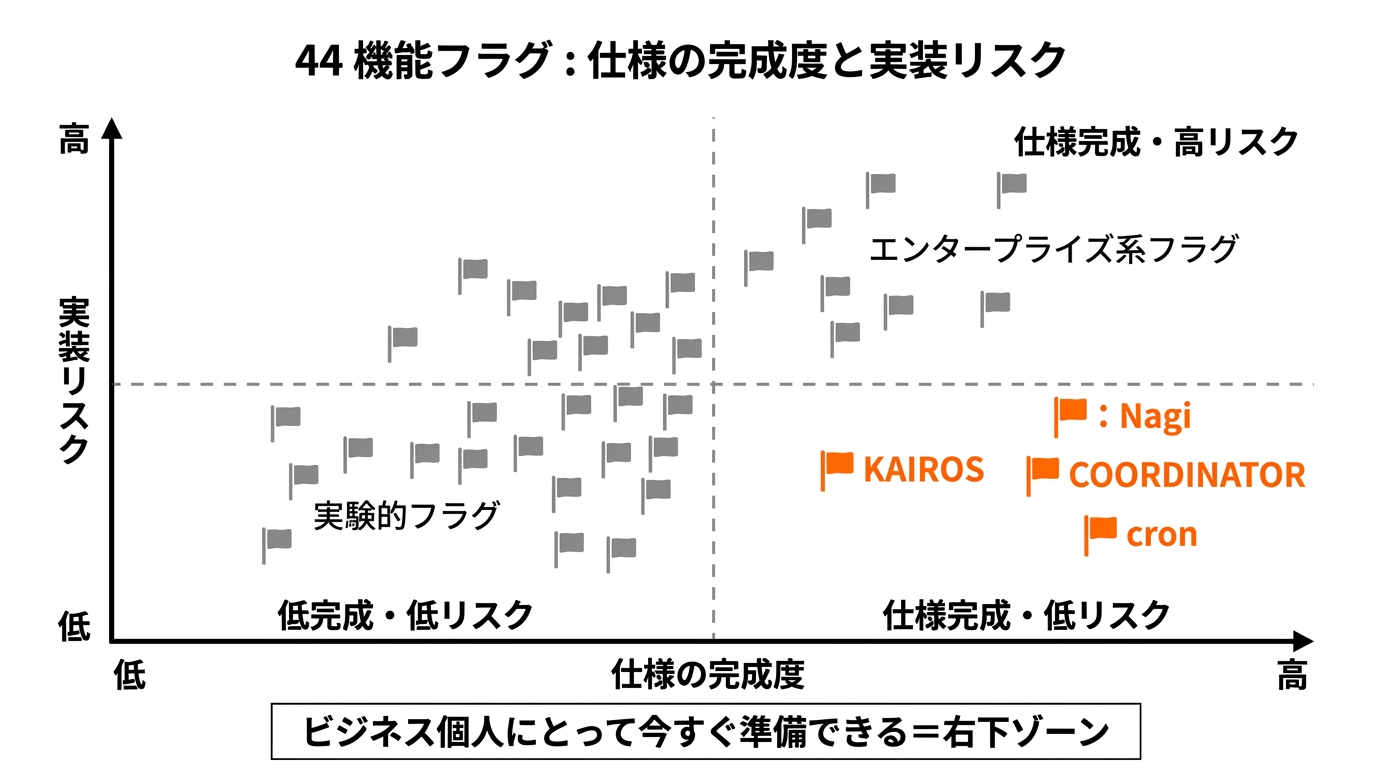
The 3 Features That Will “Change Your Work” This Year
I picked 3 out of 44. The criterion is simple: “Is there a high chance a non-engineer individual could use this in business within the year?”
KAIROS — The AI That’s Always Watching
KAIROS is Greek for “the right time.” This flag, which appears more than 150 times in the code, is a daemon mode (a resident program) that keeps Claude Code running in the background at all times (Deep Learning AI).
When KAIROS is enabled, Claude Code becomes a resident background process. It periodically receives a <tick> prompt (something like a heartbeat) and autonomously decides, “Is there anything I should do right now?” If there’s nothing to do, it waits quietly; if there is, it starts moving on its own.
The key point is the 15-second blocking budget. When KAIROS executes something, the time it can stop your work is capped at 15 seconds. The design is “it’s working away in the background, but it won’t get in the way of your foreground work” (Deep Learning AI detailed explanation).
Daily logs are designed to accumulate in append-only files, making it easy to check later “what the agent actually did.” This is an essential element for building trust.
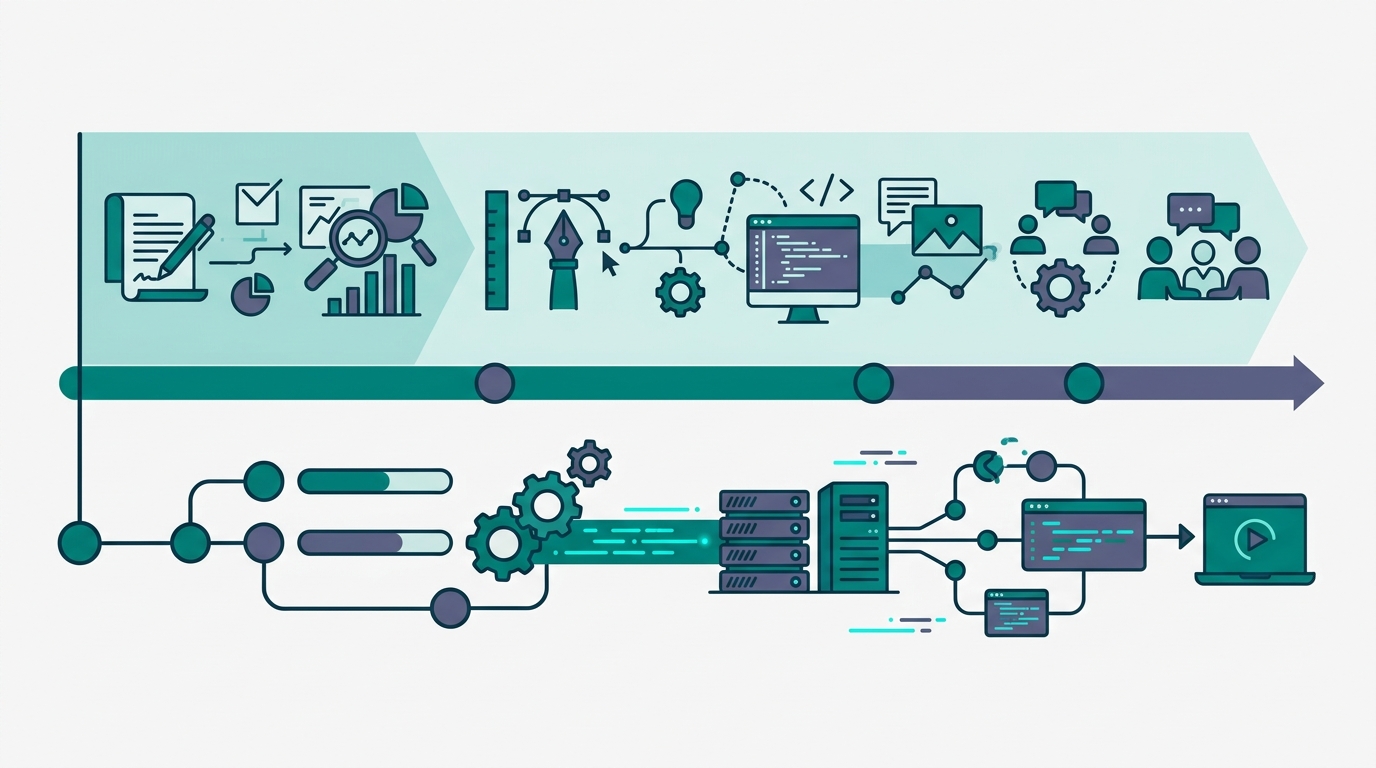
The autonomous agent system I’m running right now is built on exactly this concept. The agent advances research and quality checks in the background, and when I wake up in the morning, the reports are ready. If KAIROS ships in an official release, the same experience will become possible with Claude Code alone.
Say you’re running an e-commerce site. You leave Claude Code with KAIROS enabled running in the background. When a product review is posted, it does sentiment analysis and produces a summary; when inventory drops below a threshold, it raises an alert; it monitors competitor price changes and compiles them into a daily report. Even when you’re not at your desk, this “watching” continues.
Work Suited for KAIROS: 3 Types You Can Check Right Now
| Type | Specific work | Effect |
|---|---|---|
| Monitoring | Review collection, competitor checks, inventory monitoring | Zero misses, faster response |
| Recurring aggregation | Daily sales, social media performance, inquiry counts | Zero time spent on manual aggregation |
| Alert notifications | Threshold breaches, anomaly detection, deadline management | The agent catches things before a human notices |
In the previous “graduation line” article, I listed Condition 1: “You have repetitive tasks taking 5+ hours per week.” With KAIROS’s arrival, much of the work meeting this condition becomes a candidate for automation. People who couldn’t break the 5-hour barrier with “an AI that comes when called” have a strong chance of breaking through with “an AI that’s always watching.”
Multi-Agent Coordinator — One Person, a Whole “Team”
COORDINATOR is a feature in which a single Claude Code instance spawns and manages multiple worker agents. Internally it’s called “swarms,” controlled by a flag called tengu_amber_flint (The New Stack).
The mechanism is a mailbox system. The parent agent splits up tasks and distributes them to child agents. Each child agent operates independently with a restricted toolset and reports results back to the parent.
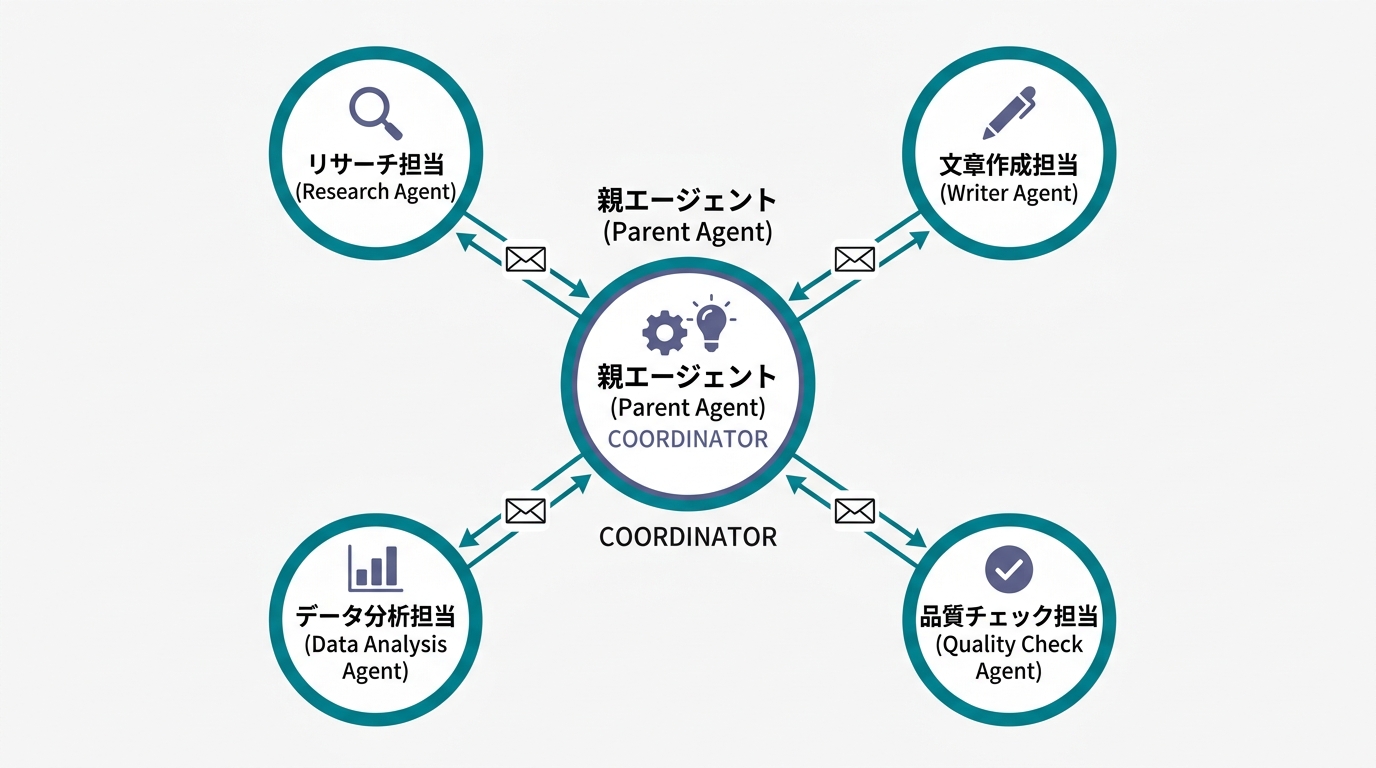
What this means is technical backing for “one person doing the work of five.” A research lead, a writing lead, a data analysis lead, a quality check lead. Being able to run agents with their own specializations simultaneously, all within Claude Code, becomes possible.
Even today, you can spawn sub-agents using Claude Code’s “Agent” feature. COORDINATOR refines this further. Task distribution, progress monitoring, and result integration are all designed to be managed through a single mechanism.
Work Suited for COORDINATOR: 3 Parallelizable Task Picks
| Role | Tasks to delegate | The “one person → team” shift |
|---|---|---|
| Research | 5 themes investigated in parallel, competitive analysis, market data collection | Research time cut to 1/5 |
| Content | Draft articles, social posts, email copy | High volume while maintaining quality |
| QA | Typo checks, fact-checking, legal risk scans | Zero misses |
Picture this. On Monday morning, you give one instruction: “Research for this week’s five articles.” Five workers immediately start parallel research, each on a different topic. By the time you finish your coffee, all five research reports are ready. That’s the world on the other side of COORDINATOR.
As Mikoto’s “10x Founder” article points out, the number of founders running businesses solo is rising. COORDINATOR could become a technical foundation supporting that kind of “solo business” from the engineering side.
Scheduled Execution (cron + Webhook) — “Friday 5 PM Report” Runs from a Setting Alone
The combination of cron and Webhook may look unassuming, but it might have the biggest impact of all.
cron is a mechanism for automatically running tasks at set times. “Gather data and write a report at 5 PM every Friday” becomes possible with just a configuration. Webhook is a trigger that starts processing when an external service sends a notification. “When an email arrives, summarize it and forward to Slack” becomes possible.
When combined with KAIROS, this is no longer just automation—it’s a secretary. It moves on schedule, responds to external events, and reports results. And it doesn’t sleep.
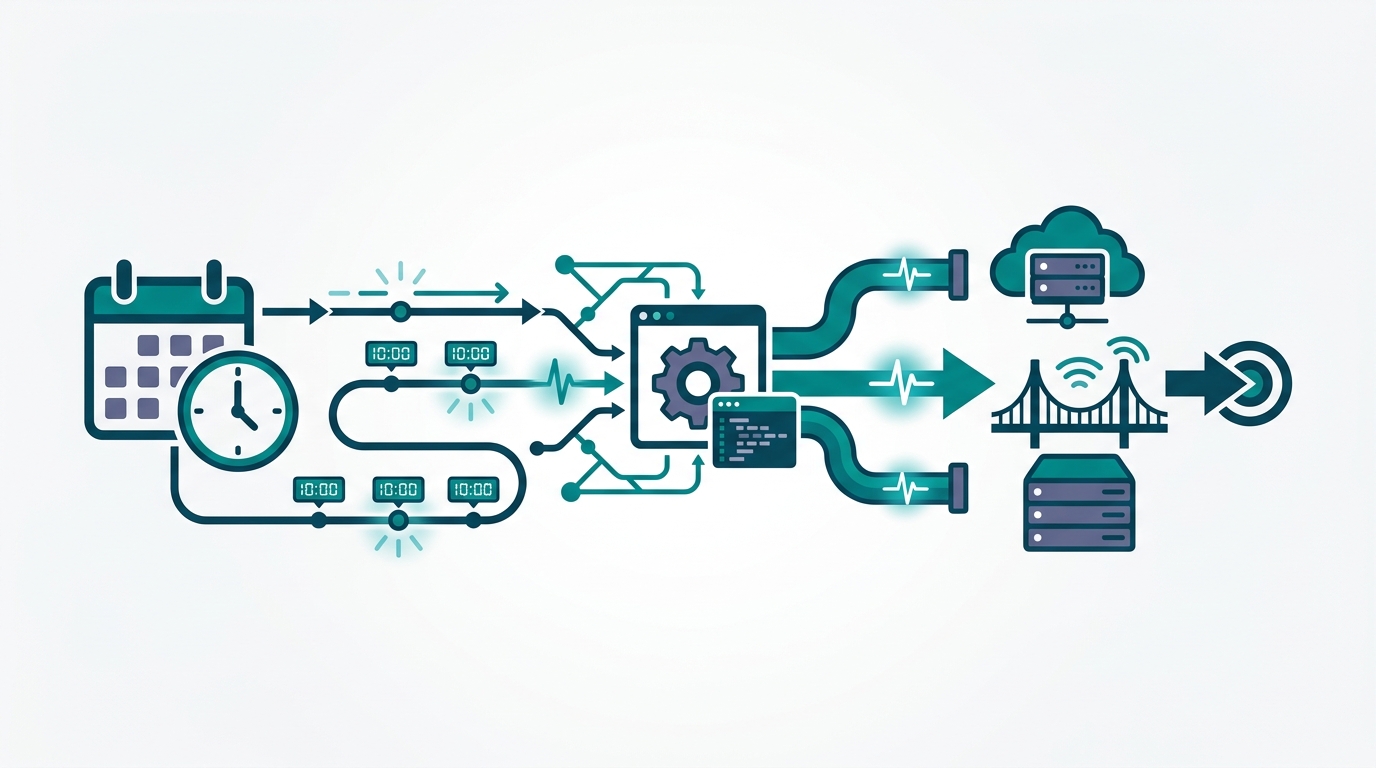
Here are a few specific use cases.
- 7 AM daily: Collect industry news, summarize only the items relevant to your business, and post to Slack
- 5 PM every Friday: Aggregate the week’s social media performance and produce a report suggesting next week’s improvements
- On email receipt: Auto-classify the content of inquiry emails, draft a reply, and put it into a review queue
- On GitHub PR creation: Run a first-pass code review and post comments if there are issues
Until now, AI could only move “when you’re in front of the screen.” Now it can keep moving “while you sleep.” Once you actually use it, the difference is surprisingly large.
This feature directly addresses Condition 2: “Trigger data is digitized” from the previous “graduation line” article. If trigger design can be completed entirely with Claude Code settings, the barrier to adoption drops dramatically.
A related flag called ULTRAPLAN is also interesting. It’s a mechanism where multiple agents deliberate on strategic decisions during a structured 10–30 minute planning window (WaveSpeed AI). Not real-time coding, but a session for working out medium- to long-term direction. This idea is close to the decision-making meetings I run daily, which I call “Kamukura.”
Why You Can Ignore the Other 41 for Now
Picking 3 out of 44 means it’s fine to put the other 41 on the back burner.
There are three reasons.
Enterprise features make up the majority. Detailed telemetry settings, role-based access control, structured audit logs. These are features that IT departments with hundreds or thousands of people need. They’re for internal compliance and security teams to track “who did what, when.” For someone running a business solo, they aren’t relevant right now. Checking back when your business scales up is plenty.
“Fun” doesn’t equal “useful.” Terminal pets (18 species of virtual pet that live in your terminal) made a splash. Visually fun. But ask yourself whether they’ll change your business’s revenue, and the answer is no.
Filtering through the flood of information is the user’s job. Try to investigate all 44 features and you’ll burn half a day. New information rains down on the AI industry every day. Chase all of it, and the work you should be doing gets postponed.
Being able to pick out “the 3 I need” is the dividing line between people who use AI well and people who drown in information.
I myself spent three hours trying to read all of it the day Claude Code’s source code went public. Partway through, I realized: “This isn’t information to read—it’s information to extract only the parts I need to use.” I switched my approach. The result is the “3 out of 44” filter you’re reading.
The ability to filter information is one of the most important skills in the AI era. As the volume of AI-generated information explodes, “what to discard” becomes the deciding factor in outcomes.
The “Always-On” Big Picture That Conway Brings Together
The three features I introduced—KAIROS, COORDINATOR, cron + Webhook. The platform that integrates all of them is “Conway,” currently being internally tested by Anthropic (Dataconomy, April 3, 2026).
Conway isn’t a standalone AI tool. It’s more like a “home” for Claude Code to operate from at all times. As a browser sidebar, or as a background process, it provides an environment that keeps running 24 hours a day.
What deserves attention is the extension format called CNW ZIP (TechBriefly, April 3, 2026). It’s a mechanism that lets developers create custom tools, UI tabs, and context handlers and add them to Conway—an idea close to a smartphone app store.
If this mechanism catches on, what happens? An era arrives where “an agent specialized for my business” is built by someone else. Real estate, restaurants, freelancers—if industry-specific agent extensions emerge, the adoption barrier drops further.
When the iPhone launched, what fueled its explosive spread wasn’t just the hardware features—it was the App Store ecosystem. CNW ZIP could play the same role. You no longer need to “design your own agent.” You can “just pick the extension that fits your industry and install it,” and reap the benefits of always-on operation.
On Conway’s Expected Official Release
Conway is currently in “internal test deployment” (Dataconomy, April 3, 2026). The official release date has not been announced by Anthropic.
That said, organizing the basis for judgment, “within this year” seems reasonable. There are three reasons. The implementation in the source code is concretely complete across all 44 flags. The previous “Conway test deployment” reporting (April 3, 2026) indicated real user testing has begun. And Anthropic has positioned “always-on agents” as its top development theme since the start of the year.
“Wait for the official announcement before moving” means you’ll leave the starting line after early movers have finished their preparations. Looking back at the three conditions from the previous “graduation line” article, if Conway is officially released, clearing Condition 2 (digitizing triggers) and Condition 3 (start from low-risk work) becomes far easier. Now is the time to start preparing.
Which Feature Suits Your Tasks—A 3-Way Adoption Decision Table
Let me organize the 3 features by “what kind of work they’re suited for.” Before reading the summary, try mapping your own work onto it.
| Decision axis | KAIROS | COORDINATOR | cron + Webhook |
|---|---|---|---|
| Task nature | Continuous monitoring & watching | Large tasks that split & parallelize | Routine handling triggered by time/events |
| Execution timing | Constantly in the background | Summoned when needed | Set times, external triggers |
| Good fits | Competitor monitoring, anomaly detection | Bulk research, content production | Weekly reports, automated email response |
| Question you can ask yourself now | ”Is there something I check every day?" | "Do I get 3+ similar tasks at once?" | "Is there a process I run on a fixed day/time?” |
If you have 5+ hours of repetitive tasks per week, use this table to check which one fits. If all three apply, you’ll be able to migrate all at once the moment Conway arrives.
Summary—Lock Down 3 Out of 44 and You’re Ready
The 500,000-line source code leak was an accident. But the direction of Claude Code’s evolution that came into view through it is, you could say, inevitable.
Of the 44 unreleased features, these 3 have the highest chance of affecting your work this year.
- KAIROS: A daemon mode that runs continuously in the background and acts autonomously at the right moment
- Multi-agent Coordinator: A mechanism for one Claude Code instance to spawn and orchestrate multiple workers
- Scheduled Execution (cron + Webhook): A feature that triggers automated task processing from time and external events
When these three are officially released, the people who benefit the most will be those who are “already prepared.”
Preparation isn’t complicated. Check the three conditions from the previous “graduation line” article, and use the decision table above to identify which one your repetitive tasks fit. Just doing that will let you move the day the new features arrive.
Forget 41 out of the 44. Remembering just 3 is enough.
The future of AI changes every day. What you should do does not. Don’t stop at researching—move your hands. What the leaked code told us is the fact that Anthropic is seriously trying to build a world of “always-on agents.”
Let’s start preparing before that world arrives.
For more on the reality that “the number of people running businesses solo is rising,” Mikoto’s article “10x Founder and the Subtraction Map” is a useful reference. Before “adding” AI agents, decide “what to stop doing.” Once this mindset is paired with the rest, you can maximize the benefits of always-on.
Sources
- Axios: Anthropic Source Code Leak Coverage (March 31, 2026)
- VentureBeat: Details on the Claude Code Source Code Leak (March 2026)
- VentureBeat: Security Analysis & Three Attack Paths
- The New Stack: Technical Analysis of the 44 Feature Flags
- Deep Learning AI: KAIROS / autoDream Explainer & Details on the 15-Second Blocking Budget
- WaveSpeed AI: BUDDY, KAIROS, and a Full List of Hidden Features
- Dataconomy: Anthropic Conway Test Deployment (April 3, 2026)
- TechBriefly: Conway Extensions and Webhook Support (April 3, 2026)

AIを使いこなせない方は、この先どんどん差がつきます。僕はAIエージェントを毎日動かして、壊して、直して、また動かしてます。そういう泥臭い実践の記録をここに書いてます。理論は他の方にお任せしました。僕は動くものを作ります。朝5時に起きてウォーキングしてからコードを書くのがルーティンです。