Anthropic Just Handed 15 AI Agents to Small Businesses. Here's How to Pick the First One That Replaces Your Late-Night Work
Claude for Small Business launched 5/13. Dissecting 15 workflows × 7 connectors and a framework to identify which one to deploy this week.
What you'll learn in this article
- What AI agents mean in plain language and why the term matters now
- Which real-world workflow patterns are already becoming practical
- Which next article deepens pricing, rollout, or implementation context
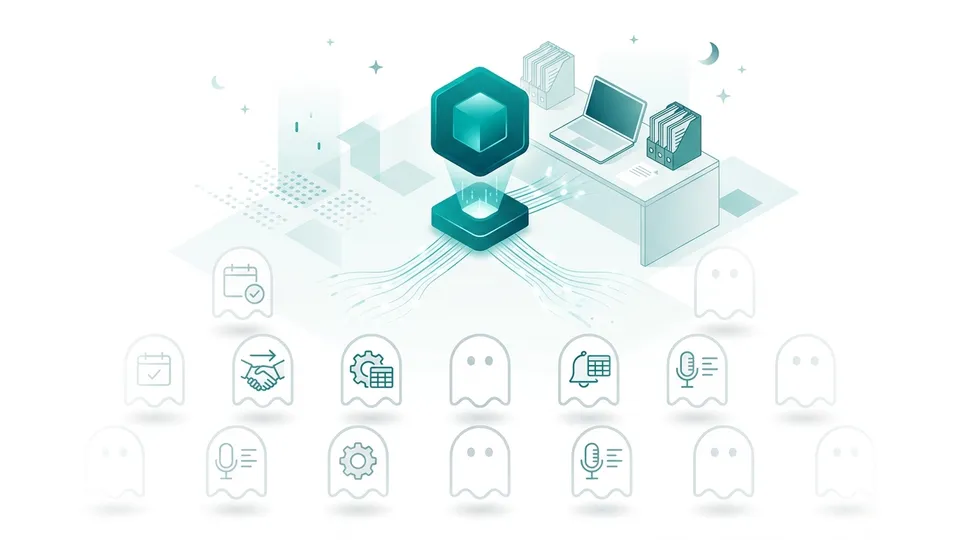
Small business owners and managers don’t get to their own work until after 10 PM. Payroll calculations, invoice follow-ups, next week’s campaign prep — the time burned during the day on customer service and floor operations gets reclaimed at night. That’s the daily reality.
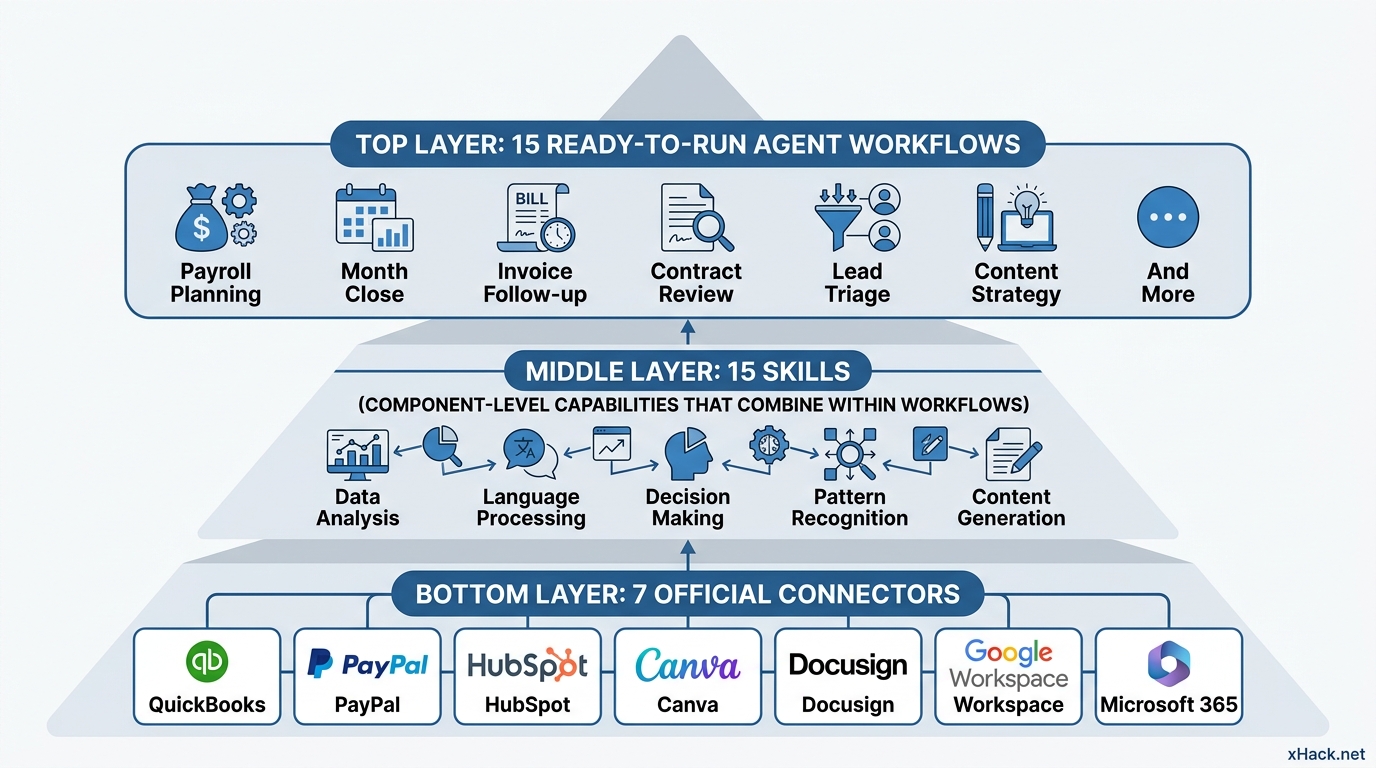
Anthropic’s “Claude for Small Business,” announced May 13, 2026, is designed to take over that late-night overtime. The announcement delivers 15 workflows, 15 skills, and connections to 7 business tools in a single package.
The problem: reading the announcement still leaves you wondering, “Which one actually works for my company?” Plenty of speed-reporting outlets covered the list of 15 agents — none of them explained how to apply it to your specific operations. This article gives you a framework to make that call in 5 minutes, organized into a business-domain map and a 3-step filtering process.
Three Numbers That Sum Up the May 13 Announcement
According to the Anthropic official announcement (Introducing Claude for Small Business, May 13, 2026), three things are being delivered.
First: 15 ready-to-run agentic workflows. These span 6 domains — finance, sales, marketing, HR, operations, and customer service — and each one executes a specific job end-to-end. Payroll planning, month-end close, invoice follow-up, contract review, lead triage, content strategy — each maps to exactly one workflow.
Second: 15 skills. These are the component-level capabilities built from tasks that small business owners identified as their biggest time drains. Think of them as the parts inside the workflows, not standalone tools.
Third: official connectors to external tools. The 7 highlighted at launch: Intuit QuickBooks, PayPal, HubSpot, Canva, Docusign, Google Workspace, and Microsoft 365. (Detailed specs also reference Gmail/Outlook, Slack, Stripe, Square, and others — but these 7 were confirmed as official connectors at launch.) Claude isn’t an AI giving instructions from outside your tools. It operates inside the tools you already use every day. That’s the biggest architectural difference from previous enterprise AI products.
Some scale context: Anthropic’s announcement notes that U.S. small businesses account for 44% of GDP and roughly half of private-sector employment — yet they’ve lagged large enterprises in AI adoption. This product is designed to close that gap.
Deployment is a toggle within Claude Cowork — no new app to install. Cowork subscribers flip the setting on, connect their tools, and run their first workflow the same day.
Brian Ludviksen, COO of Purity Coffee, an early adopter, put it this way in the official announcement: “It didn’t just solve problems — it showed me problems I didn’t know I had.” From an operator already running these agents, that signals a design that delivers both execution and insight.
Mapping 15 Workflows Into 3 Groups You Can Navigate in Seconds
You don’t need to memorize all 15 workflows. You’ll realistically use 2 or 3. What matters is having a map that lets you instantly identify where each belongs. The following reorganizes Anthropic’s 6 official domains into 3 practical groups — this is the author’s reframing, not Anthropic’s official taxonomy.
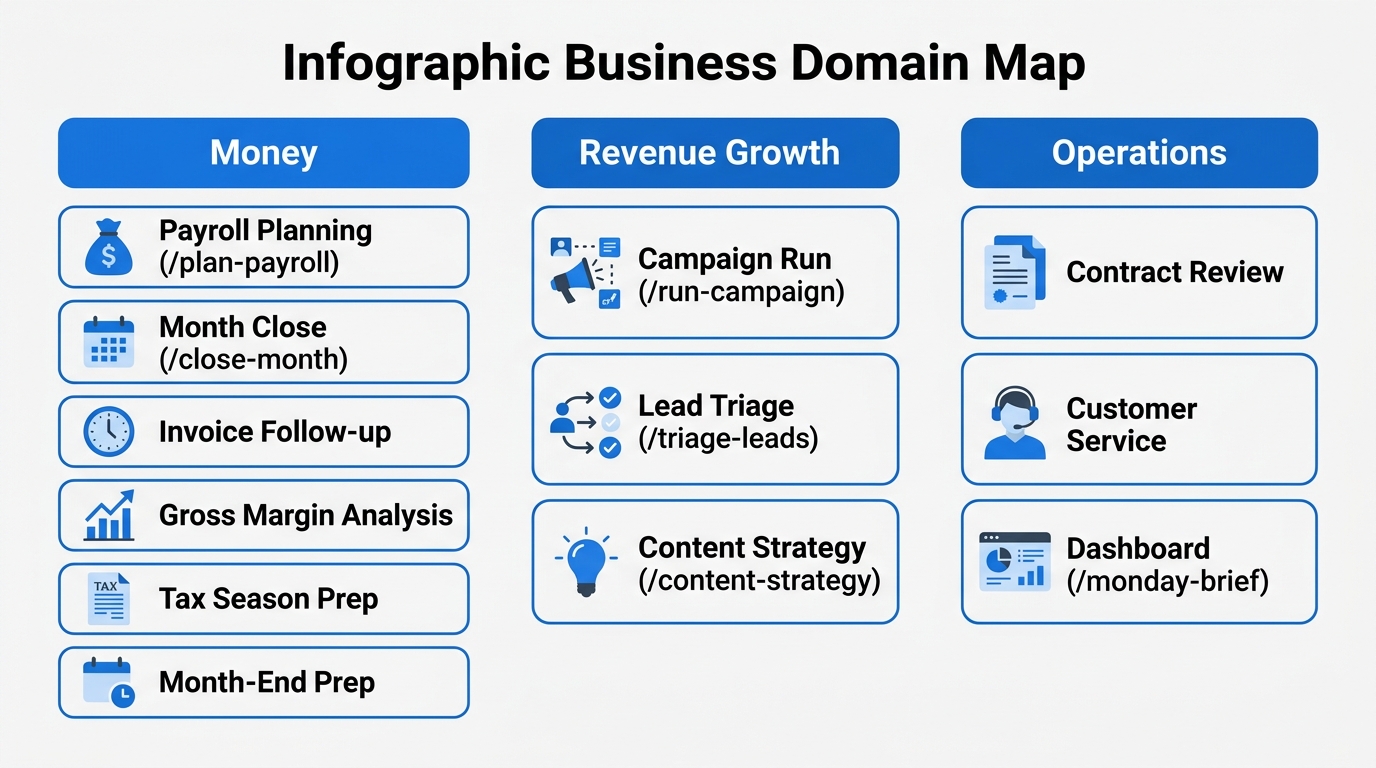
Group 1: Money. Six workflows — Payroll Planning, Month Close, Invoice Follow-up, Gross Margin Analysis, Tax Season Prep, and Month-End Prep. This is where companies with one-person accounting teams (or an owner doubling as the CFO) lose the most time.
Using the official announcement’s example: the Payroll Planning workflow (/plan-payroll) cross-references QuickBooks cash balances against PayPal incoming payments, generates a 30-day cash flow forecast, and drafts collection priority rankings. The owner hits approve, and reminder sends go out. That’s it.
Group 2: Revenue Growth. Three workflows — Campaign Run (/run-campaign), Lead Triage (/triage-leads), and Content Strategy (/content-strategy). The system analyzes historical HubSpot campaign performance, creates assets in Canva, and stages the next send — all inside a single workflow. For businesses without a dedicated marketing hire, this directly impacts revenue.
Group 3: Operations. Contract Review, Customer Service response, and the Management Dashboard (/monday-brief). The dashboard aggregates that week’s numbers from QuickBooks, HubSpot, and PayPal into one page — automatically, on schedule. The owner finishes their first coffee after arriving and the numbers are already there. That’s Group 3.
Once you locate your company’s weak column on this map, your next step becomes obvious. “Our accounting is broken” vs. “we’re bad at customer acquisition” vs. “we can’t see what’s happening” — identify the weak column and start there.
The 3-Step Decision Flow: From 15 Options to 1 in 5 Minutes
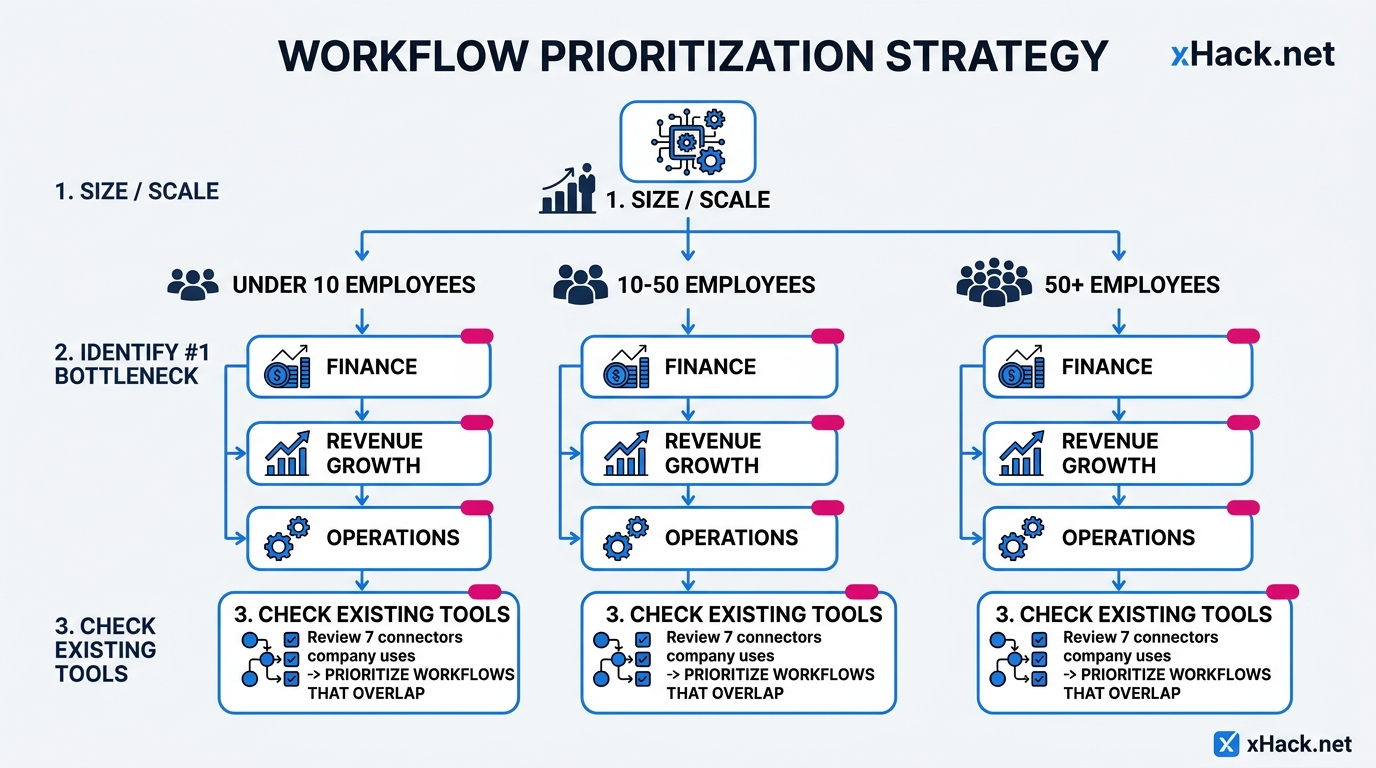
Step 1: Determine your size and industry. Under 10 employees means the owner wears multiple hats — finance bottlenecks dominate at this scale. 10–50 employees means some departmental division exists, giving you more flexibility. 50+ employees means you can assign agents by department. Size dictates your starting range.
Step 2: Name your single biggest bottleneck. Ask the owner or decision-maker to identify the one domain consuming the most time. One answer only — the temptation to list multiple is real, but focusing on a single workflow first is what drives successful rollouts. This is a lesson from covering Anthropic’s Managed Agents case studies — multi-workflow simultaneous launches consistently underperform.
Step 3: Map your existing tools to the 7 connectors. If you don’t use QuickBooks, the Money workflows won’t hit full precision. No HubSpot means the Revenue Growth automation has less to work with. Write down which of the 7 connectors you currently use. Prioritize workflows that overlap with your existing stack.
Running these 3 steps reduces 15 options to 1. Example: an 8-person e-commerce business using QuickBooks and HubSpot, with accounting as their primary bottleneck — the answer is the Payroll Planning workflow (/plan-payroll). The question to test: can accounting tasks that previously consumed 3 days at month-end be completed in half a day? That’s the first validation run.
Opposite scenario: a 3-person design firm using only Canva and Google Workspace. Starting point is the Content Strategy workflow (/content-strategy). No new tool contracts needed. Claude operates inside the existing stack. Minimum investment, measurable output.
Which Connector You Already Have Determines Where to Start
Your current tool stack determines which workflows deliver immediate impact. Here’s what the official announcement’s partner commentary reveals, broken down by tool.
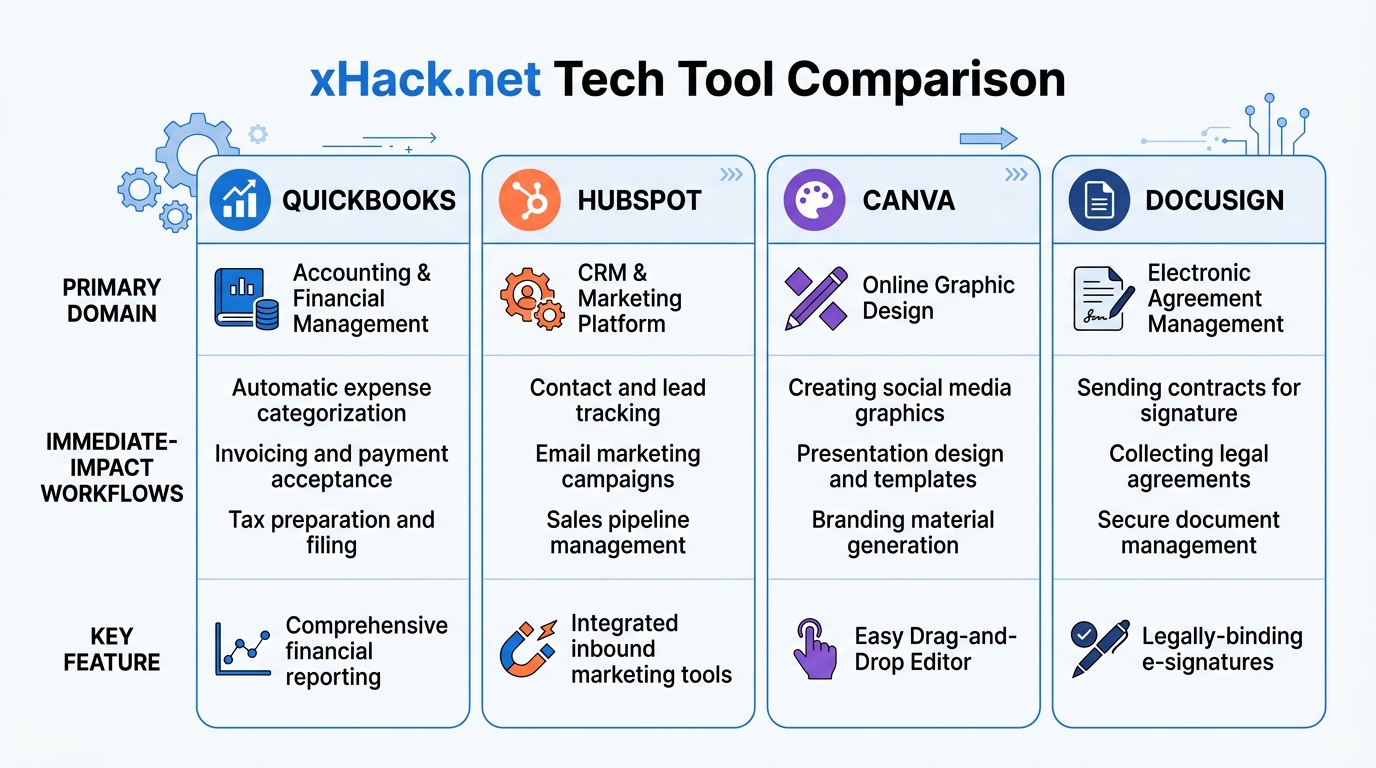
QuickBooks users: Payroll Planning (/plan-payroll) and Month Close (/close-month) deliver immediate impact. Intuit’s Joe Preston stated in the official announcement that the agent integration was built specifically to eliminate financial management complexity. The implication: the automation precision is built natively, not bolted on as a third-party connection.
HubSpot users: Start with Lead Triage (/triage-leads) and Campaign Analysis (/run-campaign). HubSpot’s Angela DeFranco noted in the official announcement that this represents the first CRM connector built natively for Claude — enabling summarization, visualization, and segmentation of customer platform context within conversation.
Canva users: Content Strategy (/content-strategy) is the entry point. Canva’s Anwar Haneef described the design as a complete loop from idea to published asset. Time that marketing personnel previously spent on image production shifts to strategic refinement.
Docusign users: Contract-review-adjacent workflows are the play. Tracking sent contracts and automating post-signature filing come packaged together. For businesses without in-house legal, where contract management is person-dependent, this is where value is most visible.
If you’re not using any of these tools: start by adopting exactly one. Signing up for 5 new tools to enable Claude for Small Business is backwards logic.
Simple Modern CEO Mike Beckham said in the official announcement: “What I thought were constraints aren’t constraints anymore. The time I was spending on things that didn’t matter disappeared. I want our whole organization using these tools daily.” That’s the operator’s view from inside active deployment.
Half of SMB Owners Named Data Security Their #1 Fear — Here’s How to Handle It
When evaluating new AI services, data handling is the first concern for small business owners. According to Anthropic’s official announcement, an internal survey found that half of small business owners cited data security as their primary hesitation around AI adoption.
Claude for Small Business addresses this with three structural safeguards. First: every task and workflow is user-initiated — nothing runs autonomously without your trigger. Second: every send, post, or payment requires explicit user approval before execution. The human hand is always on the button. Third: existing permission settings carry over. If employee A can’t see certain QuickBooks data, they can’t access it through Claude either.
On training data use, Anthropic is explicit: “Team and Enterprise plans do not use customer data for model training by default.” Review Anthropic’s Trust Center in detail with legal before signing.
Three pitfalls to watch for.
Pitfall 1: Permission design during connector setup. Selecting “allow all users full tool access” during setup makes salary data queryable by every employee. Build your role-based and team-based permission matrix before connecting.
Pitfall 2: Approval process becoming a rubber stamp. The careful pre-send review you do in week one becomes “just approve it” by week six. Skipping fact-checking on AI-drafted content creates billing errors and contract clause omissions. Build a weekly random-audit rule into your operating procedures as a backstop.
Pitfall 3: Overconfidence in vendor continuity. Seven connectors are live today. Your primary tool may migrate in the future. Document the business logic embedded in Claude-built workflows separately. This is the same AI-dependency vs. institutional-knowledge-separation principle covered in the Claude Code enterprise market article.
This Week’s Minimum Action Set: Touch, Run, Measure
Three concrete actions to complete this week.
Action 1: Write down your current tool stack. The 7 connectors: Intuit QuickBooks, PayPal, HubSpot, Canva, Docusign, Google Workspace, Microsoft 365. 30 minutes to list what you use. Count the overlaps. Three or more overlapping connectors means high-probability immediate impact.
Action 2: Reach internal consensus on the first workflow. A 30-minute conversation between the owner and one operational lead — pick a column (Money / Revenue / Operations) and commit to one workflow. No consensus, no valid test. Running multiple workflows simultaneously makes it impossible to attribute which one created the result.
Action 3: Start the Claude Cowork trial. Toggle it on. Connect one connector only. Run the first workflow. Track time-on-task and output quality for one week. One measurement: “How many minutes did this task take before vs. after?” That single data point is the entire basis for your go/no-go decision.
As covered in the Claude Code first-30-days enterprise article: AI rollout outcomes are determined by what you measure in the first month. Track one metric — time, error rate, or employee satisfaction — and track it consistently. Measuring too many things makes the decision impossible.
Alongside this service, Anthropic co-published a free online course, “AI Fluency for Small Business,” with PayPal. Instructors are small business owners already running AI in their operations — including Prospect Butcher Co. in Brooklyn and MAKS TIPM Rebuilders in California. Start with the owner and operational lead watching it first.
In-person training is also available. The “AI Fluency Tour,” co-hosted by Anthropic and Tenex.co, is circulating 10 cities this spring. Each stop gathers 100 local leaders for hands-on training plus one month of Claude Max subscription. Spring locations: Chicago, Tulsa, Dallas, Hamilton Township, Baton Rouge, Birmingham, Salt Lake City, Baltimore, San Jose, Indianapolis. Additional cities are planned for fall. For Japanese companies with U.S. subsidiaries or partners, this is a viable on-the-ground pilot resource.
Conclusion
Claude for Small Business marks a clear inflection point: AI agents are now operating as workers embedded directly inside small business operations. The three-layer structure — 15 workflows, 15 skills, 7 connectors — is the baseline knowledge you need to evaluate what’s possible for your company.
Use the business-domain map (Money / Revenue / Operations) to identify your weak column. Run the 3-step decision flow (size → bottleneck → existing tools) to narrow to one workflow. Complete the trial sign-up and connector connection before the end of this month. Whether you complete that cycle in May determines whether you’re on the “using AI” side of the ledger by year-end.
Anthropic acknowledges the data security concern directly — half of SMB owners named it as their top barrier. The response: three structural safeguards (user-initiated execution, approval gating, inherited permissions, and training-opt-out by default). Those safeguards don’t eliminate three operational pitfalls — permission design at setup, approval process decay, and vendor lock-in overconfidence — so set the operating rules before you go live.
Picture your business three months from now. Accounting that takes half a day instead of three. Numbers on the desk before the owner’s first cup of coffee is finished. A marketer who can pull Canva assets the moment someone asks “what’s the next campaign?” That outcome is now within reach.
Companies that don’t move in May will still be running the same late-night overtime in three months. The gap isn’t about which new tool you installed. It’s about whether you ran the first workflow, measured the result, and made the call.
The era when AI starts taking back the hours small business owners spend working past 10 PM has begun. Don’t start with “hand it everything.” Start with “hand it one late-night task.” That’s the optimal first move this week.
Sources
- Anthropic official: “Introducing Claude for Small Business” (May 13, 2026): https://www.anthropic.com/news/claude-for-small-business
- Claude for Small Business plugin implementation details: https://claude.com/resources/tutorials/how-to-install-the-claude-for-small-business-plugin
- Claude for Small Business plugin page: https://claude.com/plugins/small-business?c=atila
- The 44% GDP and ~50% private employment figures, and the “half of SMB owners cited data security as top concern” survey result, are both sourced from the Anthropic official announcement above.
- Quotes from Brian Ludviksen (COO, Purity Coffee), Mike Beckham (CEO, Simple Modern), Joe Preston (Intuit), Angela DeFranco (HubSpot), and Anwar Haneef (Canva) are all sourced from the same Anthropic official announcement page.
- The 10 AI Fluency Tour cities (Chicago, Tulsa, Dallas, Hamilton Township, Baton Rouge, Birmingham, Salt Lake City, Baltimore, San Jose, Indianapolis) are also sourced from the same official announcement.

AIを使いこなせない方は、この先どんどん差がつきます。僕はAIエージェントを毎日動かして、壊して、直して、また動かしてます。そういう泥臭い実践の記録をここに書いてます。理論は他の方にお任せしました。僕は動くものを作ります。朝5時に起きてウォーキングしてからコードを書くのがルーティンです。