Claude Code Pricing: How Much Does It Actually Cost? A 3-Scenario Monthly Breakdown
18,100 monthly searches for Claude Code pricing — and almost nobody writes what you'll actually pay. Pro, Max, Team, Enterprise, and API broken down across 3 real-world scenarios.
What you'll learn in this article
- Where pricing and adoption questions around Claude Code stand right now
- Which plan or rollout stage fits the reader's situation
- Which follow-up article to open next for setup, cost, or bigger-picture context

“How much does Claude Code cost per month?”
I’ve received that question from more than 10 people in the past month. Every time, they’re stuck on the same thing.
Open the official pricing page and the numbers are right there: Pro $20, Max $100, Max $200, Team, Enterprise, API. You can see the numbers. What you can’t figure out is which plan applies to you and what you’d actually pay each month. So people default to “let me start with the free tier” — and stop there.
I was the same. I re-read the pricing table three times, still couldn’t decide, and ended up leaving Anthropic’s pricing page open in a browser tab for two weeks. What finally broke the paralysis was splitting my use case into three scenarios.
⚠️ Pricing changes. This article reflects conditions as of May 2026. Always verify the latest information at Anthropic’s official pricing page.
Why “How Much Does Claude Code Cost?” Can’t Be Answered in One Line
Let me be upfront about this. Answering this question in one line is nearly impossible.
Three reasons.
Reason 1: There are two different billing systems. Pro, Max, Team, and Enterprise are flat monthly subscriptions. API usage through Anthropic Console is token-based consumption billing. Same Claude Code, completely different invoice logic depending on the entry point.
Reason 2: Within the same plan, actual cost varies by usage. Subscriptions have 5-hour rolling quotas and weekly total caps (Anthropic official docs). Someone using Claude Code 8 hours/month as a hobby has a completely different experience from someone using it 160 hours/month for professional work — even on the same Max 5x $100 plan.
Reason 3: Exchange rates move (for non-US users). As of May 2026, the USD/JPY rate is around 150, with analysts flagging possible movement toward the 140s. A $100/month plan is often cited as “¥15,000/month,” but depending on exchange rates it could float anywhere from ¥14,000 to ¥16,000.
Put these three together and the honest answer to “how much per month?” becomes “it depends on your use case.” Once you match your situation to one of three patterns, you can answer immediately.
I always divide how people use Claude Code into three scenarios: “personal trial,” “business PoC,” and “production deployment” — and estimate monthly costs from there.
Claude Code’s 5 Plans: The Full Picture in 1 Minute
Claude Code has 6 billing tiers currently (including Free). Here’s the overview:
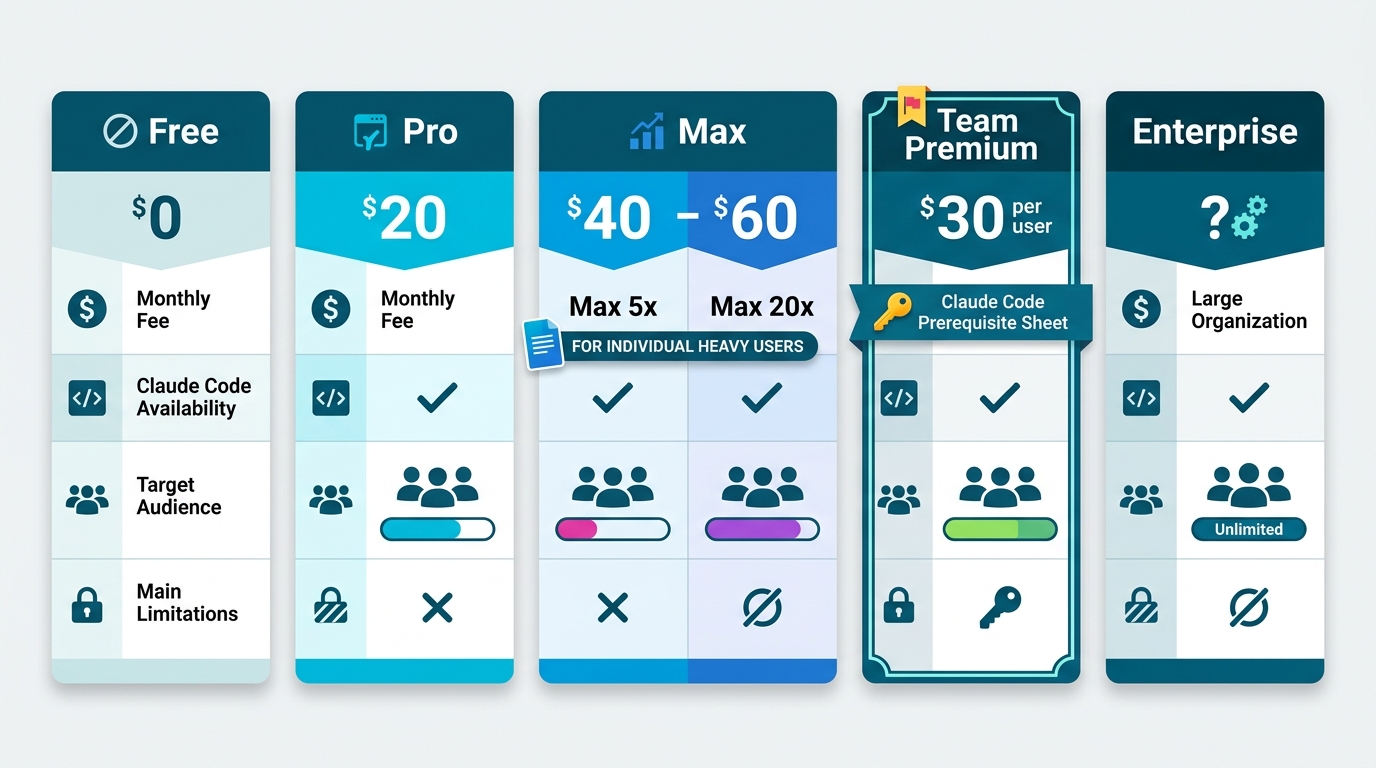
| Plan | Monthly (USD) | Claude Code access | Best for |
|---|---|---|---|
| Free | $0 | ❌ Not available | Chat only |
| Pro | $20/mo | ✅ Light usage | Personal testing, weekend use |
| Max 5x | $100/mo | ✅ Moderate usage | Professional daily use |
| Max 20x | $200/mo | ✅ Heavy usage | Continuous agent operation |
| Team Premium | $125/person/mo ($100 annual) | ✅ Available | Small business teams |
| Enterprise | Custom | ✅ Available | Company-wide deployment |
Source: Anthropic official pricing page / Claude Code usage guide (Pro/Max) (as of May 2026)
Three key points to lock in:
First: Free plan cannot use Claude Code. Chat only. “Try it free first” simply doesn’t work here — and this is where most first-time visitors get stuck.
Second: Pro $20 gives Claude Code access, but with 5-hour rolling quotas and weekly caps. Run heavy tasks multiple times per day and you’ll hit the ceiling fast. For “a few hours on weekends” it’s fine.
Third: “5x” and “20x” in the Max plans are approximate usage multipliers vs. Pro. Max 5x handles roughly 88,000 tokens in a 5-hour window; Max 20x around 220,000 (Verdent research; conditions vary). The dividing question: “Do I need agents running continuously for most of the day?”
For Team plans: the Premium seat ($125/person/month) includes Claude Code access. The Standard seat ($25/person/month) does not include Claude Code — developers and technical staff need Premium seats (official Team and Enterprise announcement).
API via Anthropic Console is separate: token-based consumption billing. Sonnet 4.6 at $3 input / $15 output, Opus 4.7 at $5 input / $25 output, Haiku 4.5 at $1 input / $5 output (per million tokens).
Scenario 1: Personal Use — Where the Line Is Between Pro $20 and Max 5x $100
Most common question: “I want to try it personally. What’s the minimum cost?”
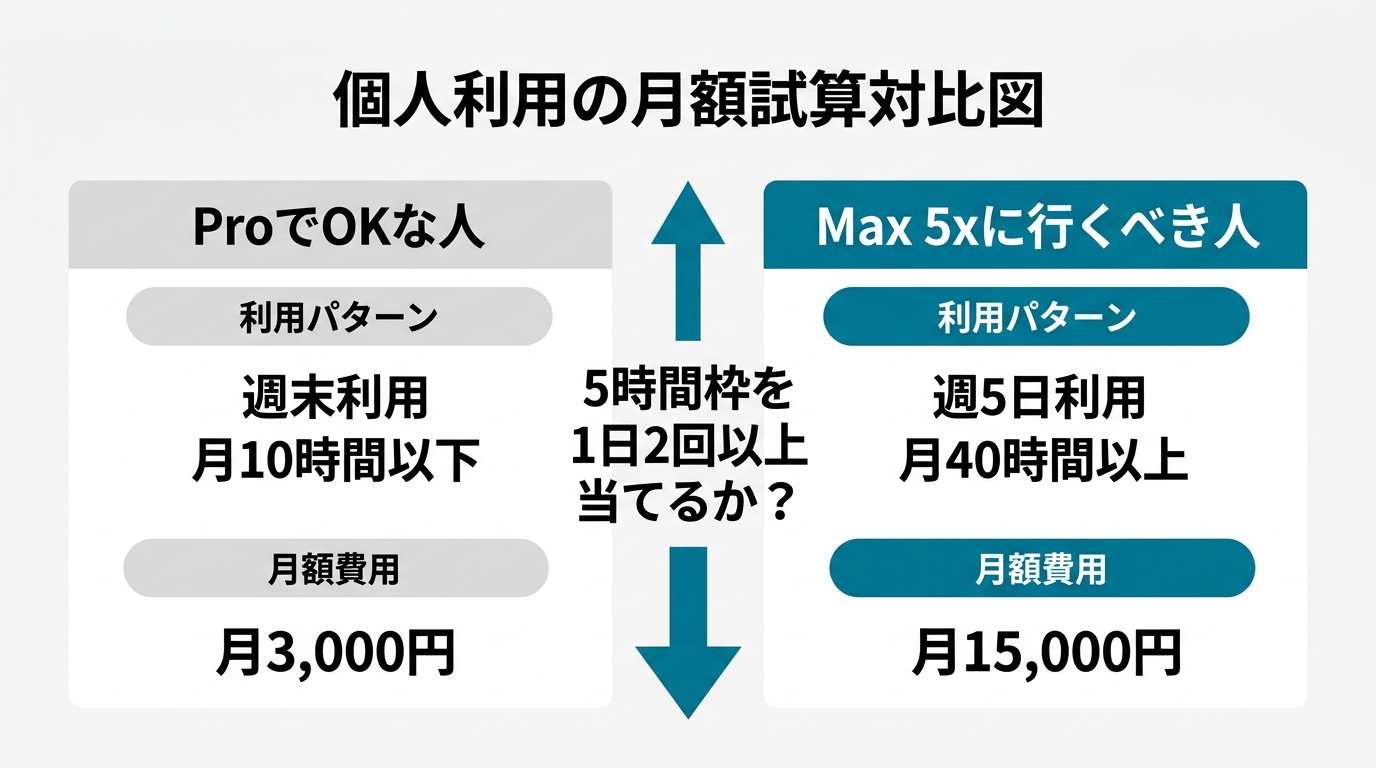
Bottom line upfront: under 10 hours/month on weekends, Pro $20 is enough. Daily professional use, 40+ hours/month: go straight to Max 5x $100. You’ll save money and frustration.
The 3 Conditions Where Pro $20 Is Sufficient
- You use Claude Code in 1–2 sessions per day or fewer
- Most sessions are under 20 minutes (partial code edits, short refactors, adding functions)
- “Waiting a few hours when the quota resets” is acceptable
If all three fit, there’s no point upgrading to Max $100. The 5-hour Pro quota resets while you’re getting coffee. Your cost stays at $20/month. Hobby programmers, side-project engineers, and people who use Claude Code casually during work hours all fall into this zone.
3 Signs It’s Time to Move to Max 5x
- You’re calling Claude Code 3+ times per workday
- Sessions increasingly involve working across 10+ files simultaneously
- Quota cutoffs are actively interrupting your work flow
Once you’re hitting these, upgrade to Max 5x. Its 5-hour window handles roughly 88,000 tokens — ~5× Pro’s capacity — and includes Opus access for complex architecture work.
One developer reported running 10 billion tokens over 8 months on Max $100, handling what would have been $15,000 in API costs for $800 (NxCode verification). That’s an extreme case, but it demonstrates how overwhelmingly cost-effective Max becomes once you’re in professional use.
Max 20x $200 Signals “Always-On” Operation
Max 20x is for one scenario: running Claude Code as a continuously active agent on your machine. Multiple parallel terminals, overnight automated fixes, 24-hour log monitoring. If you’re regularly hitting Max 5x limits, or high-priority processes are getting delayed by rate limits, the upgrade is worth it.
If you’re upgrading “just to be safe” — skip it. Doubling the cost for unused headroom isn’t optimization.
In my experience, 80% of people who can’t get started personally are stuck because they’re looking at Max 20x first and deciding $200/month is too much. Start with Pro $20. Upgrade to Max 5x when needed. Two steps is enough.
Scenario 2: Business PoC — Team Premium vs. API Console, in This Order
Next: “We want 3–10 people running a 1–2 month PoC. What do we use?”
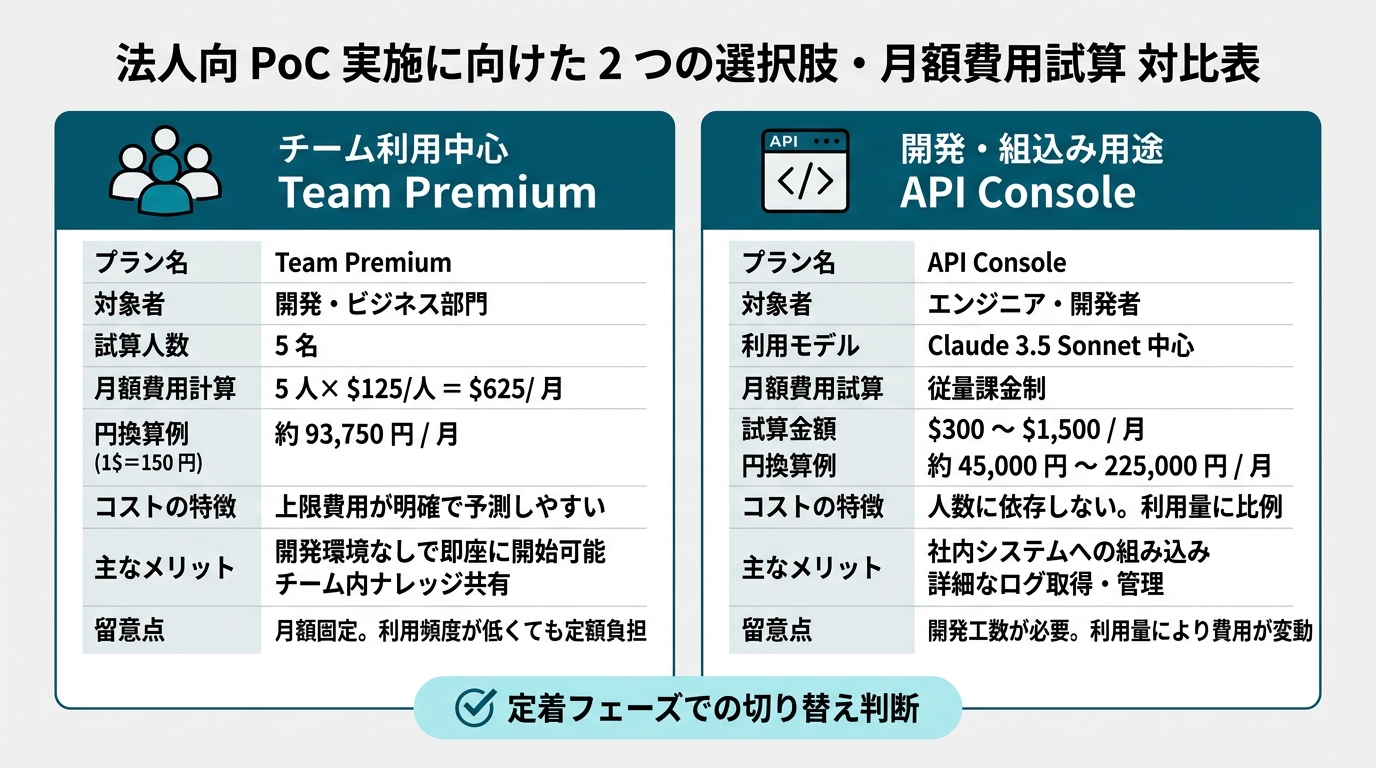
Two options: Team Premium ($125/person/month) or API Console (token-based).
When Team Premium Is the Right Choice
Deploying to 5–20 people who all need equal access: Team Premium is the clear answer.
Three reasons: (1) predictable per-person costs make monthly budgeting straightforward; (2) admin console with usage logs and cost analysis (official Team and Enterprise announcement); (3) SSO and audit logging for Claude Code included.
Start at 5 people × $125 = $625/month. Annual billing brings it to $100/person/month.
When API Console Is the Right Choice
API Console works better when 1–3 specific people need to run heavy, concentrated workloads for a PoC.
One person running 1M tokens/month on Sonnet 4.6 at 50/50 input-output: about $9/month. Three people: about $27/month. Dramatically cheaper than Max $100 — though without a ceiling, budget management requires more attention.
Key PoC technique: use Anthropic’s prompt caching (up to 90% discount) and Batch API (50% discount) from day one (official pricing). For workloads with long system prompts sent repeatedly, this alone cuts actual costs by 30–50%.
Recommended Sequence for Business PoC
Phase 1 (Weeks 1–2): 2–3 key members use API Console to validate what Claude Code can do for their workflows. Budget: $30–$100/month (author estimate).
Phase 2 (Weeks 3–6): If Phase 1 validation shows clear value, expand to Team Premium for 5–10 people. Budget: $625–$1,250/month.
Phase 3 (Week 7+): Based on PoC results, decide: continue Team, consider Enterprise, or wind down.
This sequence avoids the common failure of signing up for 20 Team Premium seats and discovering only 3 people use it. The most expensive mistake in enterprise AI adoption is buying seats before you know who will actually use the tool.
For context on enterprise rollout support, see The Day Claude Code Enterprise Adoption Became a Product. The pricing decision itself you can make internally.
Scenario 3: Production Deployment — Enterprise vs. API at Scale
Third scenario: PoC complete, moving to production.
Two options: Enterprise plan (per-seat flat rate) or API at scale via Anthropic Console (consumption plus volume discounts).
When Enterprise Is the Right Choice
Enterprise is designed for deploying Claude Code to hundreds or tens of thousands of employees. NEC Group’s 30,000-employee deployment (Anthropic announcement) and AR Advanced Technology’s full engineer and consultant distribution (see 4/19 article) operate at this tier.
Pricing is not published. Custom quote based on seat count, usage volume, and feature requirements like SSO and SCIM.
Three criteria: (1) more than 50 users; (2) audit logs, SSO, and data handling controls are requirements; (3) SLA-backed vendor support needed. Start at Anthropic’s Enterprise contact form.
When API at Scale Is the Right Choice
API at scale for embedding Claude Code into internal tools or agents — CI/CD code review agent, internal bot coding assistance, and similar use cases.
Base rate: Sonnet 4.6 at $3 input / $15 output per million tokens. At 1 billion tokens/month scale, volume discount negotiations reportedly possible. Assume 30–50% cost reduction through prompt caching and Batch API combination.
For a 100-engineer org running 1M tokens/day × 100 people = 300M tokens/month: at 50/50 input-output, roughly $3,000/month; with cache optimization, $1,500–$2,000/month is the range I’ve seen in production deployments (conditions vary; author estimate).
3 Core Cost Optimization Moves for Production
I’ve seen deployments where costs hit 2× budget within 1–3 months. Three common causes and fixes:
-
“Use Opus for everything.” Opus 4.7 costs ~1.7× Sonnet 4.6. Default rule: Sonnet for everyday tasks, Opus only when needed, Haiku for lightweight classification.
-
Not using prompt caching. Sending long system prompts and full codebases on every request compounds input token costs fast. Design for up to 90% cache discount as standard practice (Anthropic Manage costs docs).
-
Not routing batch workloads to Batch API. Overnight processing, bulk classification, and report generation don’t need real-time responses — Batch API (50% discount) handles them fine.
30-Second Decision Flow: Pick Your Plan
Five plans mapped. Use this decision flow to find yours.
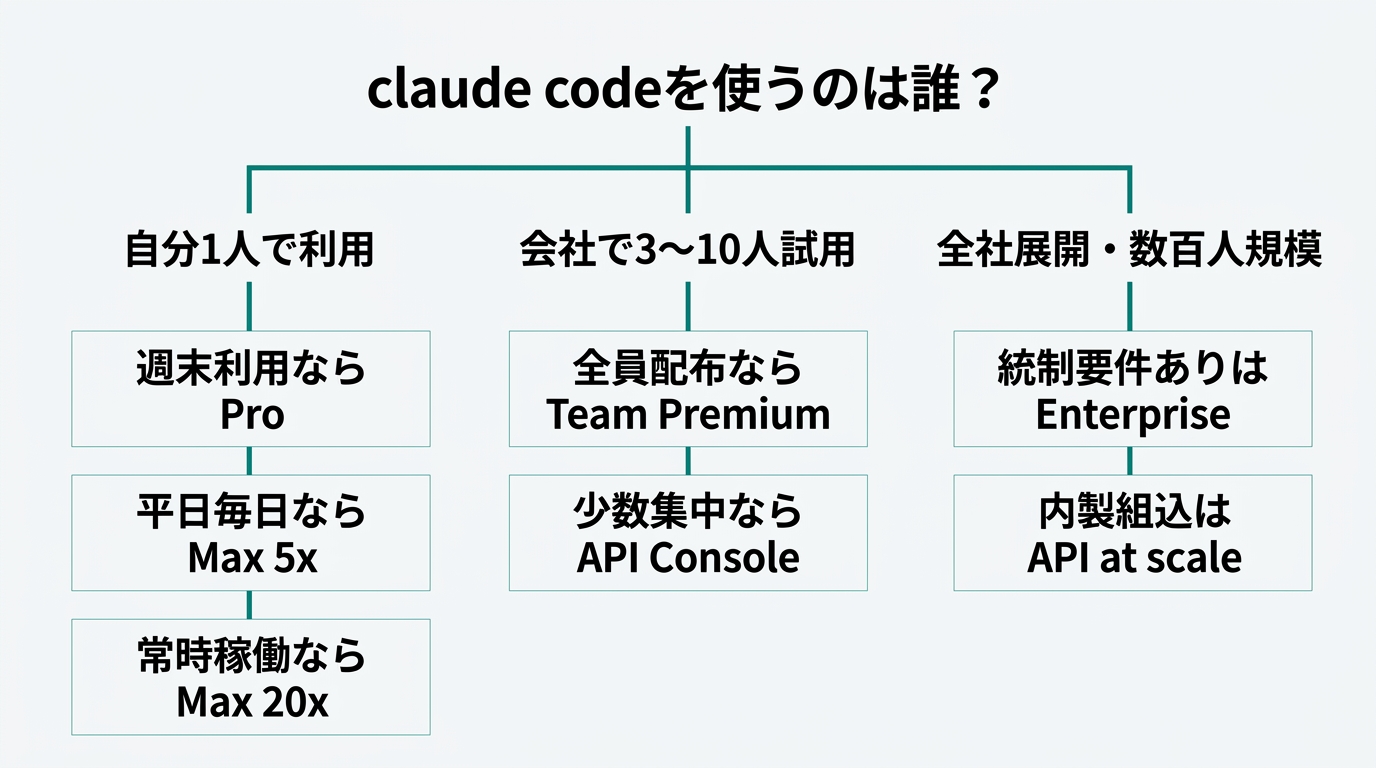
Q1: Who is using this?
- Just me → Q2
- 3–10 people at work → Q3
- Company-wide (hundreds+) → Q4
Q2: How often per week?
- Weekends / under 10 hours/month → Pro $20/month
- Daily / 40+ hours/month → Max 5x $100/month directly
- Continuous / multiple parallel processes → Max 20x $200/month
Q3: Distribute to everyone or concentrate on a few?
- Distribute equally → Team Premium $125/person/month for seats needed
- 1–3 people concentrated → API Console (Sonnet 4.6, ~$30–$100/month estimate)
Q4: Compliance and control requirements?
- Need SSO, audit logs, SLA → Contact Enterprise
- Embedding in internal tools → API at scale (volume pricing negotiation)
Key principle: don’t start with the most expensive plan. Start with Pro, upgrade to Max when needed. Run API Console PoC, expand to Team Premium, advance to Enterprise when justified.
The failure patterns I observe most often: “signed up for Max 20x, cancelled after two weeks” and “contracted 20 Team Premium seats, half went unused” (author observation).
Summary: 3 Actions for This Week
Action 1 (30 minutes today): Open Anthropic’s official pricing page, run the decision flow, commit to one entry plan. Not Free.
Action 2 (this week): Individuals: sign up and use it for a week. Businesses: identify 2–3 PoC members and create an API Console account (5 minutes with an admin Google or Microsoft account).
Action 3 (calendar reminder 1 month from now): Set a date to review usage logs and decide: upgrade, stay, or switch plans.
“I can’t figure out the pricing, so I can’t start” is the biggest barrier to trying Claude Code. If this article clears that barrier, that’s enough.
For enterprise rollout design after plan selection, see Claude Code Enterprise Deployment: The First 30-Day Playbook.
Sources

AIを使いこなせない方は、この先どんどん差がつきます。僕はAIエージェントを毎日動かして、壊して、直して、また動かしてます。そういう泥臭い実践の記録をここに書いてます。理論は他の方にお任せしました。僕は動くものを作ります。朝5時に起きてウォーキングしてからコードを書くのがルーティンです。