Anthropic Just Launched 10 AI Agents for Finance. Even If You're Not in Finance, You'll Want to Read This.
Anthropic's 10 financial AI agent templates — front 5 + back 5 — and 3 ways non-finance business people can act on them starting tomorrow.
What you'll learn in this article
- What AI agents mean in plain language and why the term matters now
- Which real-world workflow patterns are already becoming practical
- Which next article deepens pricing, rollout, or implementation context
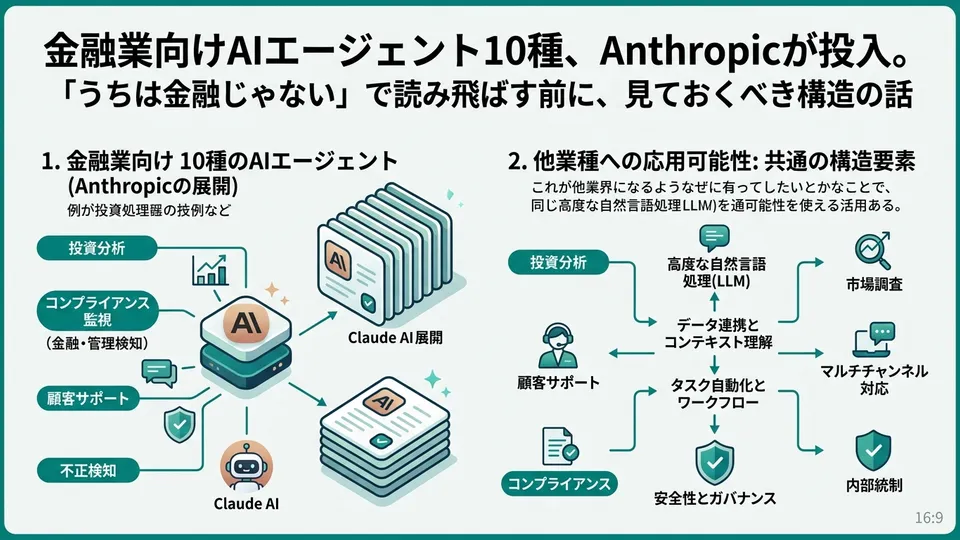
On May 5, 2026, Anthropic dropped 10 AI agent templates built specifically for financial services — all at once. JPMorgan CEO Jamie Dimon was on stage for the announcement. According to Fortune (2026-05-05), he used Claude Code to build a dashboard live in about 20 minutes (note: this specific detail appears in Fortune’s reporting and has not been confirmed in Anthropic’s official announcement).
If you’re thinking “finance news, not my problem” — you’re about to make a costly mistake.
Here’s why: peel back one layer of the “financial services” framing, and what you’re actually looking at is a standard design format for task-specific agent architecture. In fact, five of the ten templates are built around accounting, compliance, and internal operations — use cases that apply to virtually any industry.
Today I’ll map out all 10 agents using Anthropic’s press release and primary sources. Then I’ll translate them into 3 actionable reads for non-finance people — marketers, business owners, consultants, and professionals — who want to start moving tomorrow.
What Was Actually Announced — The Full List of 10 Financial AI Agents
Everything is laid out in Anthropic’s official blog post “Agents for financial services” (2026-05-05) (source: anthropic.com/news/finance-agents).
What was released is 10 agent templates. Templates here don’t mean ready-to-run apps — they mean blueprints made of three components:
- Skills (domain knowledge): Task-specific instructions and domain expertise
- Connectors (data access): Managed access to business data systems
- Subagents (supporting models): Child Claude agents handling specific subtasks
In other words: ten reference architectures, each with three layers pre-assembled for financial workflows.
Let me make the three layers concrete using the Month-end closer as an example. Skills maps to “the monthly close procedures and checklists.” Connectors maps to “access credentials for the accounting system and approval workflows.” Subagents maps to “a supporting model that automatically detects journal entry discrepancies.” Stack all three, and you’ve designed a system where “the end-of-month close work you used to grind through manually now runs on a single command.”
The fact that these are published as blueprints is the key point. They give you a foundation for thinking: “How would I adapt this for my own organization?”
The templates come in three delivery formats:
- Claude Cowork (plugin for collaborative work interfaces)
- Claude Code (plugin for development environments)
- Claude Managed Agents (headless API cookbook)
What matters here: all three delivery formats are supported. The same template runs in end-user interfaces, developer environments, and server-side automated jobs. That’s a deliberate design choice.
Until now, “where do you deploy it?” has been a constant headache for AI agent implementations. Do you call it from Slack? Embed it in an internal tool? Run it as a background job? These 10 templates ship with that problem already solved from day one.
The Full Map — Front Office 5 + Back Office 5

Here’s how Anthropic categorizes the 10 agents, translated directly:
Front Office (Research & Client-Facing) — 5 Agents
- Pitch builder: Builds target lists, runs comparable company analysis, and generates pitch deck drafts
- Meeting preparer: Automatically assembles pre-meeting briefing materials
- Earnings reviewer: Reads financial filings and call transcripts, updates financial models, and flags material changes relevant to investment decisions
- Model builder: Creates and maintains financial models from disclosure documents, data feeds, and analyst inputs
- Market researcher: Tracks sector and issuer developments by aggregating news, disclosures, and research reports
Back Office (Accounting & Compliance) — 5 Agents
- Valuation reviewer: Reviews consistency and methodology of valuation documents
- General ledger reconciler: Matches journal entries and detects discrepancies
- Month-end closer: Executes close checklists, generates journal entries, and produces close reports
- Statement auditor: Verifies consistency, completeness, and audit-readiness of financial statements
- KYC screener: Assembles counterparty files, reviews source documents, and packages escalation materials for compliance
Sources: Anthropic’s official release (anthropic.com/news/finance-agents) and Finextra reporting (2026-05-05). All 10 names and task definitions confirmed against Anthropic’s primary announcement.
Now here’s what stands out: the back-office five are not finance-specific tasks. Mapped to a general company, they read like this:
- General ledger reconciler → Your accounting team’s monthly accounts receivable/payable reconciliation
- Month-end closer → Finance and admin’s monthly report close process
- Statement auditor → Accounting’s audit-prep document review
- KYC screener → Legal and sales’ new vendor onboarding and due diligence package
Anthropic itself describes the back office side as “the most time-consuming work.” General ledger reconciliation, monthly closes, KYC — these are the unglamorous, time-eating tasks that exist in almost every company regardless of industry. The 10-agent list is labeled “financial services” on the surface, but underneath it’s a pattern library for administrative work across every sector.
3 Reads That Hit Harder If You’re NOT in Finance
Whether you close this article thinking “not relevant to me” or you open it thinking “what does this translate to in my own operations?” — the gap between those two reactions will be visible in six months.
Here are three ways to extract value from this release if you work outside financial services.
Read 1: Break your job into tasks, and half of it becomes automatable
What every one of the 10 agents has in common: they’re sliced by task, not by job title. Not “analyst as a role” but “pitch creation, earnings review, model updates” as discrete work items.
Apply that lens to your own work and the structure becomes visible.
For a marketer: “campaign brief creation,” “competitive analysis report,” “monthly performance review,” “ad compliance check” — every one of those is conceptually identical to Anthropic’s 10 templates. They’re all “recurring tasks with defined inputs and outputs.” For a consultant: “proposal drafts,” “meeting notes,” “data analysis,” “invoice reconciliation.” Same thing.
I tested this myself. As a marketing consultant, I was spending 3–4 hours every month on my monthly report. I took the Month-end closer’s design logic — three stages: checklist execution, discrepancy detection, report generation — and used it to re-architect my own process. The data collection and formatting steps became automatable with Claude, and I cut the time substantially. It wasn’t full automation — it was more like: I could finally focus exclusively on the parts that actually needed my judgment.
“Decompose your work by task, not by job title.” That’s the first read.
Read 2: The blueprints are public — the barrier to copying has dropped
Anthropic published all 10 templates as cookbooks on GitHub (repository: anthropics/financial-services). This isn’t “available only to financial institutions.” They released the actual Skills + Connectors + Subagents wiring for anyone to study.
Look at the Month-end closer’s structure and you can see it breaks into three steps: “close checklist,” “journal entry generation,” “close report.” You can see what instructions, data, and supporting models each step uses.
Translate that to your own context, and building a “monthly report close agent” for internal use is not that hard. Read the blueprint and adapt it. That’s the second read.
Read 3: Three delivery formats means you decide where it lives first
Claude Cowork, Claude Code, and Managed Agents each have a distinct character:
- Cowork: Internal team members call it from an interface (sales reps and accountants use it directly)
- Code: Developers embed it in business systems (connects to existing internal tools)
- Managed Agents: Runs automatically in the background overnight or on weekends (operates while humans are asleep)
Until now, “putting an AI agent into operations” almost always got stuck in a conversation about where to put it. This release changes that. With three delivery formats available, you can choose based on the nature of the work itself.
Decide upfront: when, by whom, and from where. That’s the third read.
Microsoft 365 Integration and Moody’s MCP — The Distribution Infrastructure Completes
Two more announcements landed alongside the 10 agents. Don’t overlook them.
Microsoft 365 Integration (Excel, PowerPoint, Word, Outlook)
According to Fortune’s reporting (2026-05-05), Claude will operate as an add-in inside Microsoft 365. Excel, PowerPoint, Word — Claude lives inside each app, and context carries across applications (these details are based on Fortune and similar reporting, supplementing Anthropic’s official announcement).
The change becomes obvious when you think about building a monthly business performance report. The old workflow: aggregate data in Excel, manually copy numbers into PowerPoint, write explanatory text in Word — three separate steps. The new workflow: select the summary table in Excel, tell Claude “build a board meeting deck from this data,” and get a PowerPoint draft in one pass. The overhead of re-explaining context every time you switch apps disappears.
This isn’t a finance-only change. The Excel → PowerPoint → Word pipeline is the backbone of white-collar work across every industry. Claude running as a horizontal thread through that pipeline hits everyone who uses Office.
Moody’s MCP App (Credit Ratings + Data on 600M+ Companies)
Moody’s is now connectable to Claude as an MCP (Model Context Protocol) app. That means credit ratings and data on over 600 million public and private companies are callable directly through Claude (source: Anthropic official blog finance-agents, with additional detail from Fortune 2026-05-05).
Again — not finance-only. New vendor credit checks, competitor research, M&A target screening — these show up in strategic decisions at any company. Reliable company data, accessible through a live conversation with Claude, is now part of Claude’s foundation layer.
The 10 agents, Office integration, and Moody’s data. Together, these three create a single end-to-end distribution line: from template, through interface, to data.
What Jamie Dimon’s 20-Minute Demo Actually Means
The most memorable moment of the event was Jamie Dimon’s live demo. According to Fortune (2026-05-05), he used Claude Code to build a dashboard for asset swaps and Treasury bid-ask spreads in roughly 20 minutes. (Note: this specific “20 minutes” detail comes from Fortune’s reporting and hasn’t been confirmed in Anthropic’s official announcement.)
He reportedly described the result as “very accurate about what he wanted.”
The point worth sitting with: Dimon is not a developer. He’s the CEO of the world’s largest bank. A non-technical executive doing a live build in 20 minutes at a public event — this signals that “non-coders running agents” is already starting at the top of the org chart.
There’s a second thing not to miss: the organizational weight of the CEO doing it himself. “This might be usable” is a very different conversation from “our CEO just built it in 20 minutes.” The temperature in any room changes completely. The technical team doesn’t need to fight for budget; the executive side already said “I tried it and it worked.”
The same dynamic is appearing in Japan. In my earlier article, “A Japanese IT company gave Claude Code to every engineer and consultant”, I covered AR Advanced Technology’s company-wide rollout — the same directional move. When a top executive demonstrates “I can do this myself” in a public forum, the temperature inside the organization shifts immediately. “I tried it and it took 20 minutes” — that single line will accelerate more organizational decisions over the next six months than any analyst report will.
3 Actions for Non-Finance People to Take Tomorrow

Three concrete actions for anyone who read this far and wants to move:
Action 1: Write down 20 of your own tasks (time: 1 hour)
Set aside one hour and list 20 things you do routinely, written as tasks — not job functions. “Prep for sales meeting,” “draft proposal,” “monthly performance report,” “invoice reconciliation check” — task names, not role descriptions.
This list becomes the foundation for your automation thinking. Vague intentions (“maybe I could use AI somehow”) never go anywhere. Naming tasks gets you to the granularity where you can actually compare them against Anthropic’s 10 templates.
A common objection: “I can’t come up with 20.” That usually means you’re thinking in half-day blocks. Break “write a proposal” into “research the client,” “build the competitive comparison,” “structure the deck,” “verify the numbers” — and you’ll blow past 20 in 30 minutes. Think in 30–60 minute work units.
Action 2: Map your 20 tasks against the 10 templates (time: 30 minutes)
Take your list and put it next to Anthropic’s 10 templates:
- “Build prospect list” → close to Pitch builder
- “Monthly report close” → close to Month-end closer
- “New vendor due diligence” → close to KYC screener
- “Competitive landscape report” → close to Market researcher
Exact matches aren’t the goal. The question is: “Is the design logic the same?” If yes, the Anthropic cookbook (published on GitHub) is a structural reference you can actually borrow from.
Action 3: Pick the highest-value task and prototype it in Claude Code for 30 minutes
From your mapped tasks, pick the one that’s highest frequency and most time-consuming, and spend 30 minutes prototyping it in Claude Code. Don’t aim for completeness. The goal is just to get something running.
If it takes shape in 30 minutes, invest a half-day to make it real. If you get stuck, switch to a different task. Spend more time moving than deliberating — that’s the decision-making speed that the AI agent era demands.
I downloaded Anthropic’s cookbook on May 6, 2026, and I’m currently testing a template that adapts the Month-end closer structure to my own reporting workflow. It’s not perfect — but just reading the blueprint and repurposing its structure, I had something functional in a few hours.
The Takeaway — The Day “Finance News” Stops Being Finance News
Four core points from this Anthropic announcement:
- 10 agent templates: Front 5 (Pitch builder, Meeting preparer, Earnings reviewer, Model builder, Market researcher) + Back 5 (Valuation reviewer, General ledger reconciler, Month-end closer, Statement auditor, KYC screener). Three-layer design: Skills / Connectors / Subagents (confirmed in Anthropic’s official release)
- Three delivery formats: Cowork (interface), Code (development), Managed Agents (automated execution) — letting you decide “when, by whom, and from where” upfront (confirmed in Anthropic’s official release)
- Microsoft 365 integration and Moody’s MCP: Cross-app context continuity plus data on 600M+ companies now embedded in Claude’s foundation (Fortune / Anthropic reporting)
- Jamie Dimon’s 20-minute demo: Per Fortune’s reporting, a top executive “showed it himself.” That fact changes how organizations make decisions
When you see a headline that says “for financial services,” try reading it as: “what does this translate to in my own operations?” The 10-agent list is a standard format for automating business tasks that applies equally to non-finance work.
The gap between people who know this and people who don’t will widen visibly over the next six months. Spend an hour today writing your 20-task list. That single act will change what you see tomorrow.
For a structural overview of AI agents, see my earlier piece “Understanding AI Agents Through Structure, Not Buzzwords”. For the wave of Claude Code enterprise adoption, see “The 10 Days That Turned Claude Code Enterprise Deployment Into a Market”.
Sources
- Anthropic official: Agents for financial services (2026-05-05) — 10 templates, 3-layer design, 3 delivery formats, Moody’s MCP confirmed against primary source
- GitHub: anthropics/financial-services (cookbook)
- Fortune: Anthropic deepens push into Wall Street with new AI agents (2026-05-05) — Jamie Dimon 20-minute demo and MS365 integration details per Fortune reporting
- Finextra: Anthropic rolls out another 10 financial services agents (2026-05-05)
- Bloomberg: Anthropic Unveils AI Agents to Field Financial Services Tasks (2026-05-05)

AIを使いこなせない方は、この先どんどん差がつきます。僕はAIエージェントを毎日動かして、壊して、直して、また動かしてます。そういう泥臭い実践の記録をここに書いてます。理論は他の方にお任せしました。僕は動くものを作ります。朝5時に起きてウォーキングしてからコードを書くのがルーティンです。