A Few Days After Writing 'Code Is a Commodity,' I Re-Lined Up My Toolkit by Monthly Cost. 9 Tools, $184 Total—and 3 I Tried and Dropped
Code became a commodity. What's left is the three axes of engineering thinking, I wrote a few days ago. So how many tools on my desk actually implement those three axes? A record of re-lining up nine tools by monthly cost and ROI.
What you'll learn in this article
- The key point to grasp before reading the full article
- How the issue changes the way developers should work next
- Which follow-up article is worth opening next

Three days ago, I wrote a piece titled “Code is a commodity. What’s left is the three axes of engineering thinking.” I framed it around three axes: problem-framing, design judgment, and production responsibility. Writing it felt pretty good. I published it, the bookmark count climbed, and people pinged me on Slack saying “I read it.”
But the moment I sat back down at my desk, my work hours hadn’t budged. The hole has a name: my toolkit.
I’m 36, a customer success professional by day with a side gig as an engineer—part of the cohort that once gave up on coding and came back through AI. Today I’m writing a record of the nine tools currently sitting on my desk, totaling $184/month. This is not a “9 recommended tools” article. It’s one person’s map of “if you’re going to implement the three axes, this is the order in which I bought what I bought.”
I spent half a year stuck between “having the three axes” and “implementing the three axes”
The “three axes of engineering thinking” I wrote about three days ago—problem-framing, design judgment, production responsibility—are conceptually right. They separate from the act of writing code and remain on the human side.
But there was a stretch where, even after “having” those three axes for half a year, my work hours barely shrank. This was around fall 2025. I had a Claude Code subscription, Cursor was installed, and intellectually I’d accepted “hand off the design and let the AI write it.” Yet day after day, my work still moved by hand.
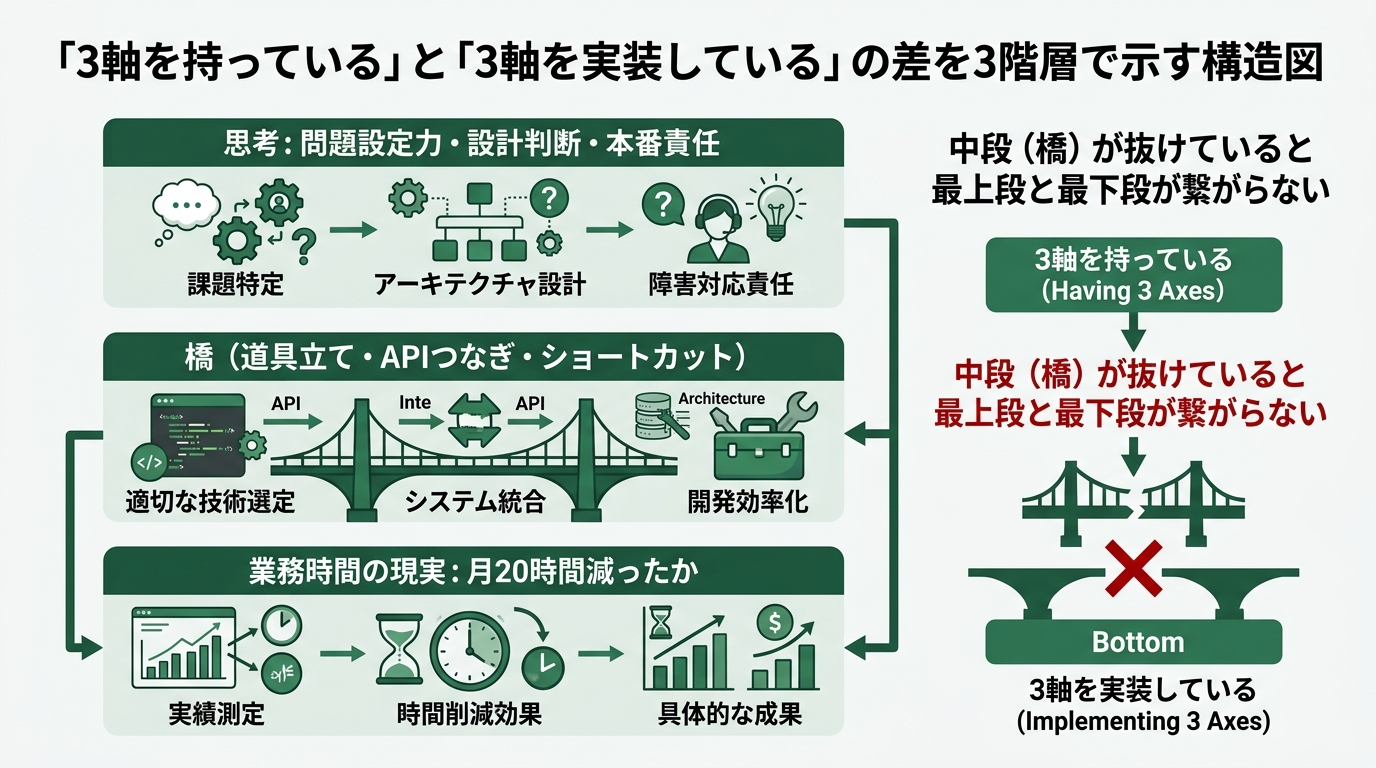
What was happening was this: the three axes were in my head, but no “tool bridge” had been built between the three axes and the actual work in front of me.
A Slack message comes in: “For this account, I want to confirm the contract renewal.” I read it, open Linear, search the past response history, jump to the CRM to verify contract terms, paste a draft response into ChatGPT to refine it, then return to Slack to reply. As thinking, this whole sequence is “customer-response decision-making.” But my three axes only show up at the very end—the part where I refine the draft and take responsibility for sending it. The bulk is mechanical clicking back and forth between tools.
If you only “have” the three axes, that mechanical work doesn’t get handed off to AI. The reason is simple: from the AI’s perspective, receiving the Slack message, searching Linear, looking up the CRM, generating a response, and replying on Slack aren’t connected as a single flow. There’s no bridge, you could say. To build the bridge, you need tools that connect APIs, tools that launch shortcuts, tools that speed up search—you need a toolkit.
The piece Mikoto wrote last week, “My AI tool bill is $300/month,” was structurally telling the same story (/en/blog/m2026042900011901/). She declared, from a business owner’s lens, that “tool spend isn’t an expense, it’s an investment.” I want to restate that from an engineer-leaning lens: if you don’t buy the tools, the three axes never reach implementation.
Lining up the 9 tools, with a monthly cost and ROI quick-reference table
Let me show you the list first. The total monthly cost is $184. Breakdown:
| # | Tool | Monthly Cost | Group | Main Role | Felt ROI |
|---|---|---|---|---|---|
| 1 | Claude Code (Pro) | $20 | Group 1 | Main battleground from design to implementation | ★★★★★ |
| 2 | Cursor (Pro) | $20 | Group 1 | Code editing & diff review | ★★★★★ |
| 3 | gh CLI | $0 | Group 1 | Speed up git/GitHub operations | ★★★★☆ |
| 4 | Slack (Pro) | $8.75 | Group 2 | Work notifications & bot endpoint | ★★★★☆ |
| 5 | n8n (Cloud Starter) | $24 | Group 2 | Workflow automation | ★★★★☆ |
| 6 | Linear (Standard) | $0 | Group 2 | Task management & MCP connection | ★★★★☆ |
| 7 | Raycast (Pro) | $10 | Group 3 | Keyboard-driven operations | ★★★★☆ |
| 8 | Obsidian + Smart Connections | $9 | Group 3 | Personal knowledge search | ★★★☆☆ |
| 9 | 1Password (Individual) | $2.99 | Group 3 | Credential management | ★★★★☆ |
Total: about $94.74/month. On top of that, usage-based fees from Claude API, OpenAI API, and image generation APIs come to roughly $80–100/month. Total tooling cost lands at about $184/month. Roughly 28,000 yen in Japanese yen. If you value the 20 hours/month I’ve cut from my work at 4,000 yen/hour, that’s 80,000 yen freed up. Net: about 52,000 yen in surplus per month—that’s my current conclusion.
Just to be clear, this hourly-rate calculation is my personal math, not a quantitative study. “Work hours dropped by 20/month” is also a daily-felt-sense record, not something I measured rigorously. Read these numbers as references, not gospel.
From here, I’ll open up Group 1, Group 2, and Group 3 in order. The basic principle is one thing: if Group 1 isn’t running, adding Group 2 won’t help. Get the order wrong, and you’ll only inflate your tooling bill.
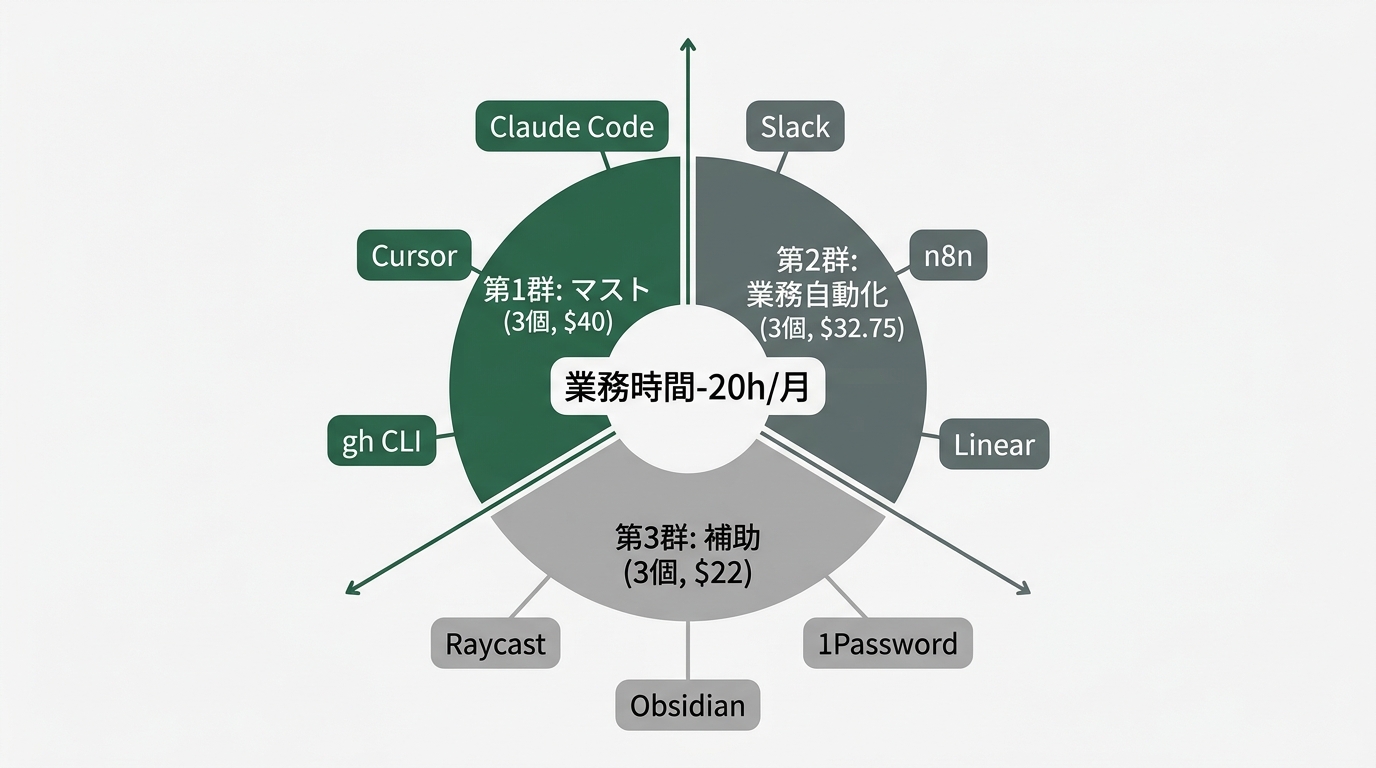
Group 1 (Must-Have) — Claude Code, Cursor, gh CLI ($40/month total + API usage)
Claude Code (Pro $20/month) — main battleground from design to implementation
I do most of my “hand off the design and let it run” workflow on Claude Code (claude.com/claude-code). Anthropic’s official pricing starts with Pro at $20/month, Max at $200/month, and beyond that you can switch to API usage-based billing. I’m on the Pro plan plus additional API charges, with my total usage running around $50/month.
What am I paying this for? The experience of “hand off the design in writing, and it implements across files.” For example, I hand it: “Add a new command to this Slack Bot, write the tests too, and draft a PR.” It reads the related files, implements in a style consistent with existing test patterns, and uses the gh command to draft the PR. All I do is judge the review and decide whether to ship.
There’s another reason I call Claude Code my “main battleground”: it only runs from the command line. Because it doesn’t rely on a GUI, my instructions remain as a log of “what I handed off as text.” For someone like me from the dropout cohort, this matters. With a GUI, I can’t remember what I clicked; with text, I can re-read yesterday’s instructions and notice “the way I phrased this was vague.”
One gotcha upfront. The Pro $20 plan caps monthly messages, so on days I run back-to-back deep-dive sessions, I burn through it fast. I wasted about three weeks before learning the settings to switch to a higher-tier plan or API usage on those days.
Cursor (Pro $20/month) — code editing & diff review
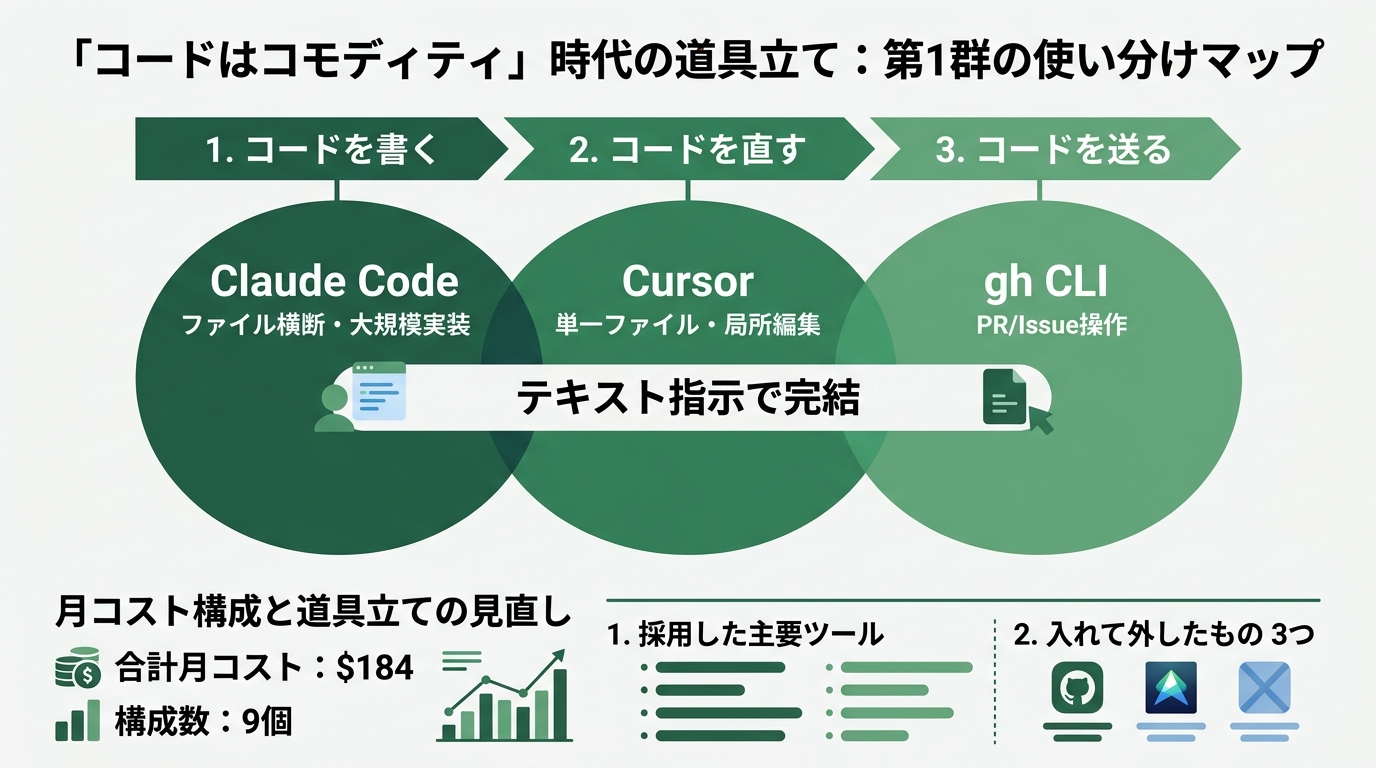
I use Cursor (cursor.com) as “the place to review and edit, with my own eyes, the diffs Claude Code writes.” Cursor itself has agent capabilities, so there’s overlap with Claude Code. I split them as: “Claude Code for cross-file, large-scale implementations; Cursor for localized edits to a single file.”
Here’s a past failure of mine. For the first three months, I tried to do everything in Cursor alone, and I broke my code repeatedly because cross-file consistency fell apart. Cursor sits on top of a GUI editor, so visually you get pulled into a single-file editing mindset. When I forced “let me complete a 10-file change in one Cursor session,” consistency checks slipped. Once I started using Claude Code alongside it, this problem stopped happening.
gh CLI ($0) — speed up git/GitHub operations
GitHub’s official command-line tool (cli.github.com). Free. Setup cost is zero, but its contribution to cutting my work hours is large.
Specifically, PR creation, review, merge, issue creation, labeling—all of it can be driven from the keyboard. Because Claude Code and Cursor can invoke it via the shell, when the AI says “I’ll draft a PR,” an actual PR appears. If you had to open the browser instead, every handoff from AI back to human would cost about 5 seconds of switching. Thirty such moments a day adds up to about 7 hours a month gone.
Group 1 is these three at $40/month (API usage extra). Without these three running, no amount of Group 2 tooling will keep your automation flows stable. Half a year ago, I started with Group 2 and caused three incidents where the flow stalled and got abandoned.
Group 2 (Workflow Automation) — Slack, n8n, Linear ($32.75/month total)
Slack (Pro $8.75/month) — work notifications & bot endpoint
Slack is the front door to my work. Customer inquiries, internal review requests, Linear notifications—everything funnels into Slack. Pro $8.75 is the minimum plan for a personal workspace. If you use a corporate Slack at work, you can add your own bot to that corporate workspace at zero additional cost.
What am I paying for? Stable access to the Slack API. On the Free tier, message history retention and long-running bots are constrained. Once you’ve embedded a bot into your workflow, hitting “I can’t see history anymore” stops your work cold. Paying $8.75/month for stable operation—that’s the call.
n8n (Cloud Starter $24/month) — workflow automation
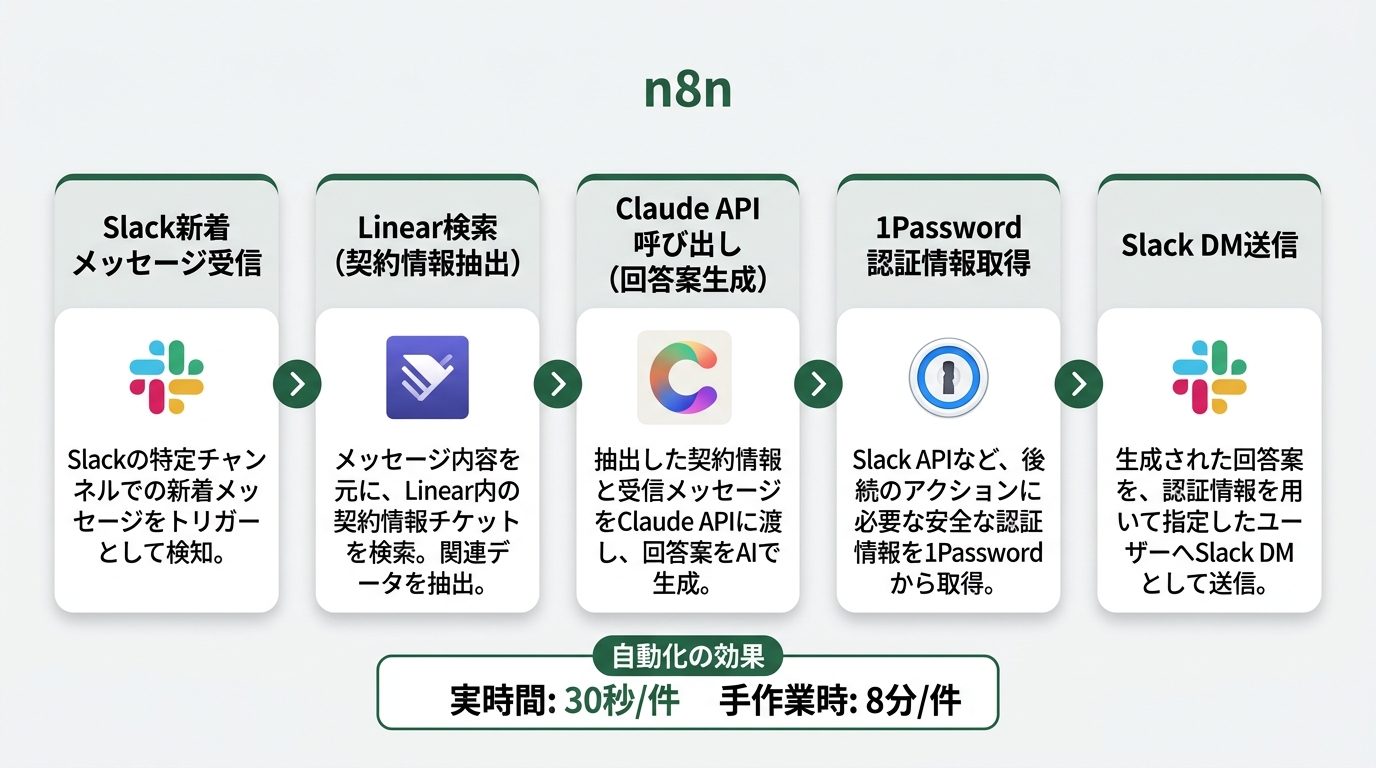
n8n (n8n.io) is my hub for workflow automation. Trigger on Slack, search Linear, call Claude API to generate a draft response, and reply via Slack—you build all of this just by connecting nodes with lines. Self-hosted is free, but I don’t want to babysit a server, so I went with Cloud Starter $24/month.
n8n’s biggest advantage is “you don’t have to write the code that connects APIs yourself.” If you tried to write Slack-to-Linear integration in raw code, you’d manage authentication tokens, error handling, retries, and logging by hand. In the current vibe-coding era, sure, you could write it—but you’d burn out maintaining it. With n8n, you just configure “retry 3 times on failure” through the node GUI.
My main n8n flows are three: customer response, task check-in, and note linking. From a customer’s Slack message, search Linear for contract renewal month and DM me a draft response. Every morning, summarize today’s tasks from Linear and notify Slack. When a new note is added to Obsidian, search related past notes and suggest links. From customer-response automation alone, my work hours dropped by 10 hours/month.
Gotcha: the integration to pull n8n credentials from 1Password is fiddly to set up the first time. I almost gave up after a full day on it. It now runs stably with weekly maintenance, but go in expecting “I’ll burn half a day on this initial setup.”
Linear (Standard $0) — task management & MCP connection
I use Linear (linear.app) on the free plan. For solo developers, the Standard free tier is plenty. If you use it as a team, there are scenarios where you’ll need Plus at $10/month, but here I’m writing as a solo user.
I don’t use Linear as just a task manager. The big win is using it as a connection point that Claude Code can drive directly via MCP (Model Context Protocol). Hook in Linear’s official MCP server, and you can issue natural-language instructions from your Claude Code session. Just write “update this issue” or “change the assignee on this ticket.” Done without ever opening Linear in a browser.
Group 2 totals $32.75/month. Combined with Group 1, about $72.75/month. Once you’re at this level, the work-hour reductions become tangible.
Group 3 (Auxiliary) — Raycast, Obsidian + Smart Connections, 1Password ($22/month total)
Raycast (Pro $10/month) — keyboard-driven operations
Raycast (raycast.com) is a macOS launcher. Pro $10/month unlocks AI features and additional extensions. Think of it as a Spotlight upgrade.
I use my Raycast as the launching window for hotkeys. Open Slack, launch Cursor, paste credentials from 1Password—I’ve consolidated all my frequently used commands into Raycast launched via Cmd+Space. Raycast AI handles light lookups not worth firing up Claude Code for. Boilerplate text gets pasted from here too.
The felt ROI is cutting my daily click count in half. When mouse motions decrease, the continuity of thinking is preserved. This is hard to show in numbers. But the previous “leave Slack, open Linear, search, come back” flow becomes “Cmd+Space to launch, type l, press Enter to confirm.” After three days of using it, you’ll feel the difference.
Obsidian + Smart Connections ($0 + Pro $9/month) — personal knowledge search
Obsidian (obsidian.md) itself is free for personal use. Smart Connections (smartconnections.app) is a plugin that runs on top of Obsidian. It provides semantic search and chat against your entire note collection. Pro at $9/month unlocks higher-tier models and Embedding API usage.
Why did I buy this? I wanted to turn my past notes into an asset. I have three years of notes piled up in Obsidian. Meeting minutes, reading notes, troubleshooting logs, article ideas. Full-text searching “what did I write about that thing?” against this hits a wall fast. Smart Connections does meaning-based search, so if you type “renewal-time price negotiation,” related past notes surface in order of semantic proximity.
One gotcha. Because Smart Connections calls the OpenAI API for embeddings, the initial index generation incurs usage-based charges. Around $5 for 3,000 notes. Monthly updates are cheap, but the first invoice is mildly surprising.
1Password (Individual $2.99/month) — credential management
1Password (1password.com/individuals/) personal plan is $2.99/month. That price is the Annual-billed monthly equivalent; Monthly billing is a bit higher.
Every Group 1 and Group 2 tool assumes safe storage of API keys and access tokens. Claude API, OpenAI API, Slack Bot Token, Linear API Key, GitHub PAT, n8n Webhook URLs. Half a year ago, I was holding all of these raw in a .env file, and I once accidentally committed and leaked them to GitHub. I deleted the repo immediately, but cleanup—rotating API keys—burned half a day.
Since installing the 1Password CLI (the op command) and switching to a habit of running things like op run -- npm start instead of reading .env directly, this kind of incident hasn’t happened. $2.99/month to “buy zero incidents”—that’s how I’d characterize the spend.
Group 3 totals $22/month. With Groups 1 and 2, about $94.75/month. Add API usage of $80–100, and the configuration totals $184/month.
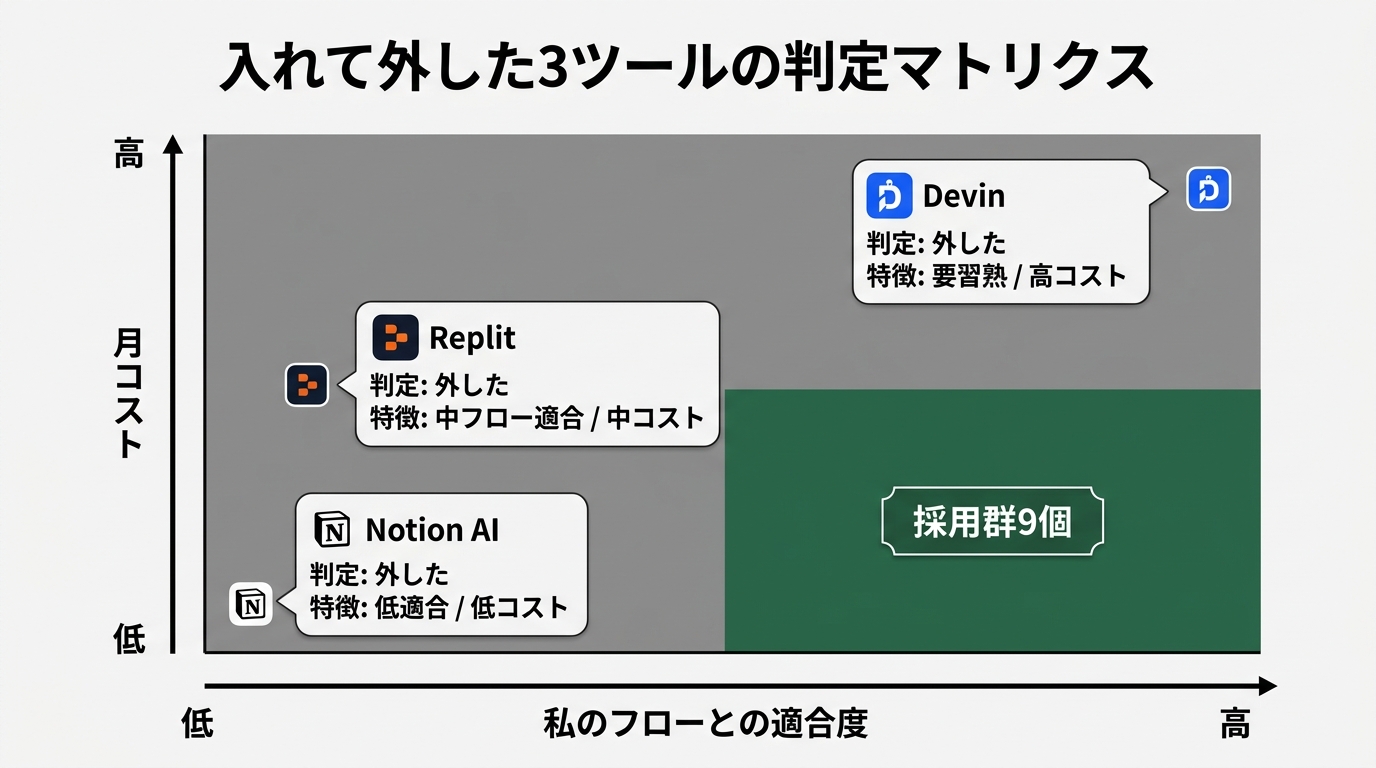
Three I tried and dropped — distinguishing “didn’t fit me” from “too early for me”
If I leave it at the above, this reads as “buy everything and your hours will drop.” So I’ll honestly write the three I tried and dropped.
1. Replit ($25/month) — “too heavy for my flow”
Replit (cloud IDE) is appealing because a dev environment spins up in just a browser. I subscribed, drawn to the scenario of “I can develop on a Chromebook while traveling.” I cancelled in three weeks. One reason: 80% of my work happens in front of a macOS terminal. The benefits of browser-only completion only matter two or three times a month. While traveling, ssh-ing from iPad + Magic Keyboard into Claude Code on my mac was actually faster.
This isn’t “Replit is bad”—it just “didn’t fit my flow.” It’s a strong tool for educational settings or for multi-person sessions where everyone needs to see the same screen.
2. Notion AI (additional $10/month) — “cannibalized with Obsidian”
Notion proper is something we use as a team, so I tried adding Notion AI for $10/month to see what it could do. I dropped it in a month. The reason: my personal knowledge base is consolidated in Obsidian, and Notion AI doesn’t have the same data. When I asked questions, I got “no relevant information found.” It’s useful against the team Notion database, but as a solo-developer-leaning user, that use case was thin.
What I learned here was “AI accuracy depends on how consolidated your data is.” Spread your notes across multiple tools and every AI will only give half-baked answers.
3. Devin (from Try plan, considered going to paid) — “too early for me”
Devin (an autonomous code-writing AI agent) is something I trialed twice over the last six months. The flow of “hand off the design and just wait for Slack notifications of results” looks like an upgrade over Layer 1 (Claude Code).
Two reasons I dropped it. One, the monthly fee is high (some plans approach $500/month). At a solo developer’s revenue scale, the ROI is sketchy. Two, reviewing Devin-written code took longer than I’d imagined. To get full autonomy out of the AI, you need to substantially raise the precision of your instructions, and getting good at that takes time. Half-a-year-ago me was too early for it—that’s my honest assessment.
I’ll probably try it again in the future, but for now spinning the “Claude Code + human review” cycle quickly is a better fit for my scale.
Wrap-up — my own decision criteria for adding tools one at a time
I’ve boiled down my decision criteria into a checklist. Five questions, drawn from half a year of trial and error.
- Is Group 1 (Claude Code, Cursor, gh CLI) running? If not, prioritize getting fluent with Group 1 before adding new tools.
- How many hours per month will this tool save? “Looks useful” isn’t enough. “Likely to cut at least 3 hours/month” is the minimum bar for adding any tool over $10/month.
- Does it cannibalize an existing tool? Lesson learned from running Notion AI alongside Obsidian: check your data consolidation.
- Can API keys be managed via 1Password? Going back to hand-written
.envfiles brings the incidents back. - Is the cancellation flow clear? For monthly subscriptions, decide upfront: try for one month, cancel immediately if it doesn’t fit.
Three days ago, I wrote: “Code is a commodity. What’s left is the three axes of engineering thinking.” What I didn’t fully write then was this: implementing the three axes requires tools—one at a time, in the right order.
The piece Nagi wrote last week, “The ‘I can’t write code so it’s not for me’ line is now obsolete” (/en/blog/n2026042700011201/), wrote about the tailwind from the non-engineer side. I want to restate it from the engineer side. Assemble nine tools, and for $184/month, you get a workplace where 20 hours/month disappear from your calendar.
Yes, you have to pay for tools, but it’s cheaper than letting your three axes idle. That’s my current conclusion.
The first one you should buy tomorrow is just Claude Code Pro at $20/month. The remaining eight, consider them in order once Group 1 starts running. Reverse the order, and you’ll burn half a year like I did.
See you tomorrow.

正直、一度エンジニアは諦めました。新卒で入った開発会社でバケモノみたいに優秀な人たちに囲まれて、「あ、私はこっち側じゃないな」って悟ったんです。その後はカスタマーサクセスに転向して10年。でもCursorとClaude Codeに出会って、全部変わりました。完璧なコードじゃなくていい。自分の仕事を自分で楽にするコードが書ければ、それでいいんですよ。週末はサウナで整いながら次に作るツールのこと考えてます。