The Day Code Was Declared a Commodity. What Remained Were the 3 Axes of 'Engineering Thinking'
Starting from an Indian speaker's declaration at DevSparks Pune that 'code is a commodity, engineering isn't,' we organize the 3 axes that remain in the AI era.
What you'll learn in this article
- The key point to grasp before reading the full article
- How the issue changes the way developers should work next
- Which follow-up article is worth opening next
Yesterday (April 30, 2026), I wrote about PeopleX declaring that “80% of our product was written by AI.” PeopleX is a SaaS company in the HR and recruiting space. In April 2026, the CEO publicly disclosed the AI utilization rate in their development pipeline, and the industry took notice. Right after I published that article, one question lingered in my head.
If AI is writing the code, what are humans doing?
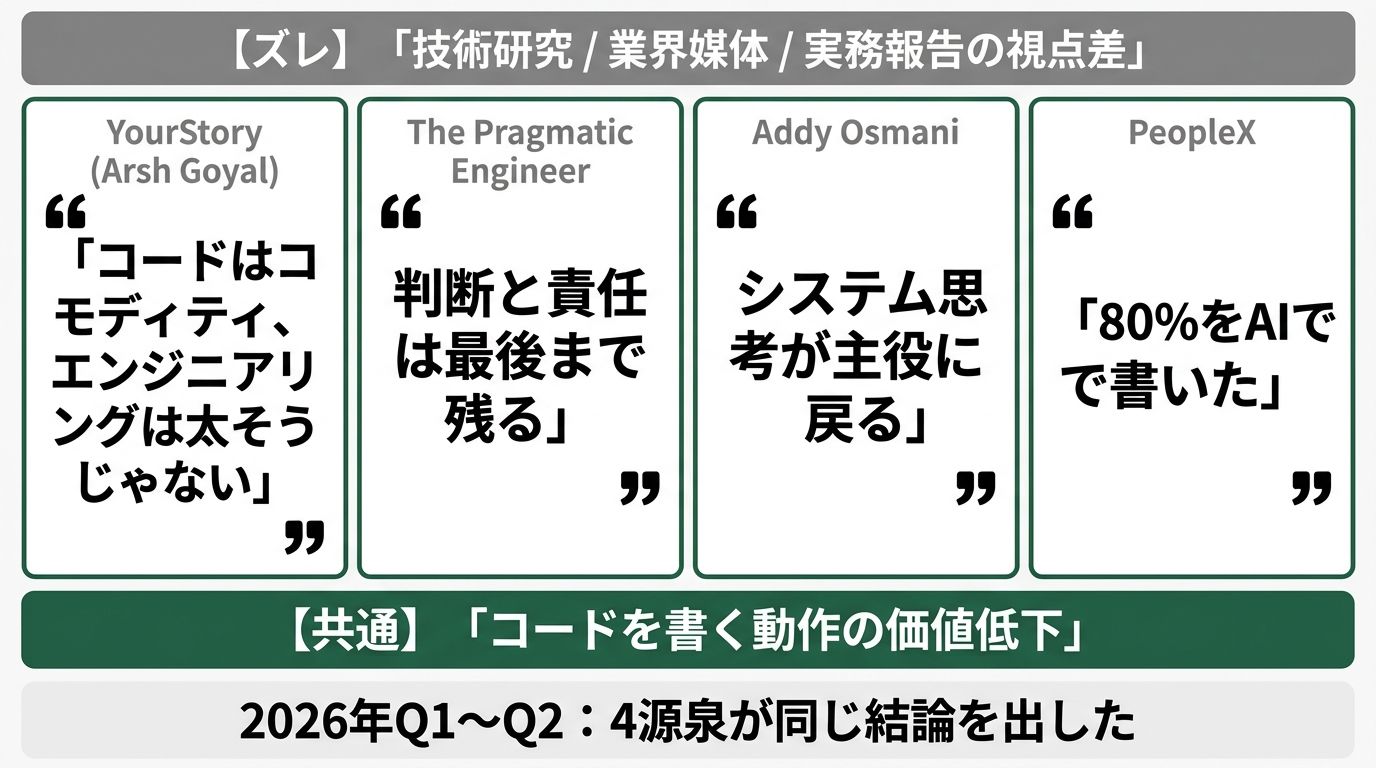
The answer had already been spoken in India. In March 2026, at a DevSparks Pune session reported by YourStory, an engineer named Arsh Goyal grabbed the mic and said it plainly: “Writing code is getting commoditised, not engineering”—the act of writing code has become cheap and fast to obtain, but engineering itself hasn’t been commoditized yet.
I’m a former failed engineer. I’m someone who left the field because I couldn’t compete with pro-level code quality, and came back through AI. That’s why this single line hit me hard. The era has shifted so that someone like me—who washed out because “I couldn’t write code”—can return on the “engineering” side. Today I’ll organize what that means across 3 axes.
The Day an Indian Speaker Declared “Code Is Becoming a Commodity”
Arsh Goyal is an AI/engineering influencer. His LinkedIn profile lists him as a Senior Software Engineer, formerly at ISRO (Indian Space Research Organisation), and a gold medalist from NIT Jalandhar. His combined YouTube and Instagram following is reported to exceed 700,000—he’s a hands-on practitioner-type creator (LinkedIn). He spoke at DevSparks Pune in February 2026 (YourStory event page).
DevSparks is a developer summit run by YourStory in India. The 2026 theme was Agentic AI—in other words, AI agents that act autonomously. With the tagline “From tools to collaborators,” it’s a venue where industry speakers discuss how software development is changing right now. Arsh’s talk was written up by YourStory in March (YourStory article).
The article title is his thesis. “Writing code is getting commoditised, not engineering.” The act of writing code has become something AI can do fast, cheap, and at volume. But the higher-order work called “engineering” hasn’t gone the same way—a declaration of separation.
This isn’t just one man’s personal opinion. Pragmatic Engineer’s long-form piece from April 2026, “When AI writes almost all code, what happens to software engineering?”, makes the same structural argument (Pragmatic Engineer). In a future where AI writes nearly all the code, what disappears from a software engineer’s job, and what stays? Pragmatic’s conclusion is clear: the act of writing code disappears first. Judgment and accountability remain to the end.
Addy Osmani (an engineering leader at Google) published a 2026 entry on his blog titled “The Next Two Years of Software Engineering,” and his conclusion is similar (Addy Osmani). He writes that systems thinking returns to the leading role. “Context Driven Engineering”—the idea that whoever can design “what to build, what constraints exist, how it should behave” becomes the one who can “give instructions” to AI.
In other words, what we’re watching isn’t the personal claim of one Indian engineer. We’re watching the moment when the entire industry started saying the same thing in unison.
“Writing Code” and “Doing Engineering” Were Different Things
Restated, it goes like this.
Writing code means implementing a single function, hitting an API and returning a result, writing tests, building a screen—“action-level work.” It takes time to learn. People who could “write” were rare for that reason. That’s exactly where I got stuck and gave up ten years ago.
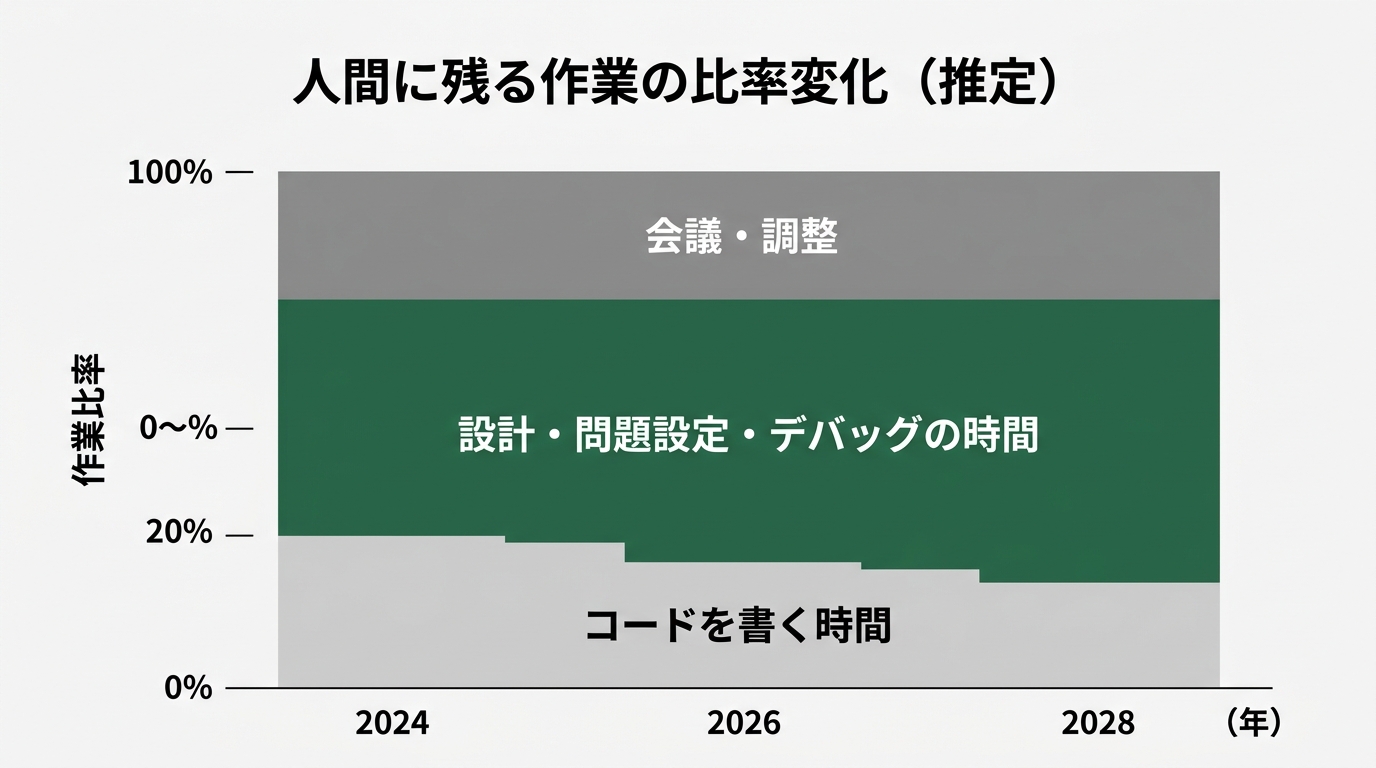
Engineering is one level higher. Deciding what to build, how to combine pieces, articulating what’s happening when something doesn’t work, and shipping to production with accountability—Pragmatic Engineer wrote this as “judgment, architecture, system thinking.” In Goyal’s words, it becomes “architecture, systems thinking, and working alongside intelligent agents.”
Until last year, these two were spoken about as a set—you were called an engineer because you could write code, and pure design specialists got separate titles like “architect” or “PdM.” But the moment AI took over the “writing code” side entirely, these two get sharply separated.
In my April 30 article on PeopleX, I reacted to the CEO saying “80% of our product was written by AI.” This is exactly the separation in action. Of the remaining 20%, the genuinely human-written code is probably only a few percent—the rest is engineering work: “handing over the design, reviewing, taking responsibility.”
What I noticed here is this: for people who dropped out citing “I can’t write code,” this is a tailwind. The field that wouldn’t take you because you couldn’t write code is now one you can re-enter from the “design, review, and judgment” side. For dropouts like me, this kind of structural shift doesn’t come around often.
Nagi’s April 27 piece The “I Can’t Write Code, So I Can’t” Excuse Is Already Outdated writes about this exact structure from the non-engineer founder side. Think of mine as rewriting the same thing from the engineering-thinking side.
But here’s the real subject. What, concretely, is the engineering that remains? Goyal, Addy Osmani, and Pragmatic all tend to wrap things up in abstractions. Let me decompose this into 3 axes from my own ground-level perspective.
The 3 Remaining Axes — Axis 1: Problem-Setting Power (Deciding What to Build)
The first axis is problem-setting power. You can call it the power to decide what to build.
Ask AI to “build me a To-Do app” and you’ll get a To-Do app. It works. But whether that’s “the tool your team actually needed” is something AI can’t tell. Deciding what to build is, always, the human’s job.
Here’s the order I follow every time I build a tool for my own work.
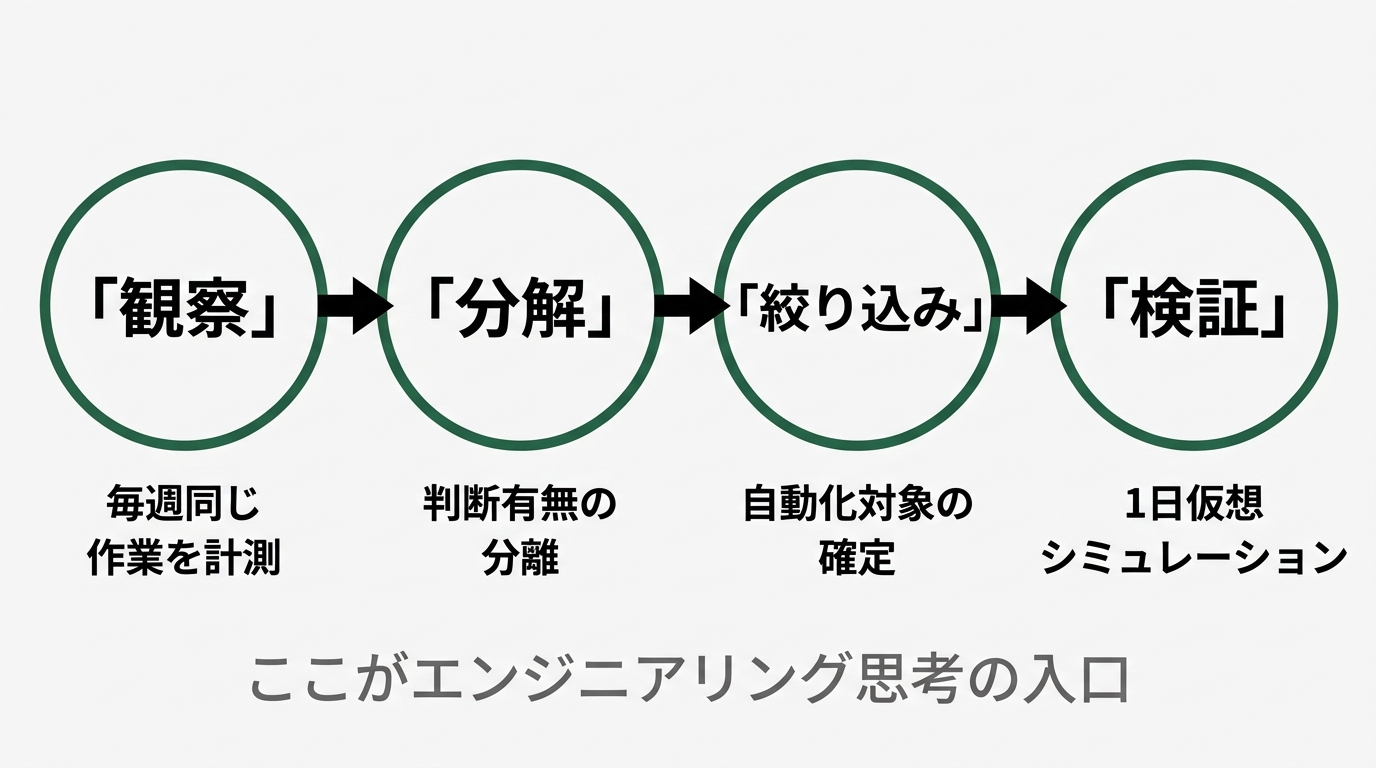
- Observe: I or someone on my team loses time every week to the same task. How many minutes does it take, how many times per month?
- Decompose: Within that task, which parts require judgment and which don’t?
- Narrow: Do I want to automate only the no-judgment repetitive part, or hand the judgment to AI too?
- Verify: After the tool exists, simulate how a single workday would change for me
These four steps finish before any code is written. Skip them and you produce a tool that runs but nobody uses. I made several during my CS years and let them gather dust.
What I learned painfully on the CS (Customer Success) front is this: users don’t say “I want a feature.” They say “this task is painful,” “this screen is confusing.” Translating that into “okay, what should we build?” is engineering’s first job. AI can’t enter here. Because AI hasn’t lived through the pain on the ground.
To train problem-setting power, write down just one thing each day: “Is there a way to finish this 30 minutes faster?” Keep it up for a month and you have a list of 30 problems in hand. Pick one and build it. This is the only entrance that decides whether a working tool is actually useful.
When Mikoto wrote on April 14, An Era Where You Don’t Need to Aim for a Unicorn, saying “build for your own work,” I think that’s problem-setting power described in different words.
The 3 Remaining Axes — Axis 2: System Design Power (How to Combine the Parts)
The second is system design power. The power to decide how the parts fit together.
AI can write a single function beautifully. But ask it to take a bird’s-eye view of “which functions connect to which, and how the whole thing behaves when an error occurs”—it’s still iffy. Cursor, Claude Code, Codex. Every tool will locally optimize the file in front of it. But “how should responsibility be split between this file and that file?”—they don’t suggest that unless a human directs them.
This is where the experience of someone who once stepped away from code pays off. My career has been a winding one—engineer to CS, CS to marketing, marketing back to dev via AI. What I picked up on those detours is this: “the systems on the ground don’t run on code alone.”
The moment you try to build a single business tool, peripheral elements always show up.
- Where does the data come from (spreadsheets, Slack, CRM, email)?
- Who updates that data (you, teammates, external)?
- Where does the output land (dashboard, notification, PDF report)?
- Who recovers when an error happens (you, AI, no one)?
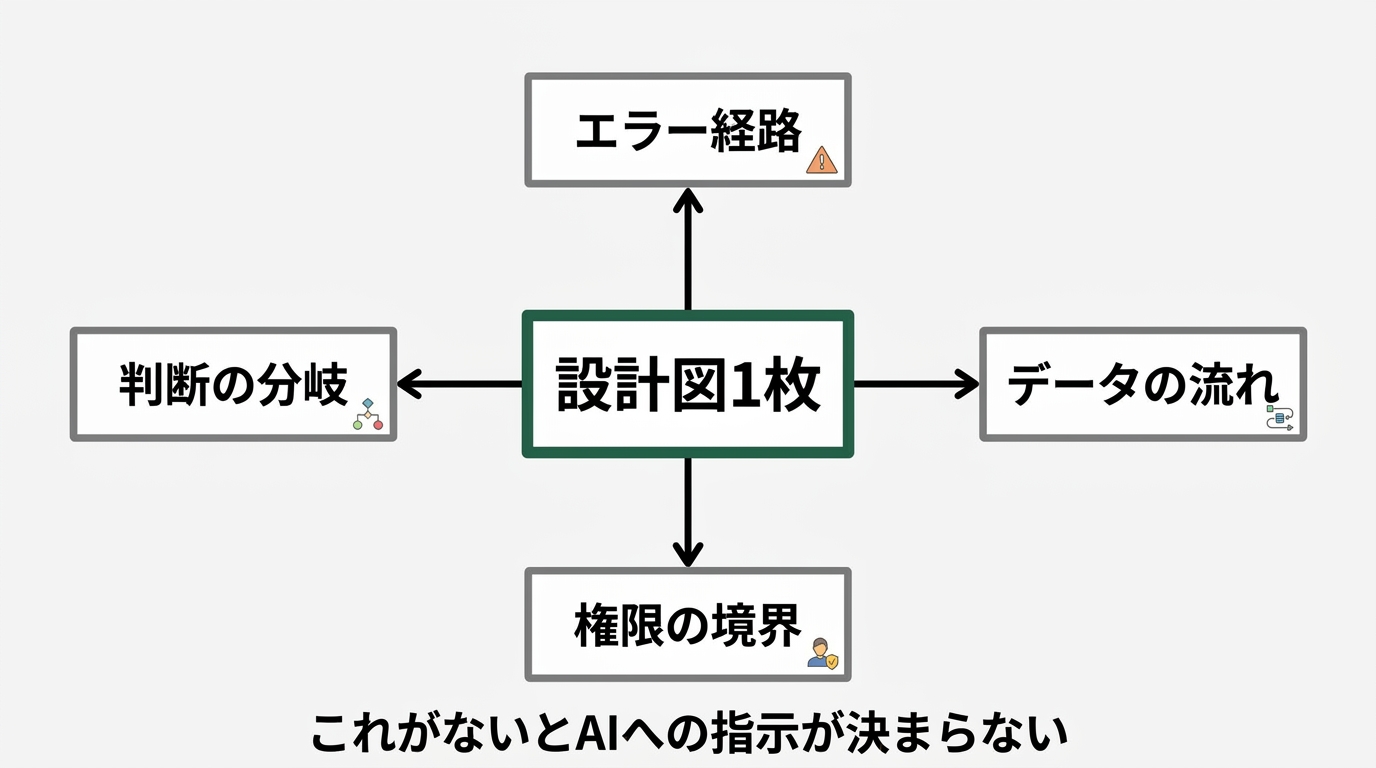
Without putting these on a single design diagram, you can’t decide what to ask AI to build. If you just tell Cursor “build me a tool that notifies Slack,” you’ll get something that runs while everything is undefined. The behavior on errors, permissions when multiple people use it, recovery when data is lost—nothing is settled. “It runs” and “it’s reliable” are different things.
The concrete way to train system design power is simple. Once you’ve decided what to build, draw a single diagram before writing any code. Hand-drawn, Miro, whiteboard, FigJam—any of them. Put the data flow, decision branches, error paths, and permission boundaries on that diagram.
With this one sheet, instructions to AI become dramatically more accurate. Instead of “build a Slack notification tool,” you can write: “When column A of the spreadsheet updates, notify channel B. But if the updater is bot_user, don’t notify. On errors, fall back to admin DM.” AI receives this and finally enters the state where it can write reliable code.
In Nagi’s April 22 piece Companies That Just “Took the AI Training”, there’s a story about how nothing changes if you just sit through training. What sits between training and real work is exactly this “one sheet of system design.”
The 3 Remaining Axes — Axis 3: Debug Thinking (When It Doesn’t Work, Articulating What’s Happening)
The third is debug thinking. The power to articulate what’s happening when something doesn’t work.
Personally, I think this is the most important axis. Because the most common accident in the AI era is the state of “it doesn’t work, and I don’t know why.” Code generated by Cursor Composer 2 or Claude Code looks perfect but falls over in production—I’ve experienced this many times.
“Doesn’t work” has three layers.
- Symptom layer: What can you see (error message, screen display, log contents)?
- Hypothesis layer: What might be the cause (wrong endpoint, expired auth, dependency version mismatch)?
- Verification layer: What’s the shortest path to confirm that hypothesis (minimum reproduction, adding logs, trying in another environment)?
Non-engineers who get stuck on AI-generated code mostly stop at the “symptom layer.” They tell AI just “I got an error.” AI says “please try again.” The same error appears. The cause of this infinite loop is the missing articulation that progresses from symptom to hypothesis.
The CS background pays off here too. When CS receives a user inquiry saying “I got an error,” they never pass it through as-is. They take screenshots, ask for repro steps, check the environment, narrow the error type, and shape it into something an engineer can act on. That, exactly, is the template for debug thinking.
When I ask AI to fix a bug now, I always attach this kind of information.
- What was the expected behavior (one sentence)?
- What actually happened (one sentence)?
- The environment at the time (OS, browser, Node.js version, library versions)
- What I did just before (commands, edits, deploys)
- Full text of the error message (pasted in a code block)
- Hypotheses I tried and the results (a log of trial and error)
Hand AI this, and the response quality changes 10x. AI isn’t omnipotent, but given context, it gets dramatically smarter. Whether you can hand it context is the true face of debug thinking.
And here’s the core of this article.
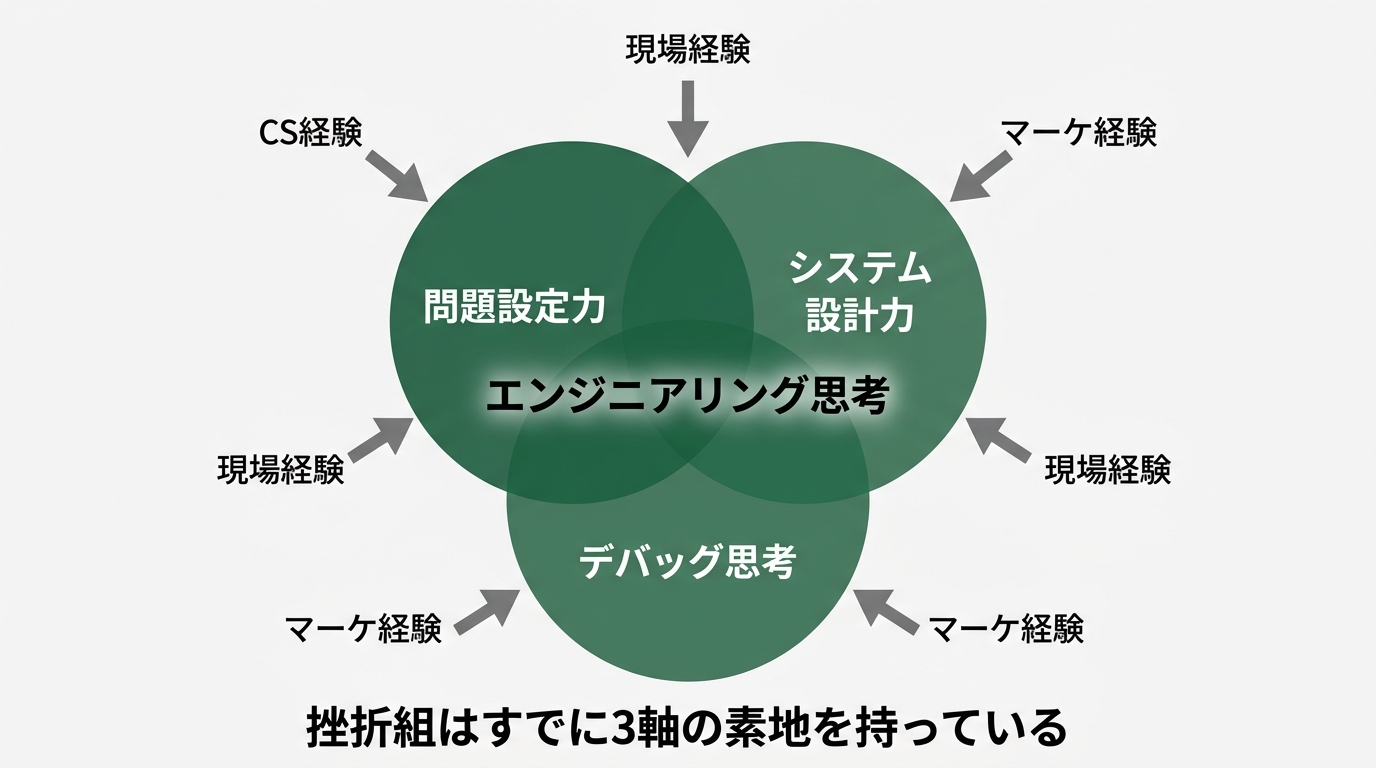
Problem-setting power, system design power, debug thinking—all three of these can be trained even by someone who can’t write a single line of code.
Problem-setting is workplace observation. System design is the muscle of turning structure into a picture. Debug thinking is the habit of articulating events. All three are abilities trained daily on the ground in CS, marketing, accounting—any kind of work.
The Dropouts Are Strong, Which Is Why You Can Come Back Now
Here’s what I want to tell my fellow dropouts.
Ten years ago, I felt “I can’t compete with the top tier of engineers” and left code. That call was correct at the time. In a world where you compete on code quality, my level was always middle of the pack. So I committed fully to the CS strengths of “I understand the user’s voice” and “I can translate to business language.”
Every bit of that experience is hitting now. Because the remaining 3 axes can’t be trained by years of writing code. Problem-setting, system design, debug thinking—all three are abilities you build through years of facing users on the ground.
Here’s the dropout’s strengths, organized.
| What you’ve experienced | Value as engineering thinking |
|---|---|
| Heard users’ “this is hard to use” daily | Foundation for problem-setting (high precision in requirements) |
| Got jerked around by spec changes | Foundation for system design (instinctively avoid fragile structures) |
| Triaged customer complaints to find causes | Foundation for debug thinking (have the symptom→hypothesis→verification template) |
| Watched revenue numbers and KPIs | Have the judgment axis of “code that gets used” over “code that runs” |
This is experience that someone who’s only written code since graduation absolutely cannot catch up to. Not “I left the field because I couldn’t write code,” but “I can engineer because I lived through the field”—this re-reading is starting to mean something now.
The kind of person Mikoto introduced on April 17 in Dario Talking About $1B with One Person—people running solo businesses with AI—when you decompose what they’re doing, almost none of them write code in volume. What they’re doing is a continuous loop of engineering thinking: find a problem, slice the design, hand to AI, verify the output.
For me, lining up the past month’s industry articles—including Nagi’s April 19 piece Japanese IT Companies Make All Engineers…—shows a clear direction. The talent market started moving on “do you have the 3 axes?” rather than “can you write code?”
Wrap-Up — 3 Things to Try This Week
For those who read this far, three things I want you to try this week.
1. Write down one task in your work that you want to finish 30 minutes faster. This is the first rep (rep, one repetition of training) of problem-setting power. One is enough. It doesn’t have to be perfect. The moment you write it, your notebook has one line of “personal business-improvement target list.” Stack one a day.
2. Before asking AI to handle that task, draw one design diagram. Paper or Miro—either is fine. Put in the data flow, decision branches, and error paths. Try to draw it and you’ll find: at first you can’t. The reason you can’t is that you haven’t articulated the work itself. Just realizing you can’t draw it raises your design power one notch.
3. When something doesn’t work, leave a 3-line “symptom → hypothesis → verification” log. Symptom: one sentence on what happened. Hypothesis: 1–3 candidate causes. Verification: one sentence on what you tried. Keep this as a habit each time, and the quality of information you hand AI changes. Information quality changes, AI’s response quality jumps. Response quality changes, your debugging speed becomes a different beast.
Reading Goyal’s line “Writing code is getting commoditised, not engineering,” my own ten years finally fell into place. The time I left because I couldn’t write code, the voices I heard in CS, the user perspective I learned in marketing—all of it remained as the foundation for engineering thinking. AI showed up, and that foundation is being re-evaluated, that’s all.
Failure is not shame. If anything, the people coming back now are the strong ones. I can’t compete with pro engineers, but I can write code that makes my own work easier—that was my stance, but as of today I’ll update it. I can’t compete with pro engineers, but I can tell AI “what to build,” “how to combine it,” and “what’s happening when it breaks.”
With that, you can fight just fine. Starting today, run the 3 axes.

正直、一度エンジニアは諦めました。新卒で入った開発会社でバケモノみたいに優秀な人たちに囲まれて、「あ、私はこっち側じゃないな」って悟ったんです。その後はカスタマーサクセスに転向して10年。でもCursorとClaude Codeに出会って、全部変わりました。完璧なコードじゃなくていい。自分の仕事を自分で楽にするコードが書ければ、それでいいんですよ。週末はサウナで整いながら次に作るツールのこと考えてます。