Google's First-Ever Discover-Only Update: 21 Days That Rewrote the 2026 Traffic Playbook
In February 2026, Google completed its first-ever Discover-only Core Update over 21 days. Combined with the desktop rollout, Discover is no longer a passive byproduct of search rankings. Now that it's an independent design target, what should you change?
What you'll learn in this article
- The key point to grasp before reading the full article
- How the issue changes practical decisions after reading
- Which follow-up article is worth opening next
“Our search rankings are holding steady, but somehow traffic isn’t growing.” I’ve been hearing this complaint a lot lately.
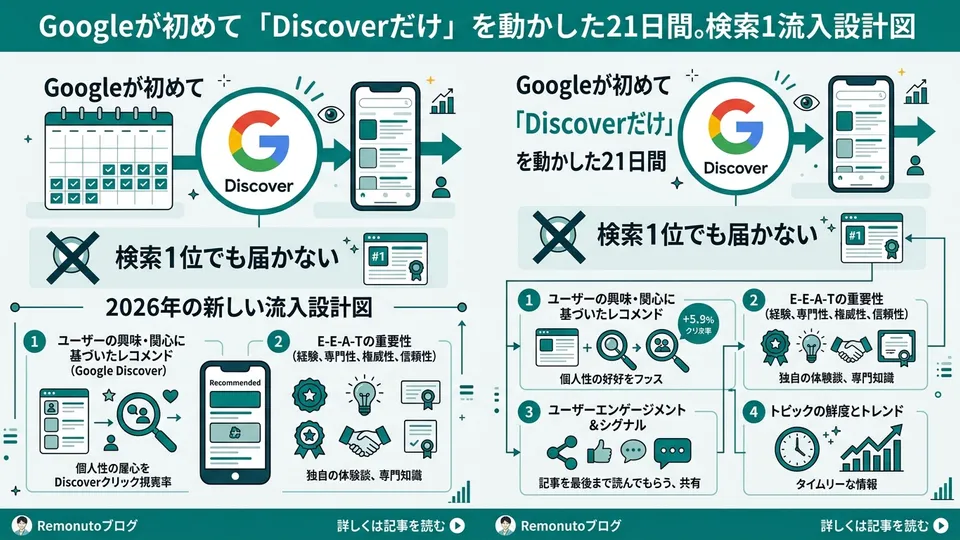
The reason is hiding in plain sight. In February 2026, Google rolled out the first-ever Core Update targeting Discover alone. It took 21 days to complete, and the desktop rollout was advancing in parallel.
Here’s what really happened: Google Discover stopped being “a side channel that traffic flows into naturally once your search rankings are solid.” It got promoted to an independent traffic channel that has to be designed for separately from search.
What happened during those 21 days? Why does “rank #1 in search = appear in Discover” no longer hold? I’ll hand over the three principles you can start applying this week, plus an implementation checklist, in the order I use them in client consultations. Install the premise that search and Discover need to be designed separately — this week.
February 2026: The 21 Days Google First Moved “Discover Alone”
The first fact to nail down: Google launched a Discover-only Core Update on February 5, 2026, and announced its completion on February 27. Twenty-one days (source: Google Search Central Blog “Google’s February 2026 Discover Core Update”).
Core Updates normally affect search overall. Until now, the Discover impact was a “side effect that moved as a result.” This time was different. A Core Update targeting only Discover was rolled out as an independent announcement. You can read this as the moment Google officially declared “we treat Discover as an independent search experience.”
The official blog includes language to this effect: “We are first rolling this out to English-speaking and US users, and will expand it to all languages and regions over the coming months.” In other words, the impact will reach Japanese websites in phases from here on out.
Industry-side data backs up the shift. According to analysis by ALM Corp (a US firm supporting local publishers), after this update, media outlets with strong local context and original reporting saw their visibility rise, while summary-only roundup articles were suppressed (source: ALM Corp “Google’s February 2026 Discover Core Update: What the Data Actually Shows”).
img: Timeline diagram. Horizontal axis: 2026/02/05 launch → 02/14 mid-rollout (US English-speaking regions) → 02/27 complete (21 days) → preview line for “expansion to all languages over the coming months” | type: diagram | style: clean infographic with horizontal timeline, milestone markers, and forecast dashed line
A question comes up here: “We don’t target English-speaking markets, so this isn’t relevant yet, right?” That’s the blind spot. Looking at Google’s past behavior, Core Updates deployed in English-speaking regions have shown equivalent behavior in Japanese-language environments a few months later. Move now, and you’re positioned to ride the wave before it arrives. Watch only your search rankings, and you’ll be on the side scrambling after the wave hits.
There’s another quieter but unmistakable move. Search Console’s weekly and monthly views were added in December 2025, setting up a premise where you view Discover performance in “medium-term trends” rather than “daily fluctuations” (source: Google Search Central Blog “Introducing weekly and monthly views in Search Console”). Google is essentially saying “Discover is a channel evaluated on a monthly basis.” It’s time to step away from designs that react to daily ups and downs.
Why Ranking #1 in Search Doesn’t Get You Into Discover
“If you’re ranking high in SEO, you’d naturally show up in Discover too, right?” I get this question often. Sorry to disappoint — search and Discover are structurally different things.
Search responds to the user’s active query. When someone types “X comparison” or “how to use X,” the most relevant articles are lined up at the top. The core of the judgment is query match, authority, and dwell time.
Discover is different. Users type nothing. In the Google app, on the mobile Google homescreen, in Chrome’s new tab, and starting in 2026 on desktop too, Google “preemptively” surfaces content matched to a user’s interest profile (source: Google “Get on Discover” official documentation).
The core of the judgment isn’t query match. It’s “can this be surfaced as a fitting experience to people likely to be interested?” Concretely, it looks like this:
| Axis | Search | Discover |
|---|---|---|
| User input | Query present | No query (passive) |
| Primary evaluation | Query match + authority | Interest fit + originality + imagery |
| Traffic characteristics | Planned, predictable | Irregular, supplementary |
| Main touchpoints | Desktop + mobile | Mobile-centric, desktop rollout in progress |
| Evaluation horizon | Days to weeks | Weeks to months |
The official documentation explicitly states that Discover traffic should be “treated as supplementary and less predictable than keyword-based search.” This hasn’t changed in 2026. Conversely, because the evaluation axes differ, top-ranking SEO content doesn’t automatically appear in Discover.
img: Comparison of Search vs. Discover decision structures. Left column: “Search: query → intent interpretation → top selection.” Right column: “Discover: user profile → interest inference → preemptive surfacing” | type: diagram | style: side-by-side comparison flowchart with contrasting colors
Then layer on the desktop rollout. Industry observers like Search Engine Roundtable report that the rollout displaying the Discover feed in Google.com’s desktop version is progressing in many countries and regions (source: Search Engine Roundtable “Google Begins Rolling Out Discover On Desktop”). On Chromebooks especially, the access path is becoming more prominent.
What this means: Discover, which was a “mobile-only side channel,” is moving toward becoming a mainstream entrance visible on desktop too. Given desktop’s share of overall web traffic, the weight of Discover as a design target is going up dramatically. Even if you rank #1 in search, whether you make it into Discover’s desktop slot is a separate matter. The entrance has been duplicated — see it that way.
If you’re thinking “great, more work to do,” it’s actually the opposite. The work to optimize for Discover only partially overlaps with the SEO and GEO foundation — and the non-overlapping portion is precisely “territory others haven’t touched.” The earlier you move, the bigger the gap you can open over those who follow.
The 2026 Three Principles for Getting Picked by Discover
Now to implementation. Cross-referencing the February 2026 update with the official documentation, the conditions for being chosen by Discover boil down to three principles.
Principle 1 — Originality
The element whose weight has increased the most. With this update, Google made it clear it would favor content with original reporting, original data, expert commentary, and firsthand experience, while suppressing summary-only articles. ALM Corp’s data analysis observed the same trend.
This has been a long-standing theme in search, but it’s applied more strictly in Discover. The reason is simple: Discover evaluates “is this worth the user’s time,” not “the right answer to a search query.” An experience where someone scrolls through summaries and feels satisfied is mismatched with Discover’s purpose (satisfy interest, generate dwell time).
Principle 2 — Visual Eligibility
Discover’s feed screen is designed visual-first. Why does imagery matter this much? Because Discover is a screen where users decide “read or don’t read” in an instant while scrolling. The judgment is made on title and image alone. The official documentation lists a minimum image width of 1200 pixels and either the max-image-preview:large meta tag or AMP as required conditions to use a large image as the thumbnail (source: Google “Get on Discover” official documentation).
You specify the image via either og:image or schema.org (ImageObject). Settings that don’t enable max-image-preview:large are a watch-out. No matter how high-resolution your images are, you’ll only get a small slot in Discover thumbnails. It’s a classic missed-setting case where one toggle changes how you appear.
One more thing. Don’t use your logo as the main image. A logo-only thumbnail in the Discover feed gives no reason to click. Pick a concrete image that symbolizes the article content — that’s the basic.
Principle 3 — Local & Topical Expertise
An axis strengthened in the February 2026 update. The direction shown is “relevance in local context” and “topical expertise evaluated granularly” (ALM Corp’s analysis).
“Granular” means expertise is judged at the article and topic level, not site-wide. Being recognized as “this site has 20+ articles specialized in Claude for business use” puts you in a stronger position than being recognized as “this site is a general AI media outlet.”
The point is favoring “sites deeply rooted in a specific domain or region” over “sites that cover everything broadly and shallowly.” It’s close to the “topic cluster strategy” you hear about in SEO. In Discover, the evaluation goes further into persona and stance: “Can this publisher be trusted as a primary source on this theme?”
img: Structural diagram of the Discover three-principle checklist. “Discover” in the center, with “1. Originality: original reporting, experience, data,” “2. Imagery: 1200px+, max-image-preview:large,” “3. Expertise: local context, topical depth” radiating outward | type: diagram | style: radial concept map with central node and three branches, each with a brief description
Of these three principles, Principle 1 “originality” is the most overlooked. Most companies start with 2 and 3 because they can be handled technically. But the real battleground is 1. I’ll dig into that next.
How to Manufacture Originality — Going “Original” With Zero Reporting
“We’re not journalists, we can’t do reporting.” I hear this often. But reporting isn’t the only entry point to originality. There are at least four practical ways to manufacture it.
First, publish your own internal data. A marketing firm could share aggregated, anonymized CTR or improvement-rate data from client campaigns. A sales company could visualize the “top 5 reasons for being turned down” from sales call logs. Just by organizing and publishing the numbers you already handle daily, you create primary data that exists nowhere else.
Second, interview the people involved. One employee, one partner, one customer. Ask anyone for 15 minutes and quote what they said. That alone puts “words found nowhere else” into your article. A 15-minute Zoom call — you can fit one in this week. It’s not a heavy lift.
Third, hands-on verification logs. This is what I always do in my articles. “I actually ran Claude Code with these steps, here’s the result” — leaving the process behind. The fine details of the procedure are often more original than benchmark numbers, because no one else tries the exact same micro-details.
Fourth, an original framework for comparison, classification, or translation. Classify existing reports into 5 patterns. Compare A and B across 4 axes. Translate an overseas concept into a Japanese business context. Even if the raw material isn’t original, originality holds when the way you organize it is.
img: Flow showing four routes to manufacturing originality. 1. Publish internal data → 2. 15-minute interviews → 3. Personal verification logs → 4. Comparison/classification/translation. Left-to-right flow illustration with a step at each stop | type: diagram | style: horizontal four-step flowchart with simple icons for each route
The natural question: how much is enough? From a hands-on feel, the sense of “at minimum 1, ideally 2 originality elements per article” is plenty. Even on a generic theme like “ChatGPT for business efficiency,” dropping in one paragraph of your own trial logs is enough. You give Google room to re-evaluate the article as “containing information not found elsewhere.”
Conversely, articles that are nothing more than ChatGPT or Claude-generated summaries fall on the suppressed side in Discover. This is a direction the February 2026 update explicitly reinforced. A strategy of mass-producing AI-generated summaries has flipped to negative in the Discover arena. I’ve personally observed the pattern across multiple sites since March: “Discover-driven clicks dropped, but search rankings stayed roughly flat.” It’s a hands-on observation, but use it as a reference point that aligns with the update’s direction.
Imagery and Expertise: An Implementation Checklist You Can Run Tomorrow
Back to the technical side. Here are items you can check starting tomorrow, ordered from lowest to highest implementation difficulty.
Check 1 — Place the max-image-preview:large meta tag
Add <meta name="robots" content="max-image-preview:large"> to your site’s head, site-wide. On many CMS platforms (WordPress, Astro, headless setups based on Next.js), it may already be implemented as standard via the theme or a plugin. Just to be safe, open your current source code and verify. Without this in place, large images won’t be selected for Discover thumbnails.
Check 2 — Verify og:image specifications
Specify og:image at 1200px width or larger, ideally 16:9 aspect ratio, and image without text overlay. Avoid logos. Give each article a unique image. Reusing the same image site-wide hurts your chances in Discover. This is explicitly stated in the official documentation.
Check 3 — Remove clickbait from titles
Hyperbolic phrasing, exaggeration, and titles that don’t match the body are being more strongly suppressed since the February 2026 update. Headline patterns like “You’ll Definitely Lose if You Don’t Know X” or “X Was Actually Unnecessary” lose ground in SEO and get especially filtered out in Discover. The kind that survives both entrances is a headline that summarizes the body’s actual claim.
Check 4 — Monthly review of the Search Console “Discover” report
Search Console has a dedicated “Discover” performance report. Use the monthly view to check the past three months of clicks, impressions, and top URLs. Compare what’s common to URLs that are growing versus URLs that are shrinking. Just from this, the contour of “what works in Discover for our case” starts to come into focus.
Check 5 — Re-examine the “granularity” of your area of expertise
This is the most time-consuming work. Look at your entire site and ask yourself: “In this domain, do we have articles deep enough to rank in the top 5 in Japan?” Domains you cover broadly and shallowly are worth boldly “reorganizing into categories.” Discover looks at fine-grained expertise. A focused site is chosen over one that writes about everything.
Of these five items, 1–3 can be done today. 4 within this week. 5 — set the direction by next month, and that’s enough pace. Don’t wait for perfect — move in order of what’s possible. That’s the heart of Discover readiness.
Wrap-up — Don’t Leave Discover as an “Unstable Bonus”
As we’ve seen, Google Discover in 2026 is no longer “a side channel of search.” It’s become a target Google rolls out independent Core Updates for, the desktop rollout is advancing, and the Search Console side now has the framework to evaluate it on monthly trends. It’s an independent main traffic channel as a design target.
Marketers watching only search rankings will face a strange phenomenon six months from now: “Traffic isn’t growing for some reason, but rankings are holding.” That phenomenon is what happens when you don’t design for Discover.
Three things to do this week:
- Verify the
max-image-preview:largesetting and review your og:image and title approach. Sort out the technical foundation in a day. - Check the Search Console “Discover” monthly report. Get a grip on which of your articles are appearing and what they have in common.
- Put at least one originality element into the next article you write. Internal data, a 15-minute interview, a personal verification log, an original framework — any of them.
Whenever I write implementation guides for AI agents, I always include one paragraph of “the steps I actually ran.” The fine details of the procedure are stronger as originality than benchmark numbers. Reader response is overwhelmingly higher on articles that quote the procedure than on articles that quote benchmarks.
Design search and Discover separately. Anyone who installs this premise this week will be on the “Discover-driven traffic increased” side six months from now, not the “somehow not growing” side. The entrance has been duplicated. Duplicate the design too.
Open another dashboard alongside the one you watch for search rankings. That alone changes the foundation of marketing in 2026 — substantially.
References:
- For changes in the evaluation axes of search itself, see also Nagi’s “The Map of Search Has Changed: A Practical Guide to Holding 5 Entrances Simultaneously With Search Everywhere Optimization”
- For designing to be cited by AI, see “What Articles Ranked #1 on Google Have in Common — That AI Still Won’t Cite”
- For the structure of articles that get cited, see “Will Your Article Be Cited by AI?”
- For the full picture, see “The 2026 Marketing Map, Now on a Single Page”
- For the integrated SEO + SNS perspective, see “Why People Who Manage SEO and SNS Separately Are Losing Out”
Sources:
- Google Search Central Blog “Google’s February 2026 Discover Core Update”
- Google Search Central “Get on Discover” official documentation
- Google Search Central Blog “Introducing weekly and monthly views in Search Console”
- ALM Corp “Google’s February 2026 Discover Core Update: What the Data Actually Shows About Local Publishers”
- Search Engine Roundtable “Google Begins Rolling Out Discover On Desktop”

AIを使いこなせない方は、この先どんどん差がつきます。僕はAIエージェントを毎日動かして、壊して、直して、また動かしてます。そういう泥臭い実践の記録をここに書いてます。理論は他の方にお任せしました。僕は動くものを作ります。朝5時に起きてウォーキングしてからコードを書くのがルーティンです。